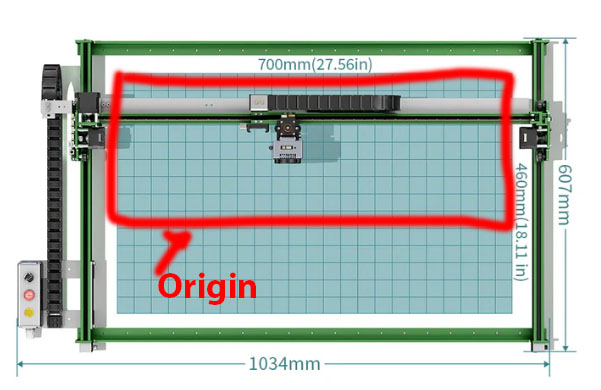
I have a Neje Max4 V2. This is my first crack at laser cutting. The problem I encountered is that my working space is 750mm by 460mm. It does show properly on Lightburn. However, when the trying to engrave or cut something. Or even press the “origin” button. It only goes half way and thinks its in the proper location.
When I use the software that came with Neje, it does go to the proper placement.
I have attached a photo and marked red where it recognises the work space as. It feels like It’s been squished.
Do yourself a favor. Switch to using Absolute Coordinates until you truly understand job origin and start from modes. Absolute coordinates makes the lightburn screen a direct representation of the laser bed. For example, if you place something in the center of the screen work area, it will engrave in the center of the machine work area. Place it lower left on screen, it engraves lower left on machine.
Pressing the origin button, sets a user defined origin position, which does have it’s place. You are currently set as Current Position, which means the laser will use the current position of the laser head as the start point (origin) of the job.
This video of mine may help your understanding of all this.
The problem is when I start the cutting process, it starts the machine and starts engraving. But the workspace is disproportionate to what appears on sceen. I have attached a photo of what the workspace on the machine is. The red box again would be the proper work space of 750mmx460mm. However, what it actually does is, it works around the blue box and identify it as 460mm when in fact it is just half of it 230mm.
The problem is, the workspace is suppose to be the red box which is a rectangle. But when the information is sent to the laser cutter, the cutter does the job within the blue box(narrow rectangle).
An example of this is when I place the word “Hello” to be engraved. I position it like the photo below. In 2 spots. Top left and bottom left of the workspace.
However, when it engraves, it engraves in the position of the photos below. Instead of the bottom left, it ends up in the middle left. and the top “Hello” ends up slightly in the middle as well. As shown in the photo below.
OK, I understand now. I have 2 probabilites in my mind. Although it doesn’t appear in your screenshot, you may have Rotary mode enabled. That can affect Y axis size / resolution. Verify that isn’t enabled.
If that isn’t it, go to the console window, Enter $$ in the dialog box then copy and paste all the output here for review.
Edit: I have had the rotary dialog act “sticky”. Even if it’s not enabled, enable it, click OK, reopen the dialog and disable it.
This is your steps per mm setting. They are almost always the same value. Most diode lasers are 80, but some are 100. I suggest you enter the following into the console.
$101=100 (enter)
$102=100 (enter)
Then burn a 100mm square on cardboard and see if it is 100mm square.
The other item I see that is way off is
That is the max speed for each axis. 100000 is not achievable. I don’t know vwhat is appropriate for your machine, but this isn’t it. Although, having it too high won’t prevent things from working.
Did Neje provide a setup file for Lightburn? It would be on the Flash disk or SD/Micro SD Card that came with the machine.
Thanks, entering those to the console seems to have solved that issue.
There was no software no set up file that came with the machine.
Thank you, this issue seems to have been solved. However, a new issue has raise. The measurement of the square is perfect. Then I tried engraving a circle. The circle seems to be quite skewed. I have attached a photo below.
That is quite ‘not round’. You have some mechanical issues with your machine. Check out this guide. It was written for Sculpfun, but all diode lasers are similar.