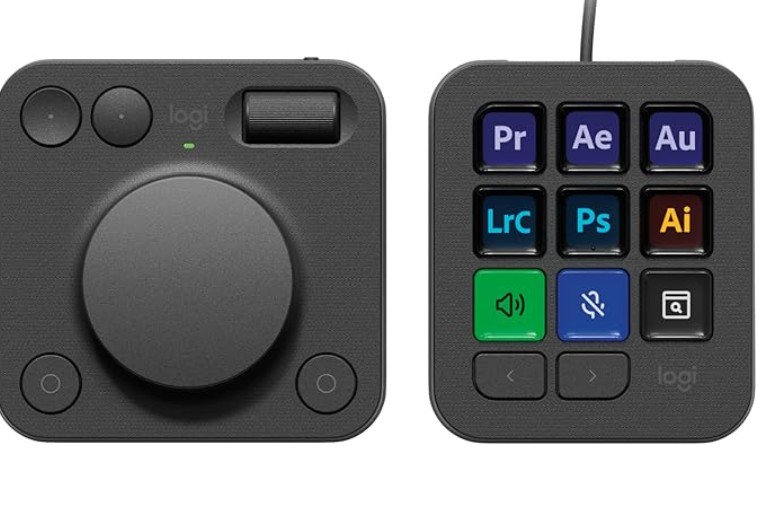
I just purchased the Logitech MX Creative Console, which has two very customizable devices for controlling applications. A dialpad (with a big knob!) and an 11 button keypad. Both devices are completely programmable for specific applications. Logitech is supporting an online library of application profiles where people can design useful profiles and post them for others to download and use.
It would be great if other Lightburn users could post what they think are useful profiles that make accessing the tools and options in Lightburn easy.
So far (day one of figuring this out), it seems very nice and useful. The keypad device has 9 customizable color LCD display keys. That changes depending on the application running and the profiles the user has mapped.
I am interested in hearing what other Lightburn users think about this product.
I just found a great use for the dialpad, this device is cordless (uses Bluetooth), so it will be perfect to use a a jog control for the laser when aligning material. Still working on the setup, but it should be able to use the scroll dial for up/down Y movement and the dial button for left/right X movement. The two top buttons can be set for fine and coarse movement.
Finally, I will be able to stand at the laser and move the head around with nice controls.
Are these profiles that exist in the software/marketplace already or are they something you had to set up? I’m looking at getting this but don’t want to drop the coin if there’s compatibility tweaks that need to be made to get it to work.
The hardware works perfectly. When your mouse is active in Lightburn, any functions you have set up to work in Lightburn on the dialpad or Keypad immediately become active. I have already setup a full screen for my Lightburn profile of the things I do most, like draw a rectangle, draw a circle, convert to path, start node edit etc. The dailpad (since it is wireless) can jog the laser head, frame, zero etc. So with the dailpad sitting next to the laser I don’t need the computer keyboard for setting up my parts.
It takes a few minutes to understand how to assign keystrokes to the keypad and dailpad. But then it is very easy to customize to exactly what you want it to do.
We’d be happy to see what you have set up for your profiles, here is definitely the place to share that - but ultimately I don’t think we can provide profiles for the wide variety of hardware solutions like this, or a streamdeck, etc - that’s why we opted to make the hotkeys customizable
That does look good. And the price is certainly better. But I really like that the Logitech has the LCDs on each key, so I know what the buttons do as I switch between apps.
On the Logitech each button has a small color LCD that is programmable in the included software. So when it detects I am using the Lightburn software, each button changes to display the function/name of the button I have configured. The user has a lot of flexibility to name the buttons, set the font size, include icons and set the color so the 9 buttons are always displaying the functions I configured for whatever program has the current focus. The Logitech software allows an unlimited number of configurations, so every application I use has its own specific keypad configuration.