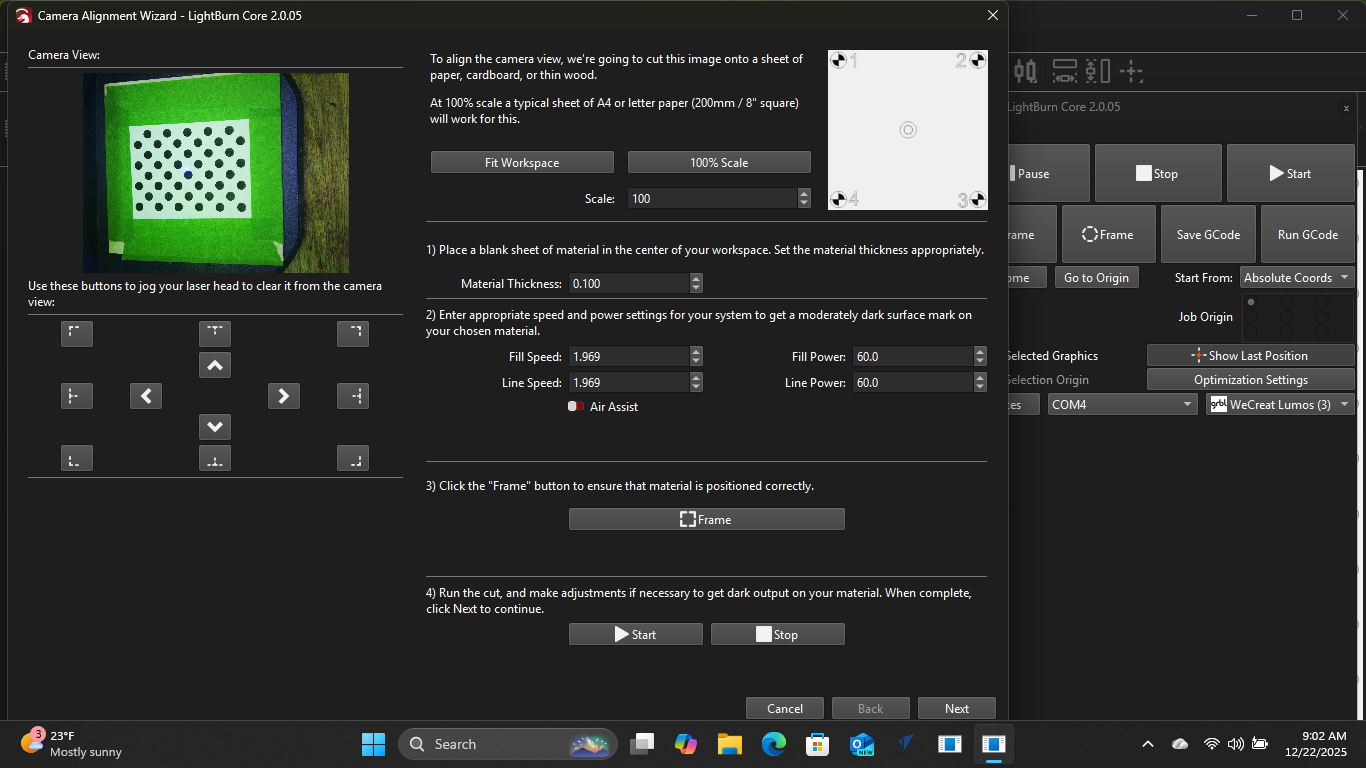
Good morning, I have a wecreat Lumos laser, It is a galvo style laser with 10-watt diode and 3-watt infrared laser. I downloaded and installed the configuration file. It appears to be connected with confirmation from the console. The camera shows the bed in the preview though it appears to be off 90 degrees from standard. If I try to calibrate the camera position everything falls apart. From the screenshot if you look at the speed its a little over one and the highest it will go is 10. It seems like a position rather then a speed. It reacts with a dialog box for framing though no framing occurs so I exit out of the dialog box. Camera is 8K HD color camera. I can’t even get close to focusing as it runs out of travel in the Z. I believe something is crisscrossed with the speeds box as 1.969 is way low. Can’t get anywhere with the dot test either. If I print it full size it doesn’t fit. If I shrink it , it still won’t recognize it. I’ve changed position and lighting with no luck. Any help would be greatly appreciated. See screenshot below for speed issue,
Is this the camera that came with the Lumos?
It appears to be rotated 90 degrees for some reason. Is it only rotated, or mirrored?
The rotation should be corrected after the Camera Alignment.
The dots pattern should not be used anymore.
LightBurn version 2.0 introduced a new way to calibrate the camera lens. It uses the new calibration card with the AprilTags and tracking function.
You can then follow the instructions for camera calibration with Tracking here: Calibrate Camera Lens (Labs) - LightBurn Documentation
This feature is still in testing (Labs feature) but is currently the most precise way to calibrate your camera. It’s only accessible with a right click on the “Camera” window:

After this, you need to perform another Camera Alignment, as usual: Calibrate Camera Alignment - LightBurn Documentation