LightBurn was working three days ago, but LaserBurn app had a firmware update, I assumed it was complete, but now and ever since that my longer nano pro 12w laser will not power up. On the light burn console it say waiting for connection and port in use .ive uninstalled both softwares and reinstalled LightBurn, but still have same issue…..
Hi @Rnpick
This isn’t a LightBurn-specific failure — “port in use” means macOS believes another process still has control of the USB device.
Something to check: Ensure LaserBurn/Longer software is not running at all, including in the background. On macOS, this means you need to quit the app.
Open Activity Monitor and look for any processes related to LaserBurn/Longer/CH34 or serial connection, and then quit them.
Closing any other program that might be accessing the COM port, as Dominic suggested, is certainly the first recommendation.
The “Port in use” message could also be misleading. It merely means, that LightBurn does not get the necessary reply from the controller.
Is this the option you selected in LaserBurn?
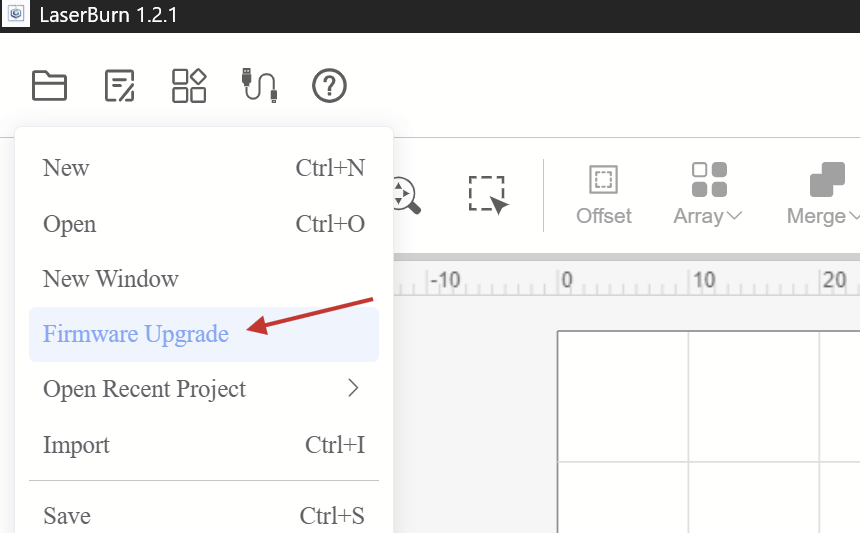
If so, I suspect that the firmware (the program running on the laser’s microcontroller) update didn’t go smoothly and is incomplete. In that case, you should try to flash it again.
2 Likes
No! Once I had opened LaserBurn on laptop it popped up so I hit install so I followed the prompts and thought it was complete. How do I relish firmware> tia
I will look at that today. I’m not familiar with these things! TIA
Okay, it might still mean that the button you clicked in LaserBurn attempted to upgrade the firmware of the laser. If that failed, it could be incomplete.
Let’s try connecting it to LightBurn again before we go down the route of reinstalling the firmware.
You can use the macOS Activity Monitor to close any processes related to LaserBurn as recommended previously, or a complete restart of the computer would also have a similar effect.
How do I close processes in activity monitor? Where is the tab for it?! Again my nano pro has NO power light therefore it will not connect to lightburn must less LaserBurn!!!
This is an electrical issue, not software. Check the power supply connections. It couls also be the power supply failed.
1 Like
that’s what I am thinking, but I don’t have another main power supply cord to switch out😢
**Well after it was plugged in for a while I went back to check and the litle green light on power supply is blinking…….Ive only had this laser for a couple weeks 
**
1 Like
I’m sure you checked the power switch on top of the handle of the Nano Pro..
But the green light of the power supply blinking (as in pulsing) is an indication that you’ll need to open a warranty case.
I did reach out to them as a warranty case, but it was denied as I received this as a gift and don’t have the order number and the person that gifted it to me deleted it also, therefore they will not send a new unit…….if I were a rep roll company I would make my customer happy and send out a replacement.emphasized text
I would politely ask them to look through their deleted emails. Or, if they purchased from the company directly, possibly they set up an account where they could access purchases. Amazon has great record keeping if purchased there.
I also understand the company’s position. There is a warranty period for a reason and someone could just say they purchased within the warranty period when it’s actually outside the warranty period.
2 Likes
This topic was automatically closed 30 days after the last reply. New replies are no longer allowed.