I am new to the laser community but cannot figure out what I am doing wrong. I changed the height of my Z axis to laser onto a thicker piece of wood than I normally do. After doing so, I homed the device, used autofocus and ran into an issue where after pressing “start”, the unit headed home and I got this error. I’ve checked my connections and there are no loose wires. Thank you in advance for any help someone can provide.

1 Like
When you homed, did the machine home correctly? As-in the homing cycle completed as it normally does and without error?
If so, then I wouldn’t expect this issue. If there was an issue at homing time then it’s possible that the controller wasn’t aware of the laser’s actual position.
Have you since tried using the laser? Are you continuing to have problems?
I just rehomed it and it threw the same error message. No, I haven’t used it at all…it continues to have this issue.
I just rehomed it (again) and it rehomed fine. Then I tried the autofocus and it threw the same error message.
I misread. Sorry.
Watch the focus process VERY closely. It should go all the way up, touch and then move down a few mm, go back up and touch, then move down until it touches the material, move up a few mm, then back down to touch again, then up to proper focus position. At what point in that process does it fail?
Has it ever focused correctly? If so, what changed?
Has something else changed in the physical configuration of your machine? Or is the laser module in a different height as compared to the normal position when homing.
Seems like to me that the laser module may be too close to the homing switches. So when autofocus occurs the laser module is somehow triggering the swtiches.
You likely need the laser at an appropriate height prior to homing. If the z-height of the module homes first, then following by XY homing then something likely is causing the z-position to be incorrect.
The homing cycle on this machine moves the Z axis all the way up before it moves X & Y. The Z has an upper limit switch and the focus switch at the bottom pulls double duty as limit and focus trip. I can’t help but suspect the laser module or it’s carrier (or the material) is out of plumb and the Z motor is stalling before the focus switch trips. That will happen if the nozzle or safety shield contacts something hard before the focus switch trips. It can also happen if the z axis binds up on the rods or any other mechanical “hitch”.
It is failing after the autofocus right now. It does go through all the steps as you mentioned though. The up,down,up,down,up.
The only thing that has changed is that I raised the head unit (laser head) to engrave on a thicker piece of material. I raised the head a little more in case it was too close and I still getting the same error code.
You loosened the module dovetail screws and slid it up the dovetail?
It touches twice at the top and also touches twice at the bottom, then sits quietly with no error?
Moving the module up in the dovetail can cause potential for the Z carrier to bottom on the Y/Z-rod carrier. There should be an obvious air gap between the two carriers when the focus switch is touching the workpiece.
There is about 40mm of travel in the z axis. If I’m working near the extremes, and want to move the module in the dovetail, I’ll depower the machine, position the module above the workpiece, loosen the dovetail screws and set the module on the workpiece, then manually turn down the height adjuster screw (on the Z motor) until it’s about 5mm above the bottom the rod carrier, then lock down the dovetail screws again. Although that’s happened maybe once when working on a board that was about 38mm thick.
I did loosen the screws and slid it up, yes. It does the touching all correctly as usual. I have a video of it but I guess the forum won’t let me upload videos.
You’ll have to host the video on YouTube or some other file sharing service and share the link here
So it focuses correctly and throws no error if you don’t attempt to start a job?
I’ll upload to youtube. here is what is showing on my console panel right now. No errors, but when I press “start” to engrave - the laser powers up for just a very quick second and then depowers and goes home. Same thing if it’s at home and I press “start” it powers up very quickly and then depowers.

I ran some commands that I saw in another post ($H
$I
$$
ok
$#
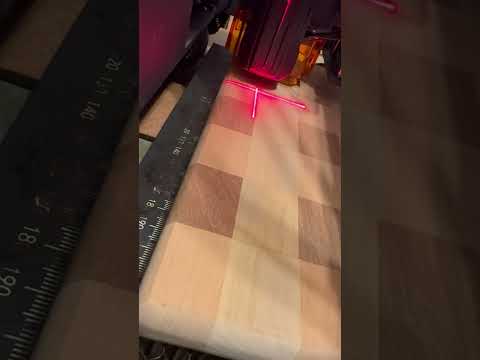
The piece of wood is 3/4"
That looks normal. I believe something else is going on. You’re not getting errors anymore? It just won’t run the job?
I believe we’re outside my scope of knowledge and it’s time for me to get some sleep. Paging @berainlb
1 Like
By the way, 3/4” shouldn’t require you to loosen the dovetail screws. You can EASILY get 35mm of range from your thinnest to your thickest workpieces. I set my dovetails with a piece of .5mm veneer and can very easily still do a 1" (25mm) thick cutting board with nothing more than the autofocus.
1 Like
Okay. I appreciate all the info so far! It’s way outside the scope of my very limited knowledge.
One or another of your switches is getting actuated. You need to identify which. Sounds like you have 2 switches for XY homing, one for Z homing, and one for autofocus.
Eliminate XY by centering your design in the middle of your work area. Manually jog the laser head away from home so that there’s no chance it will trigger the X and Y switches.
Then start the job while carefully observing. If you get the same error it will likely be something on the laser module. If it works normally then it’s likely X or Y that’s getting triggered.
What do you see?