I recently bought SCULPFUN S30 Pro Max Laser with engraving area extension shaft 935 x 905 mm. Mounted and connected all according to instructions. Downloaded Lightburn and connected and setup the machine as instructed in online manual and video.
The problem is that after homing, X axis goes to - (minus) coordinate and Y stays at 0. When I try to do move the laser, I receive error:
ALARM:2
G-code motion target exceeds machine travel. Machine position safely retained. Alarm may be unlocked. (Right-click the ‘Devices’ button to reset the connection)
On or near line 2:
It seams as the machine is expecting to go to X- and Y+ coordinates. In manual it is refereed as Quadrant II.
I have setup the machine (I hope) to use Quadrant I as home position is bottom-left and working area is without offset.
The machine has limit switches and they are working correctly.
Is there any additional setting in the machine that needs to be set for the machine to use + coordinates?
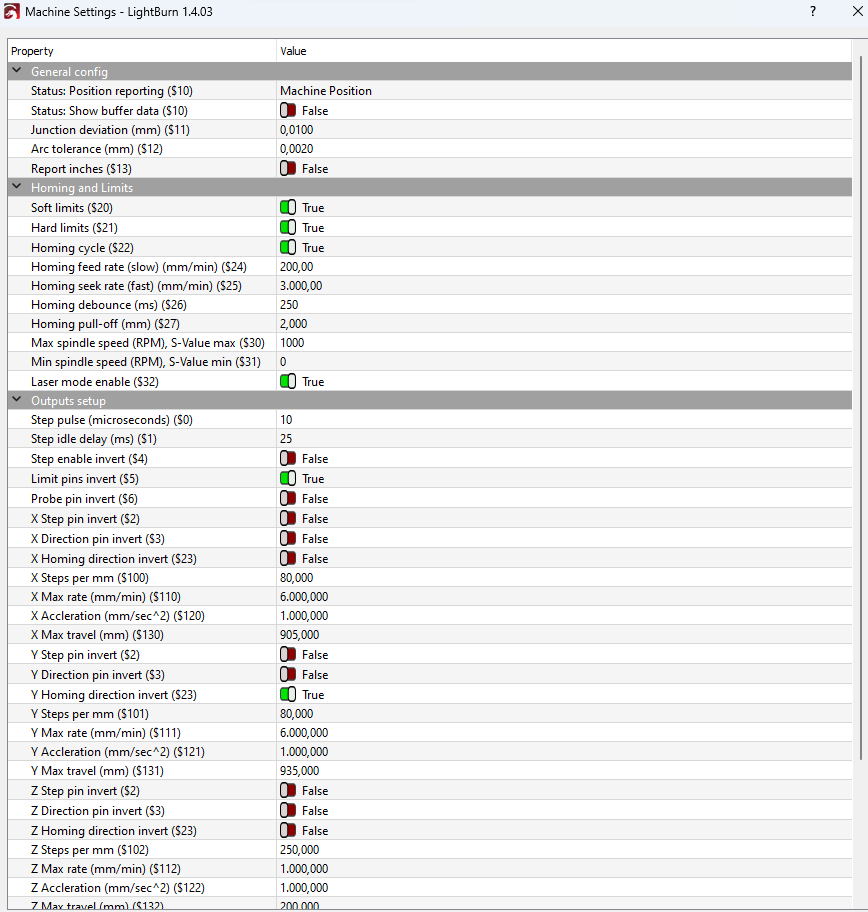
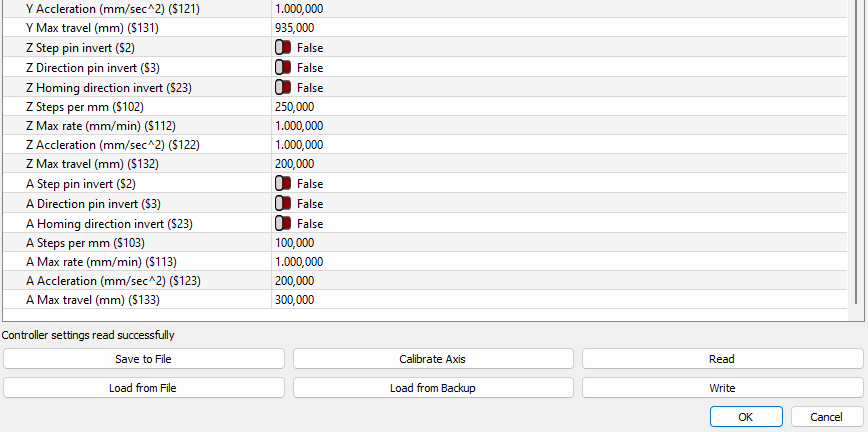
Here are the settings from the machine:
Waiting for connection…
ok
[VER:1.1h.20220925:]
[OPT:V,15,128]
Target buffer size found
ok
Homing
ok
$#
[G54:0.000,0.000,-0.000]
[G55:0.000,0.000,0.000]
[G56:0.000,0.000,0.000]
[G57:0.000,0.000,0.000]
[G58:0.000,0.000,0.000]
[G59:0.000,0.000,0.000]
[G28:0.000,0.000,0.000]
[G30:0.000,0.000,0.000]
[G92:0.000,0.000,0.000]
[TLO:0.000]
[PRB:0.000,0.000,0.000:0]
ok
?
<Idle|MPos:-4.000,0.000,0.000|FS:0,0|WCO:0.000,0.000,-0.000>
ok
$$
$0=10
$1=25
$2=0
$3=0
$4=0
$5=1
$6=0
$10=1
$11=0.010
$12=0.002
$13=0
$20=1
$21=1
$22=1
$23=2
$24=200.000
$25=3000.000
$26=250.000
$27=2.000
$30=1000.000
$31=0.000
$32=1
$100=80.000
$101=80.000
$102=250.000
$103=100.000
$104=100.000
$105=100.000
$110=6000.000
$111=6000.000
$112=1000.000
$113=1000.000
$114=1000.000
$115=1000.000
$120=1000.000
$121=1000.000
$122=1000.000
$123=200.000
$124=200.000
$125=200.000
$130=905.000
$131=935.000
$132=200.000
$133=300.000
$134=300.000
$135=300.000
ok
Non of the jogging controls work. I get Alert 2 constantly.
If I invert motor direction X then when I hit Home it tries to home on to the right (limit switches are to the left), and the laser collides with the railing and then stops.
Your firmware settings are messed up. Did you change them?
Try
$3=4
$23=7
That’s because you inverted motor directions AND homing directions. You need to first make the movement correct fitting the arrow buttons. Afterward, the homing directions need to be set.
Meanwhile, I recommend turning that on as well. It doesn’t protect crashing right- or backwards, but it prevents crashing into the switches if the laser head was moved manually. So it’s more a switch protection function
No, if you jog, the laser will keep its position updated. I meant moving the head using the hands where the laser won’t notice that the position has changed. This is not uncommon to do that, I use this as well sometimes for rough or fine-tuning of position. Much faster than using arrow buttons
No, they don’t throw an error. They only do if you have $20 enabled and jog using the buttons (but then the error is not raised by the switches but the workspace protection algorithm).
I already killed a switch because I didn’t turn hard limits on. The laser got stuck for a short time at the workpiece and lost its position during a job. At some moment later, it moved too close to the x-axis limit and broke the switch completely.
Changing $3=4 and $23=7 as suggested and clicking Home moved the laser to the right and it collided with the railing. Also tried to disable limit switches but it did not work.
Maybe first of all: if you experiment with gantry movement, have a finger on the power switch. If you see it moving to the wrong side, turn it off. The moment you hit the frame, you start damaging your mechanics.
Next, as suggested, use the arrow buttons to move the laser head. Try to click on the right and top arrow. In which direction does it move?
If those are not correct, click on “x direction pin invert” or the same for y. Can you make this work?
And its obvious it goes to the right because “x homing direction invert” is false. Set this to true. So you did not set $23 to 7. Actually, it looks like it’s set to 2.
If $3=1 is working for you, you swapped the x-axis motor cable by 180 degrees. Or you forgot to use the small cable that switches this back. Anyhow, as this can be adjusted in firmware, that’s no problem.