I have the above laser with retrofitted limiter switches. My problem, is when the module arm makes contact with the switch, it turns the machine off. I tried swapping the switches over, but the same thing happens. I followed all the firmware instructions provided by yourselves (twice), but still no joy. Any suggestions please?
Hi @Flasheart
If the machine physically powers off the moment the limit switch is pressed, that is not firmware; it’s almost always a short at the limit header.
Most likely cause on a Ray5: the 3-pin limit connector is offset or wired incorrectly, so pressing the switch is shorting 5V to GND. Damaged, wrong connector, back-to-front or something physically incorrect.
Please check this:
Power the machine on with the limit switch completely unplugged from the controller board.
If the machine now stays on normally, the issue is the wiring or connector orientation at the limit header. Obviously, it might be best to disable auto-homing.
Firmware cannot cause a full power cut — only an electrical short can.
2 Likes
When you re-wired these, did you change the basic operation?
Most of these just pull the pin low, this prevents you having to wire 5V to anything external such as the switches.
All of mine work that way, including the Ruida and my little cnc and laser grbl boards along with my 3d printer. The option is there to make it a high for active but this usually isn’t done.
@Dominic instructions about removing the plug will help you isolate it, but it won’t be able to home, so that might have to be disabled…
I don’t know how Longer builds their machines, but a pull down is much more popular than a pull up.
Usually there is no way to short one to ground as the switches usually have three pins, one for the common and NO (Normally Open) and NC (Normally Closed). Unless you wired the harness incorrectly, I don’t think it should matter…
Has this ever worked? If not, what instructions did you follow to accomplish this?
Does any of this make sense to you?
What firmware instruction are you referring? You icon says you’ve only read for 4 minutes..

2 Likes
Hi there, Jack! This is Flasheart’s daughter (Fate), I’m the one who’s been trying to help him figure this out. Neither of us are experts in this or have much experience so I’m going to ask if you can explain some of these things a little further for both of our understanding, it would be greatly appreciated!
The firmware instructions my father is talking about is the ones provided to us by Longer to follow after the installation of the limit switches. Since we tested @Dominic 's suggestion of leaving the limit switch completely unplugged, we now know the issue is NOT in the firmware, so please disregard that comment.
When we installed the limit switches, we followed the instructions provided to us to correctly wire the limit switches in. As far as I can tell, everything works as it should aside from the switch turning the machine off. I can’t be 100% sure on how the limit switches are supposed to function, so if either you or Dominic can provide a little more understanding on that, I can follow a little easier.
I really appreciate your understanding and patience in this!
- Fate
They are actually very simple.
The controller has a port it can read the status of the switch… High or low (on or off).
The controller will approach the switch and when it becomes active, it will back off the switch then re-home at a much slower speed to increase the accuracy of the home operation.
Did they instructions tell you to wire it to ground or 5V? Can you post these instructions so we can read them, it might be more simple that way. Do you have a voltmeter?
I not sure what isn’t clear to you, maybe you could elaborate?
That explanation was actually exactly what I needed to understand, thank you!
This is the link for the instructions, I can’t copy/paste the instructions because they are in an image. Ray5 Quick Install Limit Switch Instructions – LONGER
I don’t believe we have a voltmeter, but I will find out from father. If we don’t, I’m sure we can borrow one!
1 Like
Which board is in your machine? Can you tell us what’s printed in this area?
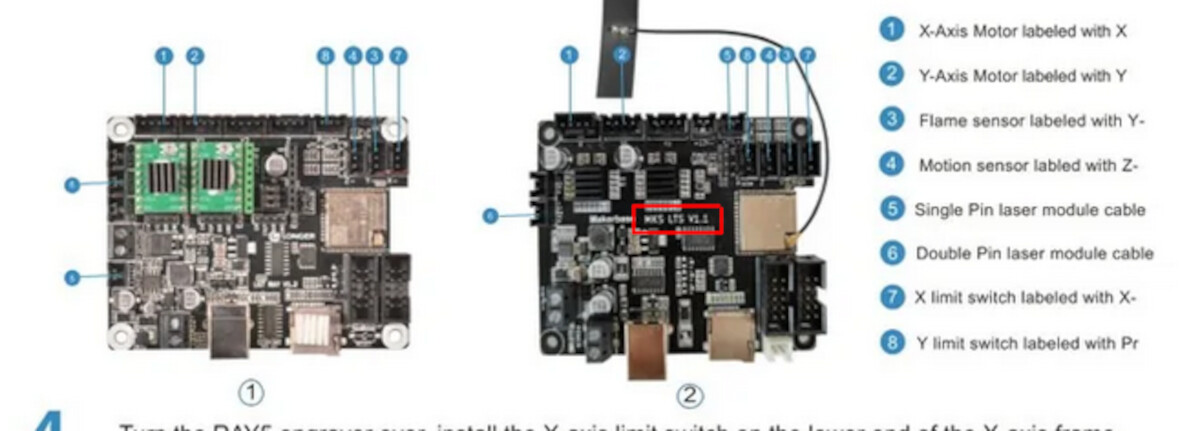
Did you upgrade the firmware and did it complete OK?
That’s kind of the annoying thing - neither of those exact boards is in our machine. Ours looks the MOST like the second one, but there’s still some differences which is why it took us so long to wire everything in.
We upgraded the firmware and it all completed OK.
This is the board we have.

1 Like
Hi @Flasheart
Do you have a multimeter?
Can you annotate your photo to show us exactly which headers you are connecting the limit switches to, please?
I took a better photo to annotate. Green are the wires, orange are the headers. 4 of the wires were labelled (X, Y, X- and pr), 2 of them weren’t.
Father can’t find his multimeter, but he can get another one reasonably quickly so he’ll have one by either today or tomorrow.
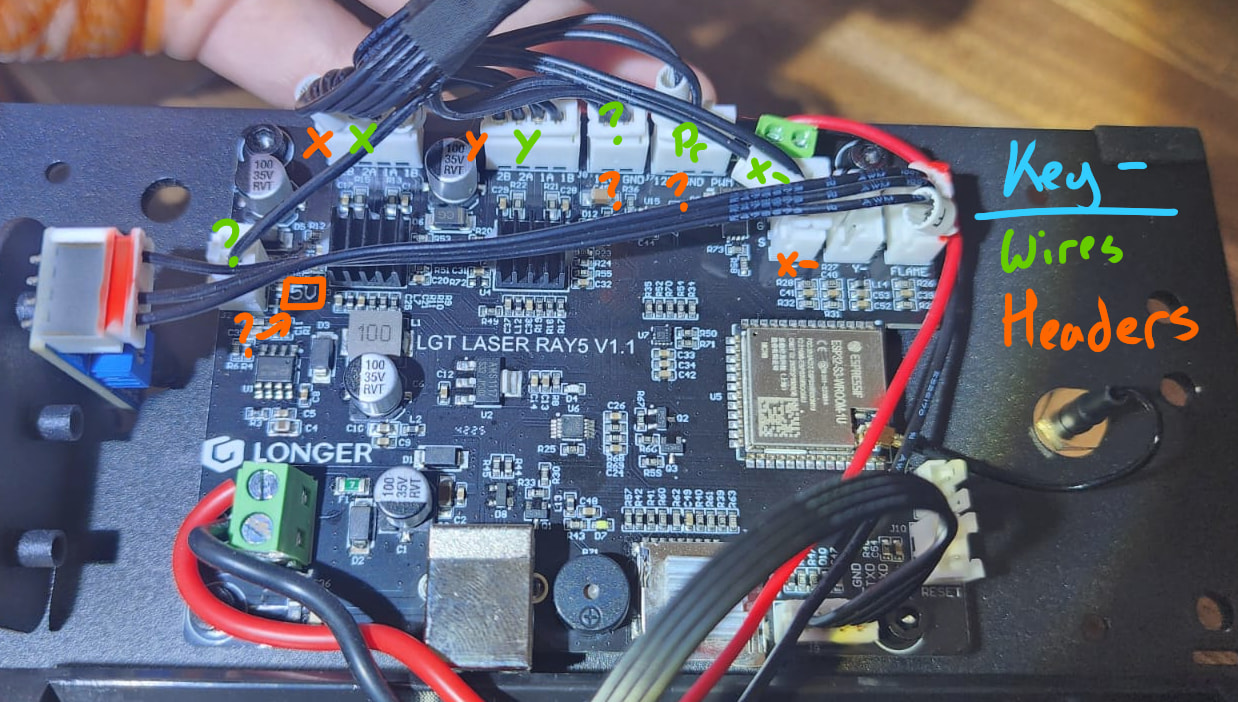
1 Like
Thanks for this, but I’m none the wiser.
Since your board revision doesn’t exactly match the documentation, I’d strongly recommend confirming with Longer which header pins are intended for X- and Y- limits on the LGT LASER RAY5 V1.1 board specifically.
The behaviour you’re seeing (full power loss) suggests something electrical rather than firmware issues, so you’d want to be absolutely certain the switches are connected to signal inputs and not a power rail or are faulty.
From what I can make out, and it’s just a guess….
The top right green connector and the bottom left have much more heavy lines than elsewhere. I’d guess the bottom left is power in and the top right must be output to the laser.
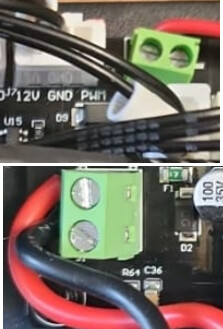
Just left of the top red connector, the white one, it’s labeled PWM, so that’s generally the laser control.
Which is your wiring and where does it go?
Apologies for the delayed response!
In the annotated diagram, all of the marked wires are our own wiring.
@Dominic , we have sent an email to Longer and we are awaiting a response. However, we are only here in this forum because Longer support stopped responding to us when we initially had this problem, so we aren’t holding our breaths on them coming back to us.
2 Likes
After speaking to longer, they sent out new wiring for us to use. When the new wiring arrived and we could immediately see what the previous problem had been - there was no Y- wire to connect to the board. Connecting the new wiring stopped the issue of the machine switching off when the Y- axis switch was pressed.
However, we have a new problem. When we first connected the engraver to Longer’s engraving program (I forgot the name), the machine would auto-home upon start-up and would start engraving based on the design’s location on the canvas. However, it has started to get a little lost and will start engraving in a random place. Additionally, it seems to forget where Home is supposed to be.
Also, some advice on how to position the Honeycomb would be appreciated (and whether the 360mmx360mm is big enough for our 400mmx400mm engraver)!
1 Like
I would check with Longer to find out if this is normal. It should not auto-RUN a program, Home is okay.
I position my honeycomb so that the Home position is exactly in the corner of the grid (not the frame). That way, using Absolute Coords means the part set in the corner will align with a drawing set in the corner.
I recommend you secure the laser and the honeycomb so they cannot move in relation to eachother.
1 Like