Hello,
I recently purchased a Mecpow X4 Pro 22W with a camera. Before buying software, I’m testing the trial version. I’ ve downloaded theh last Lightburn version. The software detects the Mecpow camera but doesn’t display any picture.
The camera works fine in Windows but not in Lightburn, so it’s not a hardware issue. Can you please help me, please?
If you are running Windows 11 for ARM? - it would not surprise me if you ran into a few issues, since we don’t officially support it yet. Do you have any other regular Windows PC you can try?
Make sure you quit out of the windows camera app before you try to access the camera with LightBurn.
In Edit>Settings>Camera, try the ‘Fallback’ camera system.
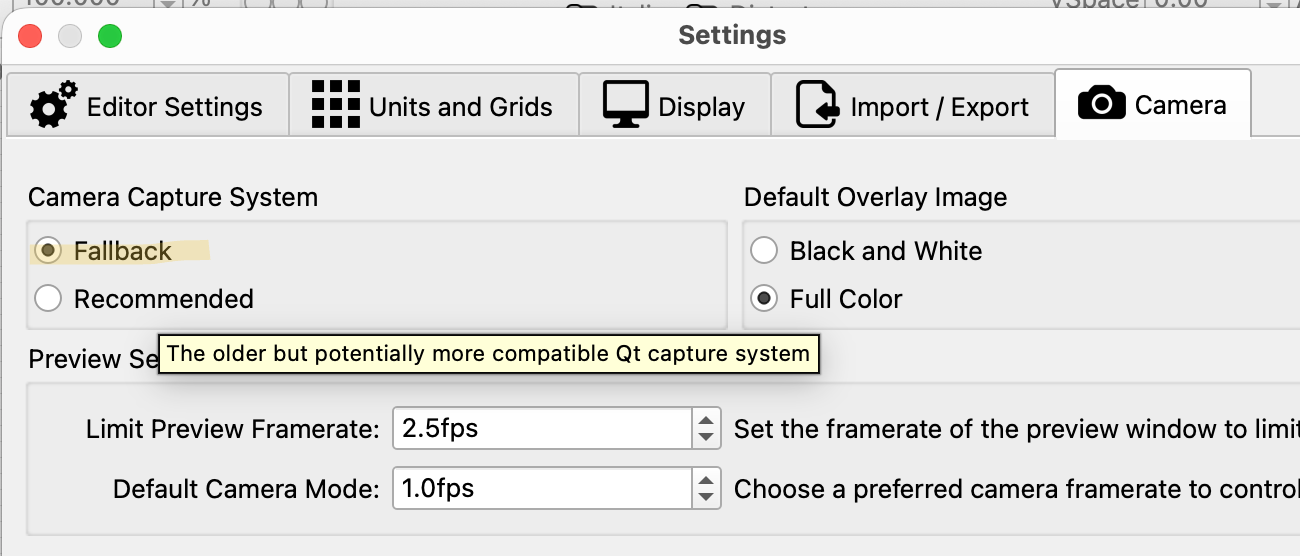
Thanks NicholasL
By using Fallback option, I’m able to see the camera capture on W11.
I’ll test the calibration. To be continue…
This topic was automatically closed 30 days after the last reply. New replies are no longer allowed.