DO NOT post your License Key
If your issue requires LightBurn staff attention, please email us at support@LightBurnSoftware.com - this is a public forum
p300-Mat-2.lbrn2 (68.5 KB)
DO NOT post your License Key
If your issue requires LightBurn staff attention, please email us at support@LightBurnSoftware.com - this is a public forum
I am using Lightburn Core 2.1.04 with an XTool S1 laser to cut wood veneers.
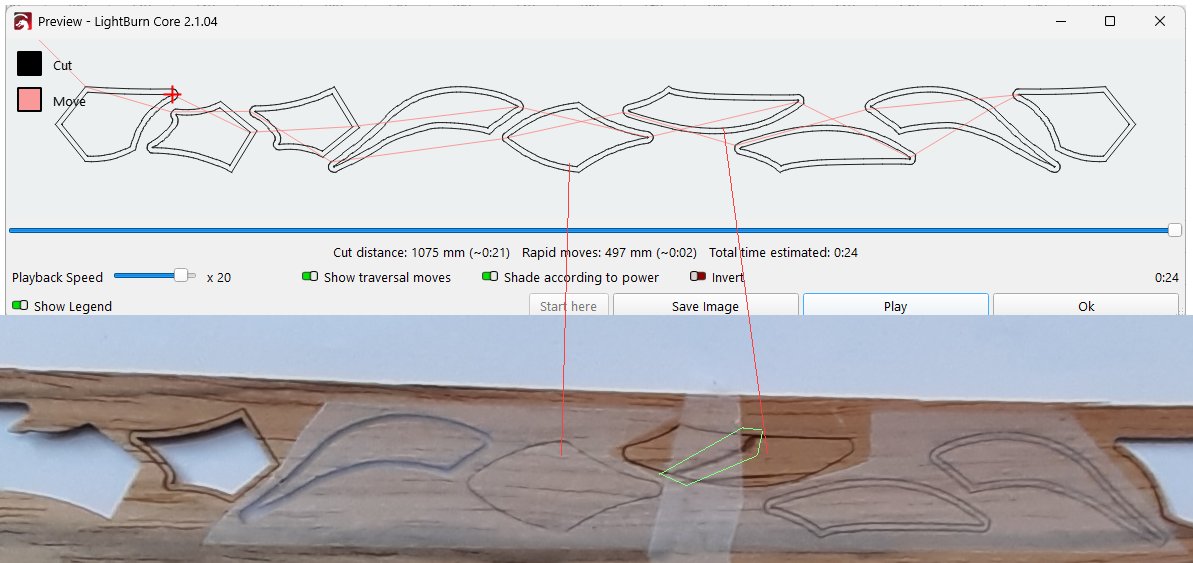
Attached is a picture which shows at the top the cutter path in Lightburn Play below and a section of the veneer which was cut. The red lines point to 2 shapes where only the outer profile was cut. The green shape encloses a ‘mark’ which does not seem to ‘belong’ to the veneer The other inner and outer shapes were cut as required. Also attached is the Lightburn file which was used.
I then removed all the parts but the two which failed and ran with the same settings. This time both profiles were cut.
Why has this happened and who should I talk to find out how to prevent this happening again?
strong text
Because the Preview looks good, at least here, dropouts like that suggests a USB communication problem, which is (unfortunately) all too common, between the PC and the laser controller.
Some previous discussions explore the situation and suggest solutions:
Also, unless you have a compelling reason to cut the outside (red) lines first, doing the inside (green) lines first will preserve their alignment: when the red piece gets free, it will almost certainly be misaligned for the green cut.
Thanks for that which i hope it is since other options like problems with the S1 are so worse to think about. Thanks also for suggestion about cutting order. There are small tags to hold the parts in p!ace but the order makes sense.
There is no way to tell if a specific USB cable will “work”, other than by trying it.
From what we’ve seen around here, spending more for a cable with ferrite cores improves the odds, although I recommend buying from a seller that does not also carry swimwear, pet feeders, and home decor items.
