Hi,
I just installed limit switches – left and bottom – to my Sculpfun S9. Before the installation everything work as expected. I have the laser working great it can engrave and cuts fine responds and prints any job I send it — except — first, it will Home fine to the lower left, but if I try to jog with the arrow buttons in the ‘Move’ window the laser moves to the upper right. I can ask it to move down and left to a designated position with the ‘Move to Position’ function and it moves fine. Now with the ‘Show All’ in the console window turned to ‘on’ I can select any direction button – Up, Right, Down, or Left and they all will cause Lightburn to issue the following commands shown in the console window:
Starting Stream
G21
G91
G1 X374 Y394 F6000 S0
If I let it go it will move to the upper right of the machine. It reports the position as X374 Y394. If I ask it to jog left (10mm step) it does not move but Lightburn issues the following command.
Foremost, you should NOT change the firmware when installing the limit switches. This was a fault in Sculpfun’s instructions and was never removed, unfortunately.
Which version of the S9 do you have? The early ones with the 8bit controller? Or a newer one with the 32bit controller? There are multiple options to make the laser report 0,0 at the homing position, the easiest is to set a workspace coordinate offset. This guide explains everything you need to know:
I believe I have the eight-bit version as I purchased this many years ago right after Sculpfun introduced the S9, but I can’t be sure. While looking at the Diode Laser Wiki my board looks like the S10 NOT the S30.
Please try using the latest version 2.0.03 RC3 : Public Release Candidates – LightBurn Software, as I believe it includes patches to fix issues with jogging with negative coordinate machines.
After you home the machine, if you jog left by 10mm does it move to the right?
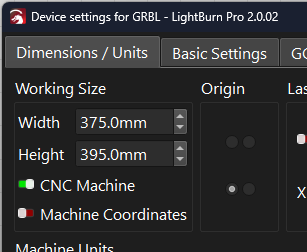
If so, toggle the ‘CNC Machine’ setting to invert the direction.
My ‘Device Settings’ are like your snapshot except my CNC Machine is disabled. I am running 2.0.02 and when I ‘Home’ and then attempt to jog left 10mm it moves to the upper right.
Then I installed the Pre-Released version 2.0.03-RC-3, you suggested, when it asked to transfer my settings to the pre-release version, I selected ‘Yes’. Well it is now “Jogging” as expected, hopefully this solves the problem for good! I did try the 2.0.02 version again and it still goes to the upper right. Thanks for your time and all the help, it is greatly appreciated!
With continuous jogging and the direction key held down, movement should continue until it smoothly decelerates and auto-stops at the end of an axis without triggering or breaching soft limits. Test at a low speed.
With the Pre-Release (2.0.03-RC-3) version the ‘Continuous Jog’ works perfect, it stops at the edges in all directions. With the 2.0.02 version, after homing (Lower Left) with continuous jog enabled, pressing the ‘Right’ or ‘Up’ arrow causes no movement with the Console window reporting
error:15
Jog target exceeds machine travel. Command ignored.
Pressing the ‘Left’ or ‘Down’ arrow causes to laser head to move right or up respectfully. When held it will continue until released, and will stop at the edge correctly. Even after using continuous jog (Down and Left) to move the head to the center of the work area the Up and Right buttons still report the same ‘error 15…’ message.
Thanks, thats useful info for those experiencing similar symptoms in 2.0.02 and that’s what I wanted to hear about 2.0.03 RC3
For others reading this, with jog movement issues, in the Console window there is a “show all” option that allows you to see the command that is sent to the machine when you click on a jog button.
So if you are able to describe what you tried to do vs what the machine did but also paste the associated command that was sent to the machine - that additional information is super useful for anybody troubleshooting, so props to you for a clearly worded first post describing the problem with that extra detail included.