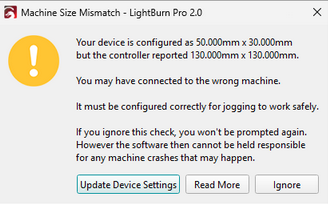
Good morning, under normal conditions my laser had a working area of 400x410, but after the last software update, this working area was reduced.
I have checked all the parameters in the software and they are correct, I have performed a factory reset and the problem still persists.
Do you have any recommendations for solving the problem?
This is a newer warning that appears if your Device Settings in LightBurn don’t match the firmware settings on your controller.
Selecting “Read More” should bring you to the page linked above with a detailed explanation.
It’s not clear what you did exactly when you “performed a factory reset”. Can you give us more context, and let us know if the docs page helps?