I have a need for 2 different size fonts on the same line
I have a Boss laser and when I create a font - it wont let me change the size on the same line.
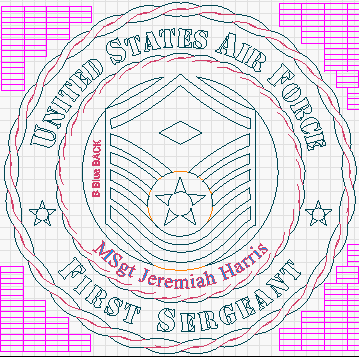
This is what I need
Since stencil font is all the same - I need to have larger and smaller letters on the same line.
Not possible from within Lightburn. You can either “stack” 2 separate sections of text which is difficult to align or create in another program and import as svg.
I think yon are searching for a small caps font. So use “small caps stencil font” as search term.
Remark: There are true small caps fonts and false ones. The false ones are simply with scaled capital letters. This reduces the line width for the smaller letters and also the tracking so it may look “wrong”.
Thanks Tim,
I kind of thought that since it was so difficult to figure out…disappointing.
So even if I find a font that does this, Lightburn wouldn’t be able to do it?
If you find a “small caps” stencil font that you like it works. You just can’t have different sizes on the same line / text box.
This topic was automatically closed 30 days after the last reply. New replies are no longer allowed.