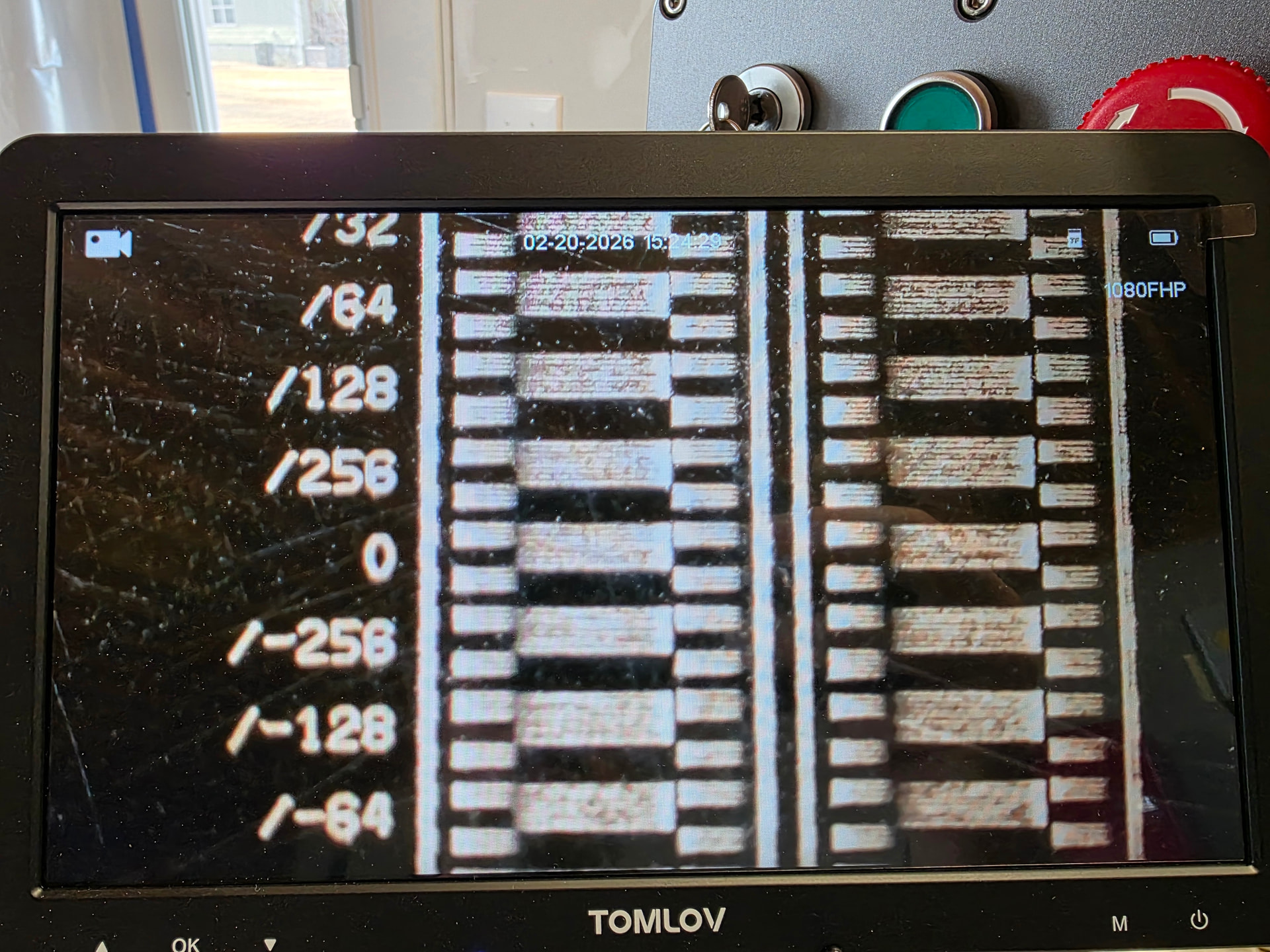
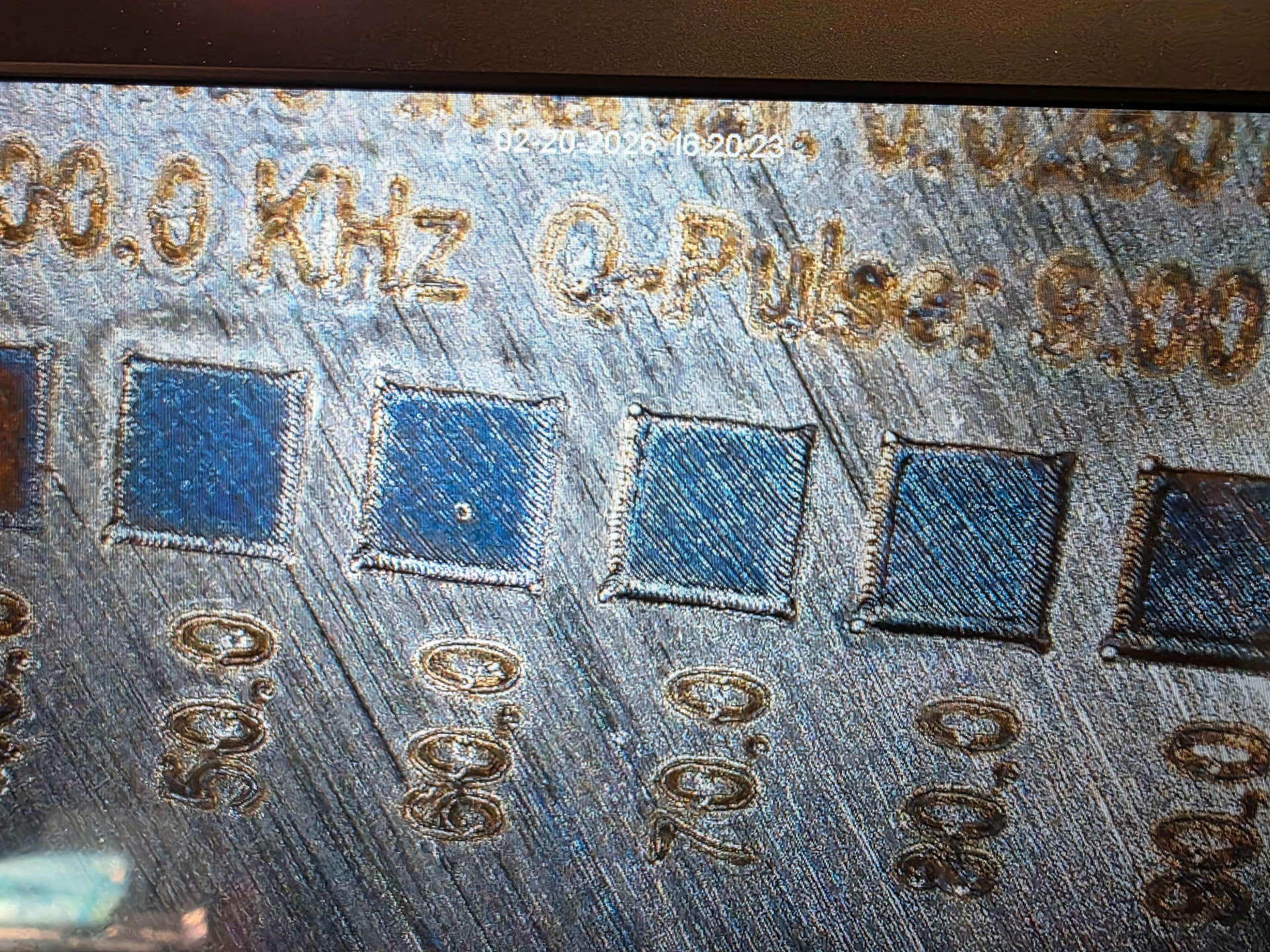
Need LB overscan on galvo?

I do appreciate it! And appreciate your in depth write up!

Now I make the assumption that this corrects how you run your raster settings, but may end up with on / off times that don’t work so well for vector as the ramping will still show due to how it’s handled? Or are you seeing vector images controlled as well if eliminating delay and end settings?

If they are different… how are you managing timing changes… globally or in layer override?

If im missing the obvious in reading i do apologize. I see the problem clearly but the light bulb just hasn’t clicked on for the application of a solution.

Thank you again

@Dannym What are your thoughts on the jump delay? What settings are you using during the tests?

The Ton/Toff delay should always be set globally. At least that’s the way it worked for me, on my machine.

As best I understand this-

The galvo controller is the BJJCZ. It’s all this refined high speed DSP stuff inside, but the fiber source is an entirely different thing from a different mfg and sort of a black box to the BJJCZ. It just blindly sends a fire command and doesn’t have any feedback on when the energy hits the bed. And with high speed galvos, that’s critical. Especially with high res rastered graphics. If doing bidir (and you usually want to), if the left and right passes don’t line up you’d get a double image. When doing rotation (also, you pretty much always want to do this), a pixel firing early or late would be offset on a single line, but overall make a circle across the sum of the passes, with a radius equal to the timing error.

The BJJCZ just needs to know exactly when to send or stop sending the fire command so the energy hits the bed at the precise moment it planned.

It doesn’t matter what speed or type of moment (raster vs vector) it’s doing. It just needs the timing number so the fiber source is in sync. How much a timing error offsets raster pixels, resulting in blurring the image, depends on the speed of the raster too. The spatial offset error you get scales with speed, and the significance of the spatial offset error scales with the level of detail in the job.

So here’s the big reveal- these lasers are capable of getting fine detail at far higher speeds than people (and vendors) think. They just don’t know how to do a high precision Ton/Toff calibration and don’t even realize the problem exists. They think that at higher speeds the galvo mirrors are inaccurate and you just shouldn’t go that fast. And erroneously validate that their testing method was accurate because the raster quality is still ok at the low speeds they think is the limit of machine galvo accuracy.

You might think the fiber laser source’s response time would vary with its q-pulse or power level. But I don’t recall see that on my machine, surprisingly. I can’t entirely rule out that for other laser sources though.

So, I didn’t see any reason this would be a layer setting. It’s a question of the delay within the fiber laser source and it doesn’t know or care what you’re doing with the beam.

As listed on the text on the test LB project, jump delay min/max get set to zero.

The guides telling you to do vector cornering to set Ton/Toff are more inaccurate by orders of magnitude. So many things wrong here:

  1. it’s mixing up start/stop and cornering behaviors with the actual Ton/Toff timing. That’s conflating completely unrelated aspects of the machine. Mirror instability on starts/stops/cornering should NOT be addressed by changing Ton/Toff, and that’s usually what you’re actually seeing during their tests. It may look better in that specific case, but it’s not going to be right for anything else. And then the cornering behavior parameters get set wrong too, because they’re conflated with timing.
  2. Vectors don’t have the degree of visual accuracy in the result to make any high accuracy judgement calls.
  3. You don’t even know what it’s doing for sure. Lightburn doesn’t guarantee which direction a vector cuts in, so that really confuses what you’re looking at.

The design of this test is that we’re clear of the edges and the mirrors should be moving at constant velocity across the “gaps”. We’re comparing right-going and left-going passes, at constant velocity, so all you’re looking at is the Ton/Toff inaccuracies and nothing else.

Get Ton/Toff PERFECT first. Then go play with jump delays and polygon TC etc but DO NOT touch the Ton/Toff again.

Thank you for sharing this Danny!
I’ll give this a try when I can.

If i am doing frequency for the test… it says speed /Li

So lets say 7,000 / 0.0818 for a 300mm lens

Thats like 86,000 …. I am missing something on that one


I also see some difference between the vector side and the image side that I’m not sure if im supposed to see when looking at this… Itmeans i would have to break between the two… i must be doing something wrong with this


I cant seem to find any combination of setting in LB that will let me do a material test with 45degree and cross hatch that wont show that outside box engraved harder because of the ramping…. No matter if im at 0 delay timing

Vectors have no “overscan”. The mirrors move from any direction, an attempt at a straight line from the end of whatever the last vector was.

Just picture where it comes from 90 deg off- or the opposite direction. It will basically begin at a standstill- or even overshoot- and start firing.

A CO2 laser like a Ruida controller throttles back the beam power proportionately when it’s not able to go at the commanded speed.

Galvos current do not. The way the galvo interface controls power is serial comm and it doesn’t work as well as it could to adjust power on the fly. The tech isn’t perfect yet.

So, vectors are going to overburn at starts/stops/corners. On the other hand, the acceleration on a galvo is much much faster than a CO2 gantry laser and these acceleration zones are usually very small.

You can’t adjust this out. That’s not what Ton/Toff do, or anything else. You can reduce it by limiting speed. Because if you ask for a very high speed, and give it a power appropriate for that speed, there’s a big long runway in the starts where it’s getting up to speed and overburning.

If you asked for 1/4 of that speed, the acceleration zone goes down to 1/4 of what it was. You’d be taking your power (or freq) down to 1/4 of what you’d use for the higher speed to get the same new burn.

Yeah, this limitation of the tech annoys me. I’m not 100% clear if this could or couldn’t be fixed if Lightburn did “overscan”- start along the same line the vector is going to be, but go there and start accelerating few mm ahead of the start point with the beam off to get up to speed, and turn on the beam as it passes the start point at a constant velocity. That would be nice.

There’s another flaw with that strategy though- I studied this and saw the beam actually doesn’t start instantly. It gets a fire command and puts out a few weak pulses before it reaches a constant power. Overscan won’t fix that and it could make it worse.

Rasters don’t overscan either on galvo. A Ruida CO2 controller does- it pads the sides, past what your job said to burn, with enough turnaround room that it will always be at a constant speed when it does your content.

Lightburn COULD fix that by inserting that sort of overscan. It’s more straightforward than trying to do it for vectors. But, right now it is what it is.

There IS a workaround. Why is there a vertical bar on the left and right of the Ton/Toff blocks, anyways?

That is forcing Lightburn and the BJJCZ galvo card to start the scan line outside the area you need to have right. It may have artifacts in like the first 2mm of a line at high speed- but that’s outside the timing blocks so just ignore it.

So, the timing test really should be done with the raster layers.

Can I do this fix IRL? Well, say you’re doing a coin. There’s no technological reason LB shouldn’t just pretend like the image starts a few mm outside the first nonzero pixel, start the scan line in whatever direction it is, and be up to speed when it reaches the edge of the image and edge of the coin and fire there.

OK, that’s the way LB could fix it (and maybe they have, I haven’t done tests on mine for a few updates, apologies if I have it wrong). Can *I* fix it? Well, AFAIK you can’t force LB to see the image as larger than it is with white space (actually, I need to confirm that now).

But you COULD make a ring outside your coin image, a ring a few mm larger dia but only one black pixel wide. LB would have to start the line further out and it will be at constant velocity by the time it reaches the coin edge. But it will etch into your holding jig. You could just tolerate it, or put spoil there, or put something there that the fiber laser won’t have any effect on.

The more I used it, the lack of overscan wasn’t all that bad. It’s a small artifact at lower speeds, but can be a limiting factor for running it really fast. And I noticed that because I have a 300W machine so I’d like it to go really fast. And all these machines can actually go faster than advertised- considerably so- WHEN you get Ton/Toff set with precision. Even the mfgs don’t seem to know how to do that- but this test absolutely will.

So, you can run much, much faster with no loss of quality mid-line when Ton/Toff are exact. Huge improvement at no cost. But, then the lack of overscan causes significant issues on the edges unless you add in your own.
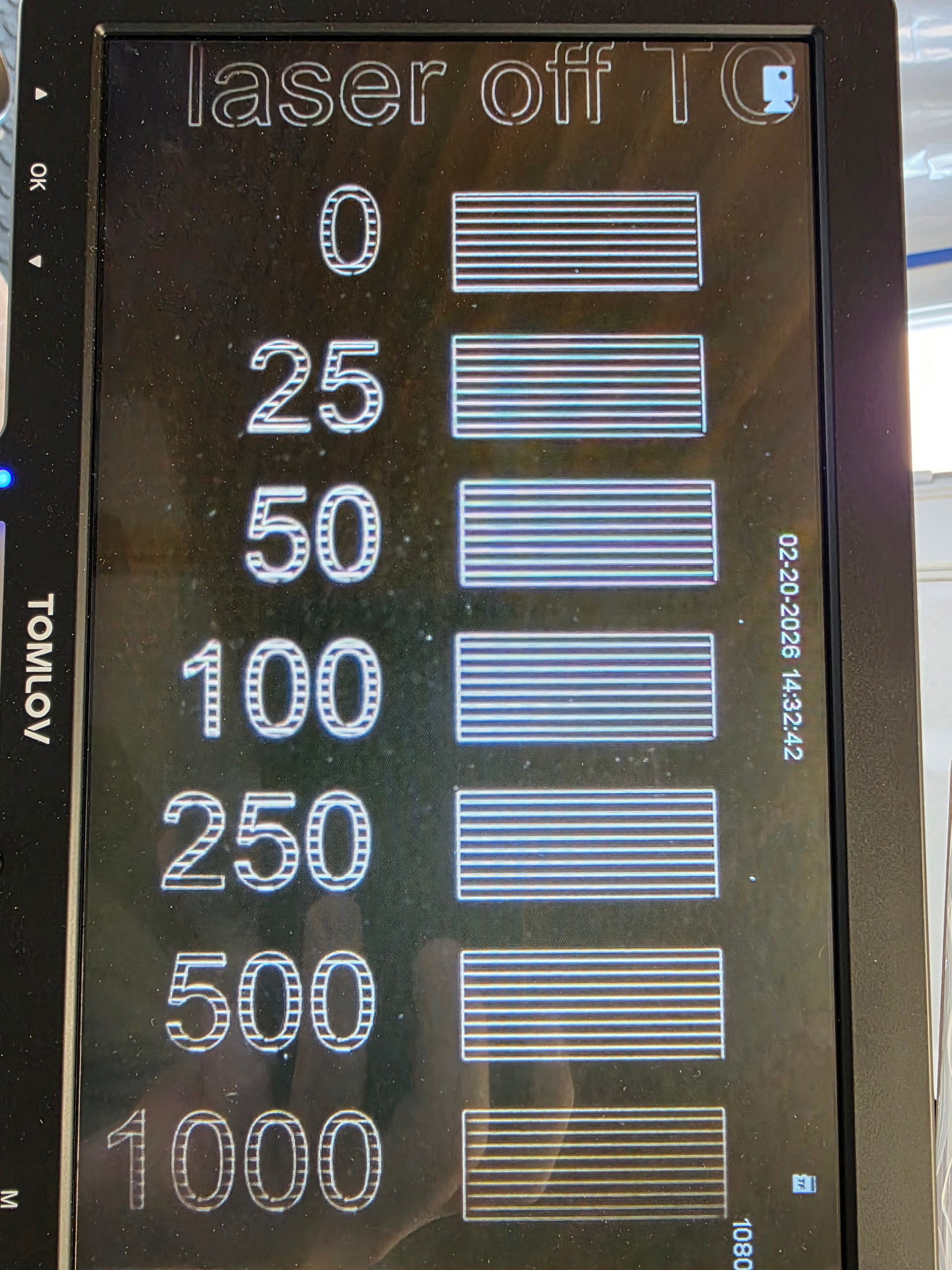
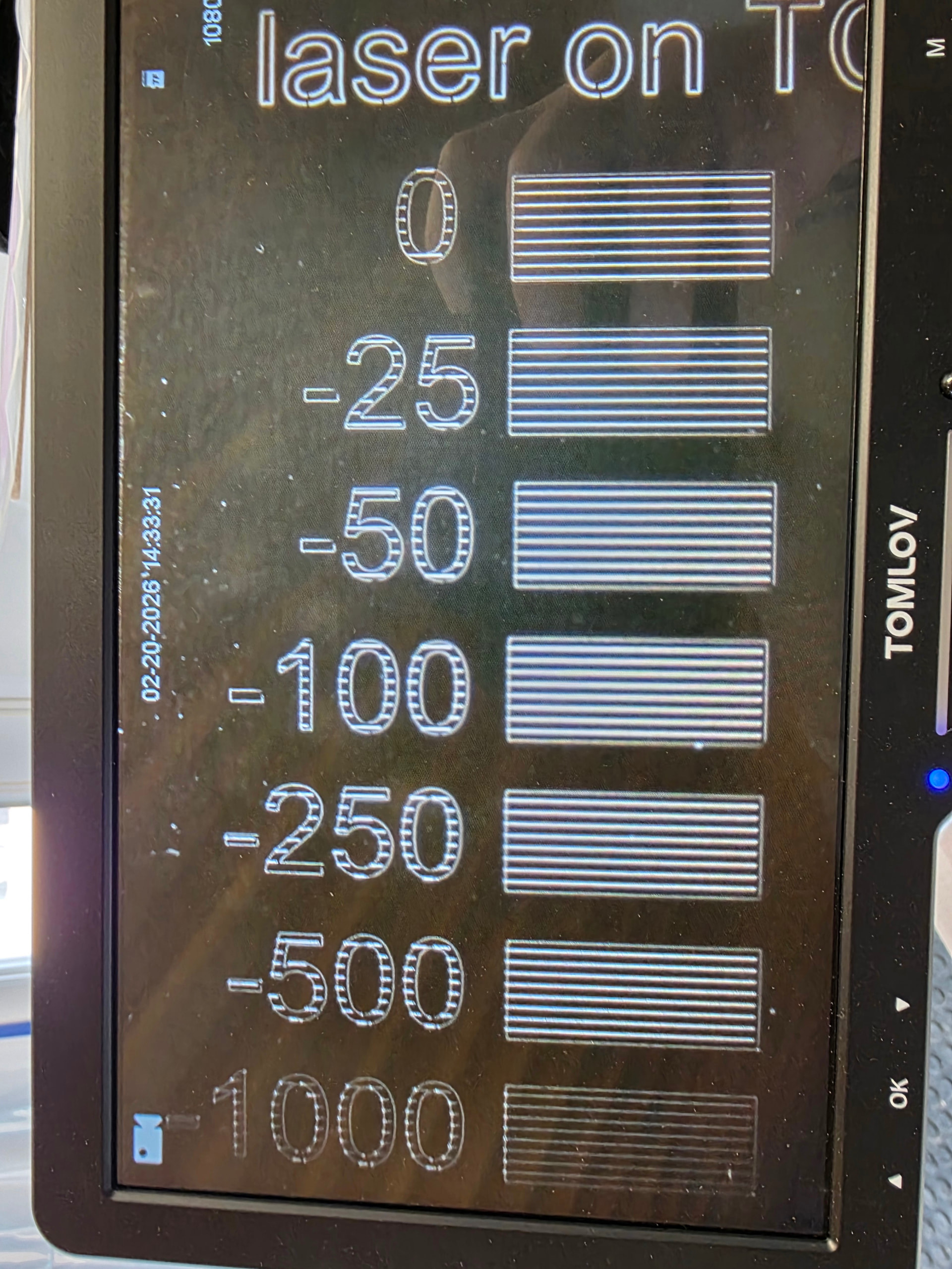
Trying to process and reply a little slower this morning while getting my caffein in, vs trying to post while pulling my hair out yesterday lol

Ok, I was under the impression that the timing was somehow going to correct both ultimately, but the issue is deeper if i really need the ramp to disappear… I thought the comment in the timing thread was suggesting that everything was being treated as a vector ultimately meant I just wasn’t seeing the solution yet. That was 100% my lack of understanding.

So…in short… vector is out if i ever need an even / no ramp engrave.

(If i am reading this correctly) Raster on the other hand can give me the ability to build a “workaround” for an even / no ramp engraving.

So perhaps my logic needs to be that there are two separate methods of approach. Vectors when the ramping is acceptable on other engrave / marking types where the ease of using the software supersede the need for an even engrave / mark. Raster will have to be used 100% of the time when i require an even (no ramp) engrave, and am willing to build the “workaround”

Ok i think i need to process this a bit more… i was able to notice that when i had to cut power output below 100% (even at a pulse width of 2) i was able to see a little bit of a ramp in marking from the start of the line. I assume that is me observing what you are trying to explain to me here?

Is moving to a pulse frequency that would fall close to / right at the cut off curve for the pulse width being used possibly a way to help avoid these weak pulses…?… i have tests to do once i get closer perhaps

Ok so trying to make sure i understand the timing test workaround properly: If looking at an image, and i have the bar outside …. then there is a possibility of making the rest of the mark at constant speed (no ramp during mark)

Understood, i will rerun with just the image portion and the text

Ok to clarify for this workaround method i would need the marking speed and jump speed set the same as well as a 0 min & max jump delay?

So if i needed two different marking speeds during a mark…. I would need to change jump speed between layers or possibly use layer over rides…

the problem only shows for me in color marking metals or specific layer ablation of multi color layer coating.

If I need to remove only the top layer to show layer two… i end up showing the bottom layer at the ramp. or i end up removing all coating at the ramp when trying to show the bottom layer. in color metal marking i end up changing the color at the ramp or actually engraving and removing all color at the ramp.

These are the only two very frustrating things i am trying to accomplish that this becomes an issue with, so I could live with only doing image processing there if that is a viable workaround.

Thank you again! I appreciate you taking your time to try and explain your findings with the rest of us that are currently pulling our hair out LOL. Sorry if it takes a bit to get it all across to me.

I love reading these dialogs, and am learning a lot. I think @Dannym said the magic words, “The tech isn’t perfect yet.” I also think it is too early for me to get a galvo machine. Blessed are the pioneers!