I moved Lightburn to a new windows 11 computer abd connected my Atomstack x7. The laser is visible in the device manager, but Lightburn couldn’t discover it, so I created it manually, using GRBL with the appropriate size and origin. Lightburn couldn’t connect. One thing I’m curious about is LIghtburn never asked me for the comm port. Any suggestions?
Did you migrate from old computer to the new one?
I didn’t migrate, treated it like a new install. I have exported and imported the lbdev file, and see if that works. Thanks for the pointer.
It is in the pull-down in the Laser window. That should show one or more COM ports with the laser connected and powered up.
Hi @dwitton
Once you’re sorted out, be sure to come back and let us know how you resolved the issue.
With regards to COM PORT selection.
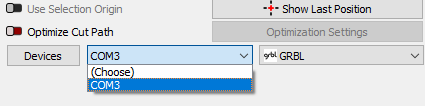
Your Laser windows will show as either (choose) or (AUTO) until you click the dropdown and select one. You can check which one in Windows Device Manager (right-click the Windows icon and choose Device Manager). Just like @MikeyH said.
I installed the migrated laser definition. Now the correct port shows in LIghtburn, but I still can’t connect. Perhaps something is amiss with the laser - I notice the display is blank despite multiple presses of the reset button.
As a start enable Show All in Console Window. Right-click in Console and select clear content.
In Laser Window right-click the Devices button to reset connection.
Copy and past here in a reply, all Console content.
Also past the laser .device
Stupid user error - the emergency stop button was pressed. All is good now