After installing new LB update a few weeks ago, I’ve had several problems; 1) laser engraves bottom to top. Not critical but annoying on setup, 2) I can’t use “user origin” to set starting point. Not able move green origin dot to correct stop. not able to frame. I can’t find any place to change any of these settings. This has me shut down…
Start by loading a preferences backup file from before the update and see if that sorts it out.
File Menu> Preferences> Load Prefs Backup.
i had exactly same im shut down also if here anything to fix ill come back let you know its my only laser so production 0%
“Exactly the same” as in: it worked before the update?
If so, Tim’s suggestion to restore your settings from a Prefs Backup should solve it.
IM GETTING THER BEEN BACK TO BASICS WITH LGBRL BUT IVE STILL HAD TO ENLARGE MY JOBS LIKE 1000%MTO FIT WORKS SPACE TY GET IT TO FRAME RIGHT SIZE GRRRR
strong text
Can you press the Caps Lock key and give us a little more context? What do you mean with “had to enlange my jobs 1000%”?
sorry about caps
since update lb i lost everything laser wouldnt even move changed driver pcb no different
i went back to basics with lgrbl put all to standard
it started to move again in LB but totally all movements are wrong way round and the scale is all wrong on LB i put in size of y and x axis but when i put job on LB screen the movement when i frame job is like a thousand % smaller on the laser so 200mm on screen is about 25 mm on laser please could you advice im stuck still loosing money from not able to run laser
its been great all year working great till this sob upgrade /?
thanks in advance LightBurn Software Questions upgrade hassle
mark
also my machine used to lock up motors when turned machine on but noe u hear a clunk as they supposed to but you can still move laser by hand so confused bud
All good. II’m glad you didn’t take my snarky comment the wrong way. 
Please explain, what you did here exactly. Did you change the whole mainboard? Or only the stepper drivers?
What you describe with the movement being smaller indicates that your new controller/stepper driver is using a different Microstep setting.
It’s not immediately clear which exact upgrade you mean. Which LightBurn version are you using?
If nothing on your machine changed, you should be back to a working state if you reinstall the previous LightBurn version from release.lightburnsoftware.com and restore your settings from a prefs backup, as recommended by Tim earlier.
This is outside the control of LightBurn, and I don’t see how a software update would have changed that.
Please tell us as much detail about the laser’s controller and its history, like what changes you might have made. Which firmware is it running?
GRBL firmware has a controller setting to dictate for how long a stepper motor stays energised after a move: $1 - Step idle delay, milliseconds
@dmorgan52 Curious to hear, how it went for you. Feel free to follow up if you still have the described problems after restoring a prefs backup or reinstalling an older LightBurn version.
After installing new LB update a few weeks ago, I’ve had several problems; 1) laser engraves bottom to top. Not critical but annoying on setup, 2) I can’t use “user origin” to set starting point. Not able move green origin dot to correct spot. not able to frame. I can’t find any place to change any of these settings. This has me shut down…
Kinda…I was able to back up to a previous setting, but I think I went too far because I lost some files. I was able to complete job That I had in progress but. I opened Lightburn today to engrave a job and back to the same problems… What is the green square on the left side of coordinate square? If it’s the center marker, shouldn’t it be in the center of my image? When I tried to “frame” my image as I always do, the laser head rapidly moved from extreme corners to opposite corners and landed back where green square is. My laser doesn’t have limit switches, so I position by hand. It has always worked correctly until this last revision. This is getting ridiculous!!!
The green square represents the Job Origin.
Only, if you select this center bubble:
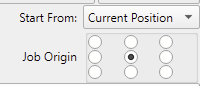
This docs page explains this terminology:
Please review this page about Machines without homing sensors or limit switches