
I have 12 days left on my trial. This is not a good experience in your quality assurance is this poor.
1 Like
Lightburn is a desktop application, not a network application. It has been said many times that loading and saving files to/from other than the local drive is risky. This includes clouds, OneDrive, and network storage devices. Most people that use external storage save to their local, then copy to the external drive for backup.
I use a NAS box (Raid 3), but all file I/O’s are to the local H.D. with not a single failure.
5 Likes
OneDrive has worked fine for me during my trial testing of version 2.0.02. When I upgraded to the new version I was no longer able to use my OneDrive. So something has changed with their new release. I also use Carveco Maker Plus with the same workflow with no problems. If the new version does not support my workflow I can’t see any reason to purchase.
I saw OneDrive in the path, but that path is actually Local. Are you sure that is where the file is supposed to be? Is that the default save location for the .lbrn2 files in Lightburn? Did you try to locate the Hanger.lbrn2 file on your PC?
It is a new file. Never existed before.
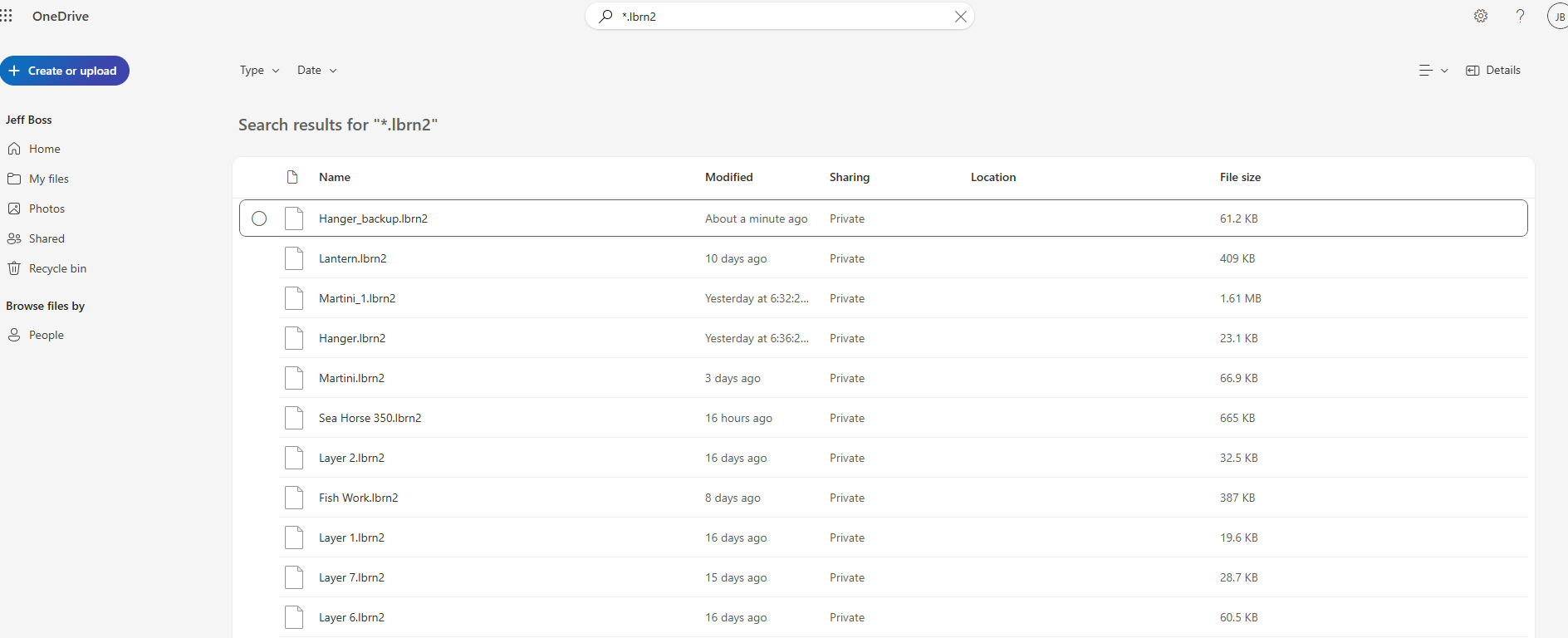
As you can see version 2.0.02 has been creating and saving files to OneDrive. Version 2.0.03 fails to create a new file on OneDrive. So File.Create fails in the new version for some reason.
I do not use OneDrive for the reasons in posting #2, but that image shows what can happen. It appears your file could be local, but the backup is on the OneDrive. Lightburn expects the file and backup to be in the same folder.
In Explorer, navigate to *C:\Users\LENOVO\OneDrive\Documents\Tortugas\Laser* and see if your file is there. If it is not, open the backup with Lightburn and see if that is your missing file. If it is only partial, read Posting #2 again.
1 Like
Mikey - are you a programmer? I think not. I have 15 years experience in programming Windows applications. If one version works in a predicted manner (writing to local directory that are backed up to OneDrive) and the next version work in a different manner, something has changed. Do you work for Lightburn or are just an experienced user. You definitely not understanding what I am saying.
Yes, since 1974. I think that would be 15+ years.
No.
If you do not understand what I am saying, that is not your fault. True both ways.
Surely with your experience you know what appears to be wrong can sometimes be totally unrelated to the truth. Curious, were you a Windows Applications programmer or a Windows Programmer?
A Windows patch deleted my inetpub folder. It was not until it happened a second time I found it in an old.files folder. I could have blamed that on Explorer, right?
I posted in #7 some things to try in order to diagnose your issue. If your primary desire is to blame Lightburn (and maybe even insult me) rather than figure out where your files went, then I will cease bothering you. As you posited, I am just a user trying to help.
1 Like
Thank you for your help.
I’m not aware of any changes from 2.0.02 to 2.0.03, that could explain this behavior change.
The Windows error is peculiar: You are saving a new .lbrn2 file to Jeff - Personal > Documents > Tortugas > Laser
The error message states, that the file does not exist in:
C:\Users\ LENOVO\OneDrive\Documents\Tortugas\Laser..
I’d say, the better the programmer, the less obvious it is what OneDrive is doing here!
You could try saving it directly in this path
C:\Users\**LENOVO**\OneDrive\Documents\Tortugas\Laser\..
2 Likes
I agree with you fully here.
I think you mean 50+ years 

I prefer 0x30+.
4 Likes
Yeah, but I did not want to be a show off! 
I have the exact same issue, Lenovo & local Onedrive folder…
We don’t recommend using cloud storage providers due to the multitude of errors that can appear in ways like this. Save locally if at all possible.
You can also try going to ‘Edit > Settings’ and changing the Load / Save dialog to use external or bypass system, which may play nice-er with your cloud storage solution.
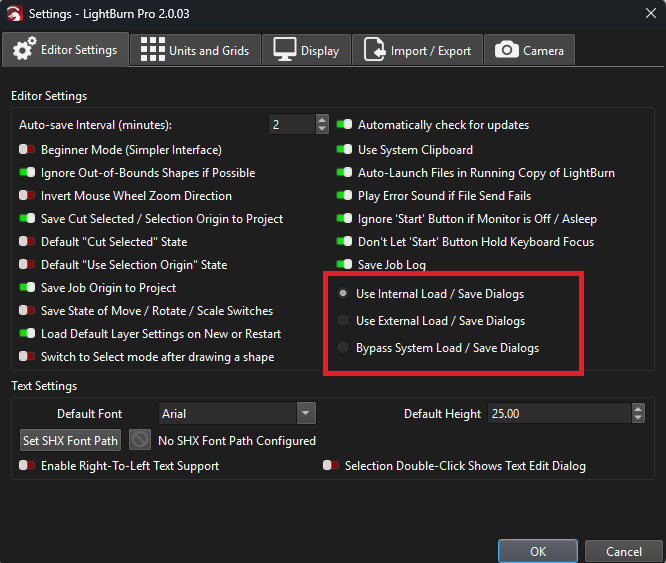
This seems to be the default settings for both versions. Does not work in version 2.0.03. When saving a new project the error states that it can’t find the file you are trying to create. Maybe you need a test case scenario that include a OneDrive user, since it is very popular to access files remotely.
Please show us the exact file directory so we can compare.
