Thank you for posting. I have not experienced what you are observing, so let’s dig in to see what might be happening.
First, a bit more about what you are working with. Which version of LightBurn are you running on which OS?
No apologies required. In fact, we are trying to “see” what you observe, so your words, images / illustrations assist us in helping you. Please don’t hesitate to share as many details as possible. 
When I turn off the ‘Snap to Objects’ and commit this change, the behavior of the cursor changes, no longer showing the snapping behavior marks. Using our latest public release, LightBurn 1.4.00, running on an older MacBook Pro, I am finding the change to snap behavior retained and set as expected upon restart of LightBurn.
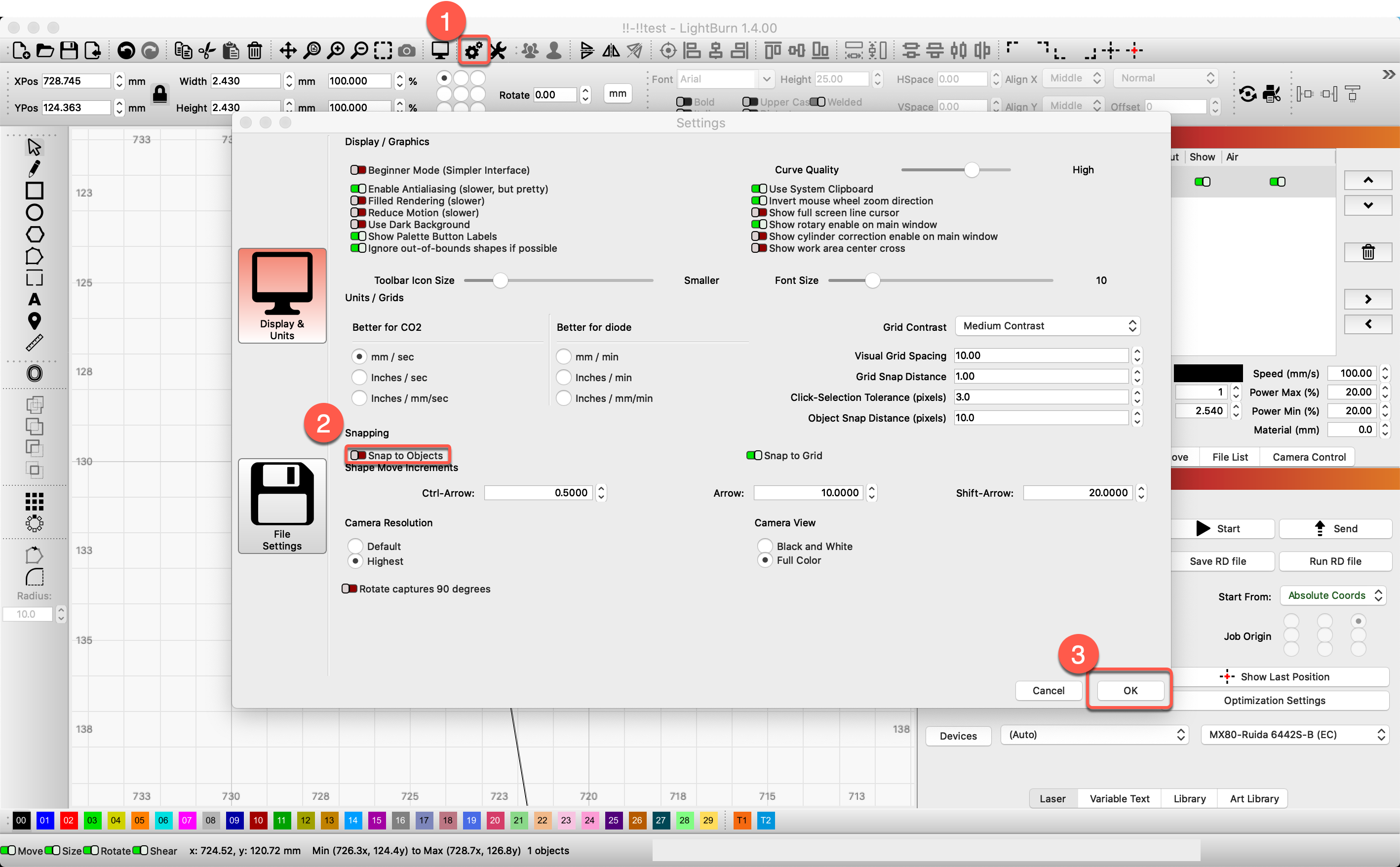
Snapping behaviors
LightBurn will automatically align your selection to snapping points if you see the cursor change to a snap cursor before you click:
- The selection will snap to a point
- The selection will snap to a line
- The selection will snap to the midpoint of a line
- The selection will snap to the center of an object
Hold Ctrl/⌘ to toggle object snapping (Disable by default, may be enable if Settings were changed).
Hold Alt to make snapping ‘stickier’ - you can snap to things from farther away.