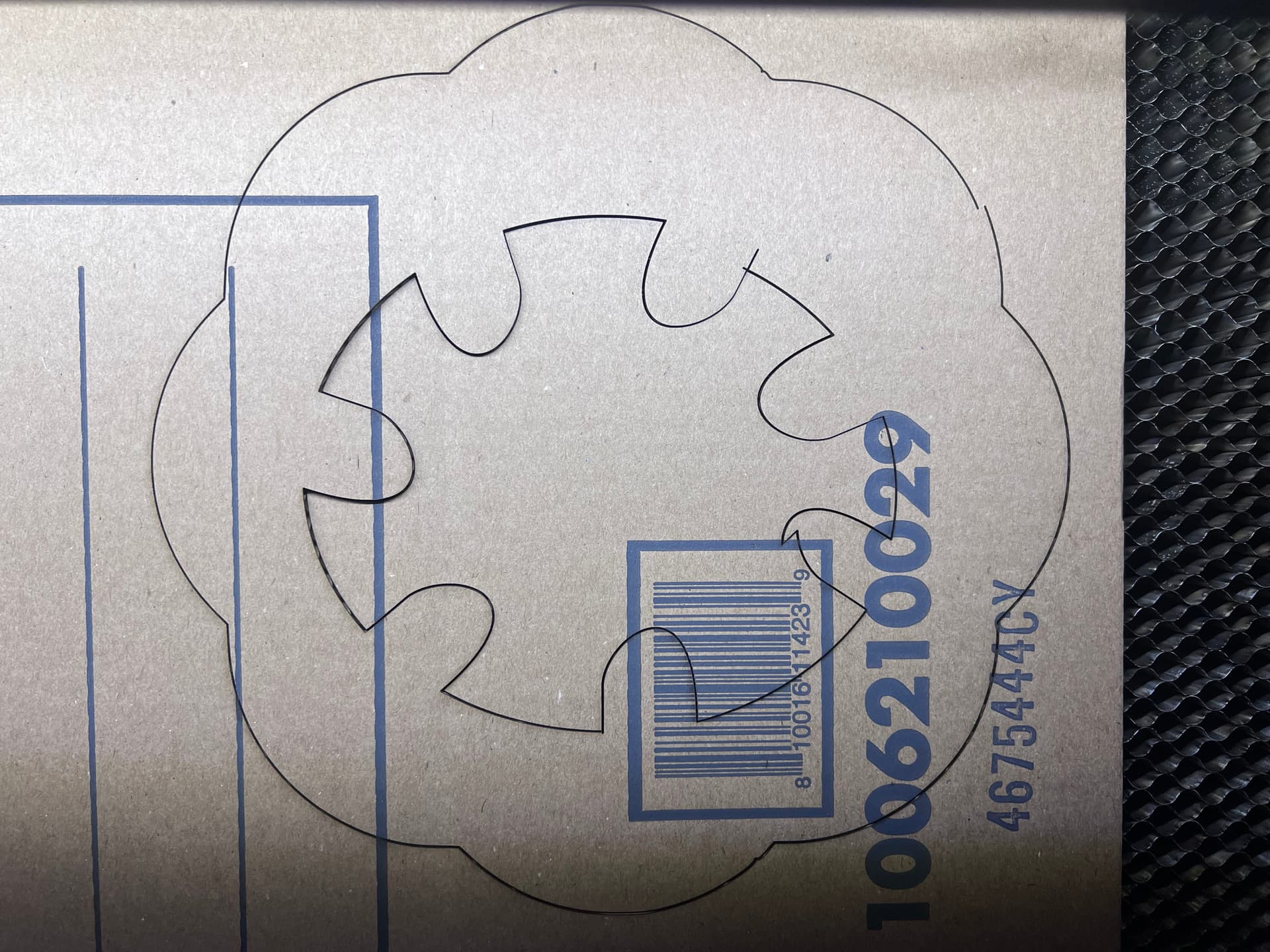
I am having some odd outputs while using Lightburn 1.7.8. (No real intention to move to LB2, unless it solves my issue(s). Using a Windows 10 laptop. BossLaser LS2440 70w CO2
I’m starting to see odd outputs after running the laser for a few projects. Each project has 1-2 issues, with the latest one being at least 3. I’d love to see if the issue is with LB or the laser itself.
I’ve already checked the belts on my laser, they’re tight.
Specs:
25mm/s
65% power
1 pass
Adding file for review if anyone wants to see the actual one.
Issues:
This issue here is not on the final product. It was there at one point and I fixed it, then I ran the program to my machine.
No idea where LB got this shape, this is clearly not in the final product or any version of the product.
This looks like a small miss step as it clearly did not connect back on the other side. Not a big deal, this is still a rough draft.
Anyone have any ideas why these issues come up? Should I check more things on my laser? Is it possible a file corruption occurs when sending to the laser and the code gets messed up?
I have not taken the file directly to the machine yet, I may or may not do that at this time. (I have to do some file conversion for it to work properly.)
Be nice if you put this in your profile, along with the type of controller it’s using.
This looks like it’s on the laser bed?
This can happen with any communication system. If you’re running usb, I’d suggest you use Ethernet through your lan, much more dependable. It also has nothing to do with drivers, if you can access the Internet, then you can access your laser.
I’ll add the controller to my profile, thank you. Didn’t think of that.
I am connected over USB, correct. If I try Ethernet I’d have to run a temp wire across the garage to an Ethernet/wifi switch. Laptop I don’t think has an Ethernet port, it’s not that old.
I did another run of the same file again and this time I got that weird little claw/eagle thing on a different object, which I’d doubly weird, but makes me lean towards a difference in the file when it connects to the controller.
Don’t let it keep you up at night… most of us forget to update our profiles when getting new machines.
Have you tried to save the RD file, then copy it to a USB stick and see if that shows correctly in the machine console… it does show up correctly doesn’t it?
If all else fails, maybe Ethernet.. Don’t do a direct connection to your pc unless you know how to configure your Ethernet port for the Ruida.
Hello, check ALL your layers, there seem to be double lines. When you use scissors, zoom in as much as possible! Also check your work if you used the “close path” function. The problem seems to come from there, nothing to do with the USB or anything else. Under Ruida, sometimes the memory saturates and causes bugs.