New to the Ortur Laser and Lightburn Forum. The laser was working perfectly, then I bumped it. The laser will move to the correct start point, turn on, but then doesn’t move. It just burns a hole. If I frame out the design, the laser fires at the lower power and moves.
Double check your CUTS and LAYERS window. What speed is your layer set to?
Change the layer and try again.
Post a screenshot of your machine settings.
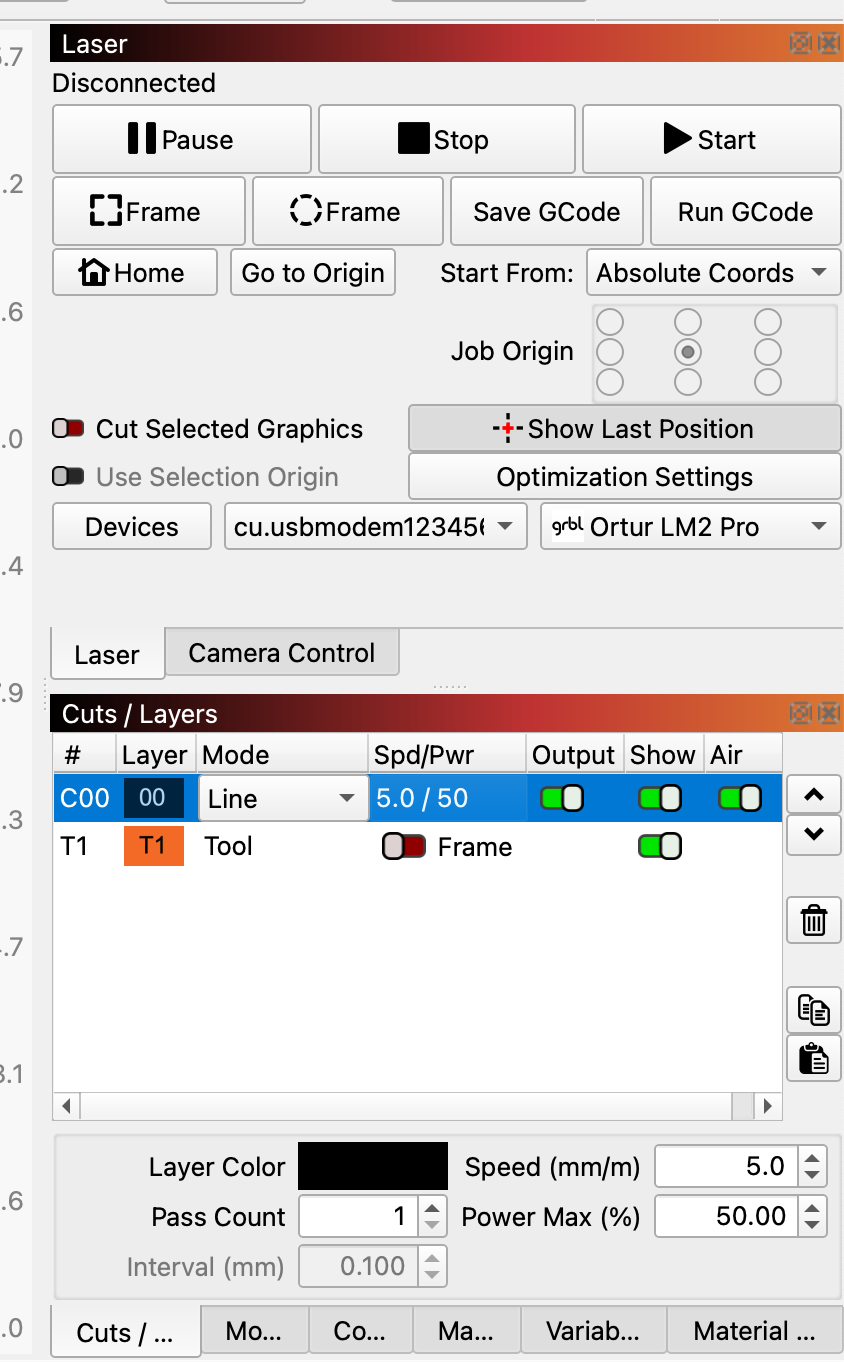
The speeds of 5 and 10 mm/minute are so slow you’d never notice the motion. Change that to, say, 1000 mm/min and it’ll be obvious.
If you’re thinking of speeds in inch/min, then you should change the LightBurn Design Units and Control Units accordingly.
However, essentially everybody else in the world uses metric units, so whenever you mention the machine speeds, include the units so we all know what’s going on.
Thank you! This makes sense…I had it set to in/min, but reset it after I upgraded Lightburn. I have’t been back out to the garage due to the frigid weather here in Michigan, but I’m prettty confident that it will work now. I will let you know when I get a chance.