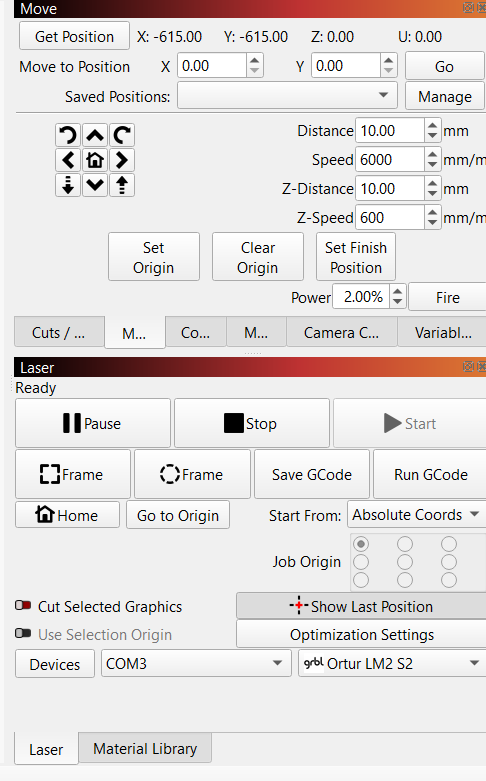
Due to the gantry running into the side of the engraver upon startup, I removed and them re-installed my Ortur Laser Master, but did not select the option to auto-home on startup.
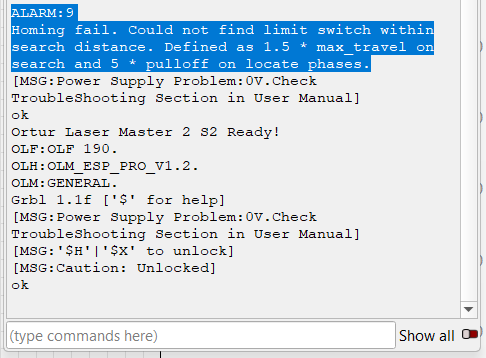
Now when it starts up, as shown in my screenshot of the “Move” screen, the position is X -615 Y -615. When I manually press the HOME button, I get the error show in the Consol screenshot. It states “ALARM:9
Homing fail. Could not find limit switch within search distance. Defined as 1.5 * max_travel on search and 5 * pulloff on locate phases.”
How can I get my laser engraver to home correctly? I have attempted to input G code into the console (G92 and G54 commands to reset the position) but have been unable to get it to work.
I was able to resolve this issue by plugging into a more reliable power supply. I have now enabled “auto-home on startup” and it is running smoothly.
I believe that the reason it gave me and issue in the first place is because my laser head was lowered, which prevented the gantry from reaching the limit switch, which resulted in a grinding noise. I raised the laser, and with the solution from above, was able to resolve this issue.
Good to hear that you found the issue. And what you found with the laser hitting the frame before it could touch the limit switches is the perfect explanation for what you’ve experienced!
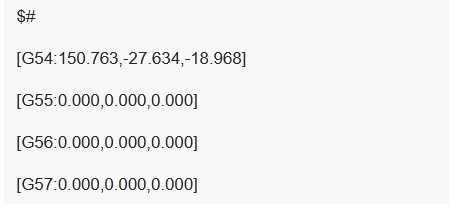
If you’ve messed with the G54 offset, you might need to reset that again.
Enter this command in the console and press enter: $#
If you get a reply similar to this, it means you have a G54 offset