Jogging works in laserGRBL. When i try to home it goes back to wherever it started at. If i jig and hit home it goes back to where the big started, if that makes sense.

The last entry was hitting home button
Enter $H in the area that reads “type gcode here”. Explain in detail what happens and return output please.

I can’t make out anything in that photo.
Can you take a look at this site on how to take a screenshot? That will make things quite a bit easier.
Can you describe the motion?
Also, when you attempt to home in LightBurn, is there any motion at all?
Goes straight down and then to the left.
No movement on lightburn.
I’ll try this tomorrow. I know it’s a holiday weekend, so don’t feel pressured to respond too quickly. We can take this up next week if you want. I really appreciate your help. This is driving me nuts.
After making contact with the frame, is there any additional motion?
This one is a bit of a surprise to me.
If you disconnect the laser entirely from the computer does the machine home upon power-on automatically?
Yes. When reconnected it homes like it should when reconnected. But no additional movement after that.
What do you mean by reconnected here?
I want to make sure I absolutely understand what’s happening.
- When the machine is first turned on, the machine homes automatically
- If you then start LightBurn and connect, what then happens? Do you see another attempt to home?
- If you push the Home button in Laser window or enter
$Hin Console, what happens?
Can you very thoroughly describe the homing motion that you see when it automatically homes? Or please take a video if that’s easier.
Ok. Sorry for the confusion. When the machine is turned on it does home. When i start lightburn it does nothing. When i push the home button or type $H in consol it does nothing. Just wondering, could it be i need to re-download a driver? By the way Merry Christmas. I really do apricots your help.
Appreciate. Dumb spell check. Lol.
Apricots for Christmas sounds like a treat. Apricots for everyone in my book.
I don’t believe this is the problem.
But the results are very peculiar.
Please try to get the LaserGRBL screenshot please. Does the laser home every time $H is initiated?
Ok. I’ll work on it tomorrow and try to post it. You can respond whenever you get a chance. Thank you…
Ok. Sorry for the delay, Christmas and all. im sending a few attachments. They are screenshots of LB upon login and then laserGRBL on login.
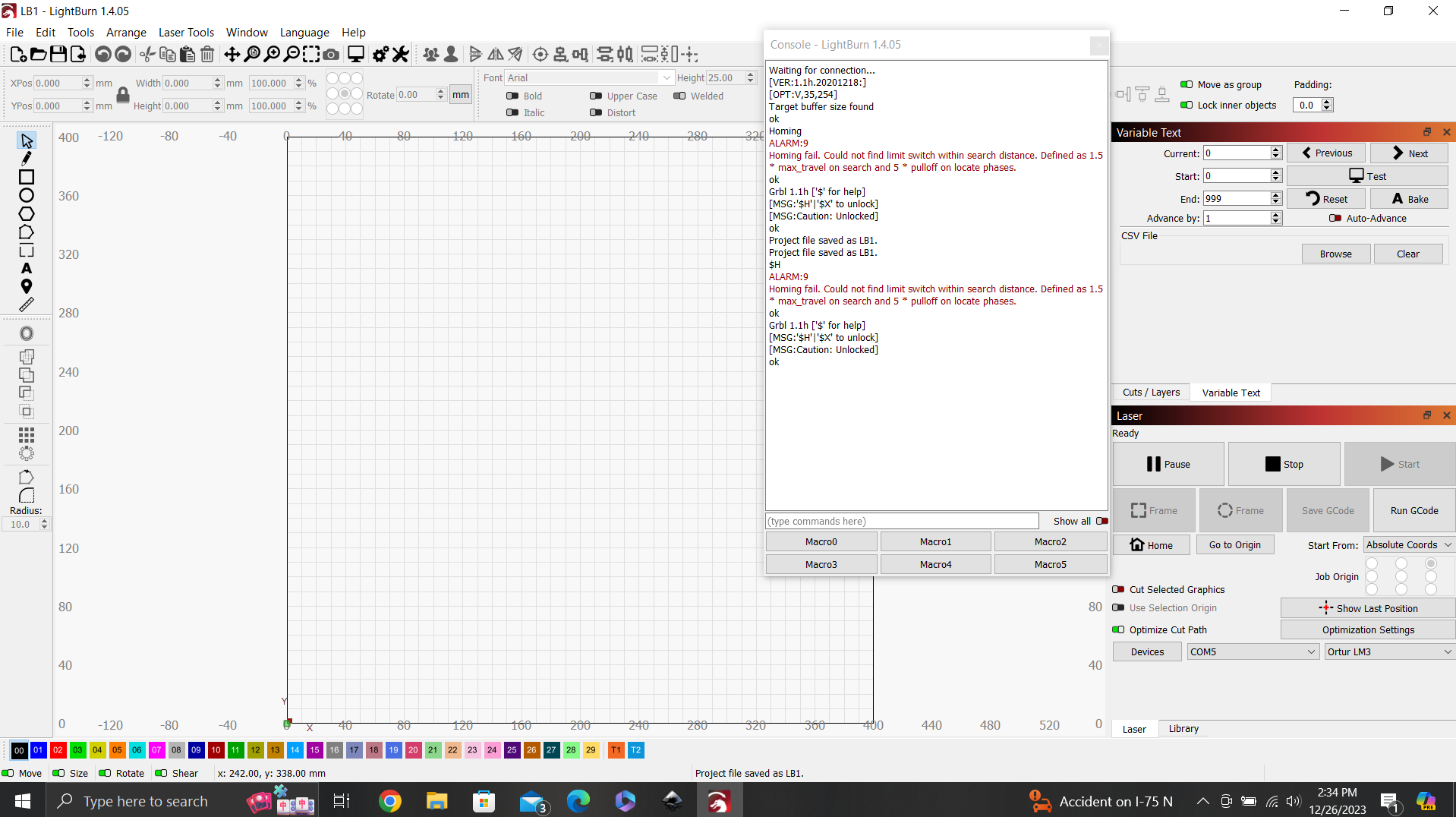
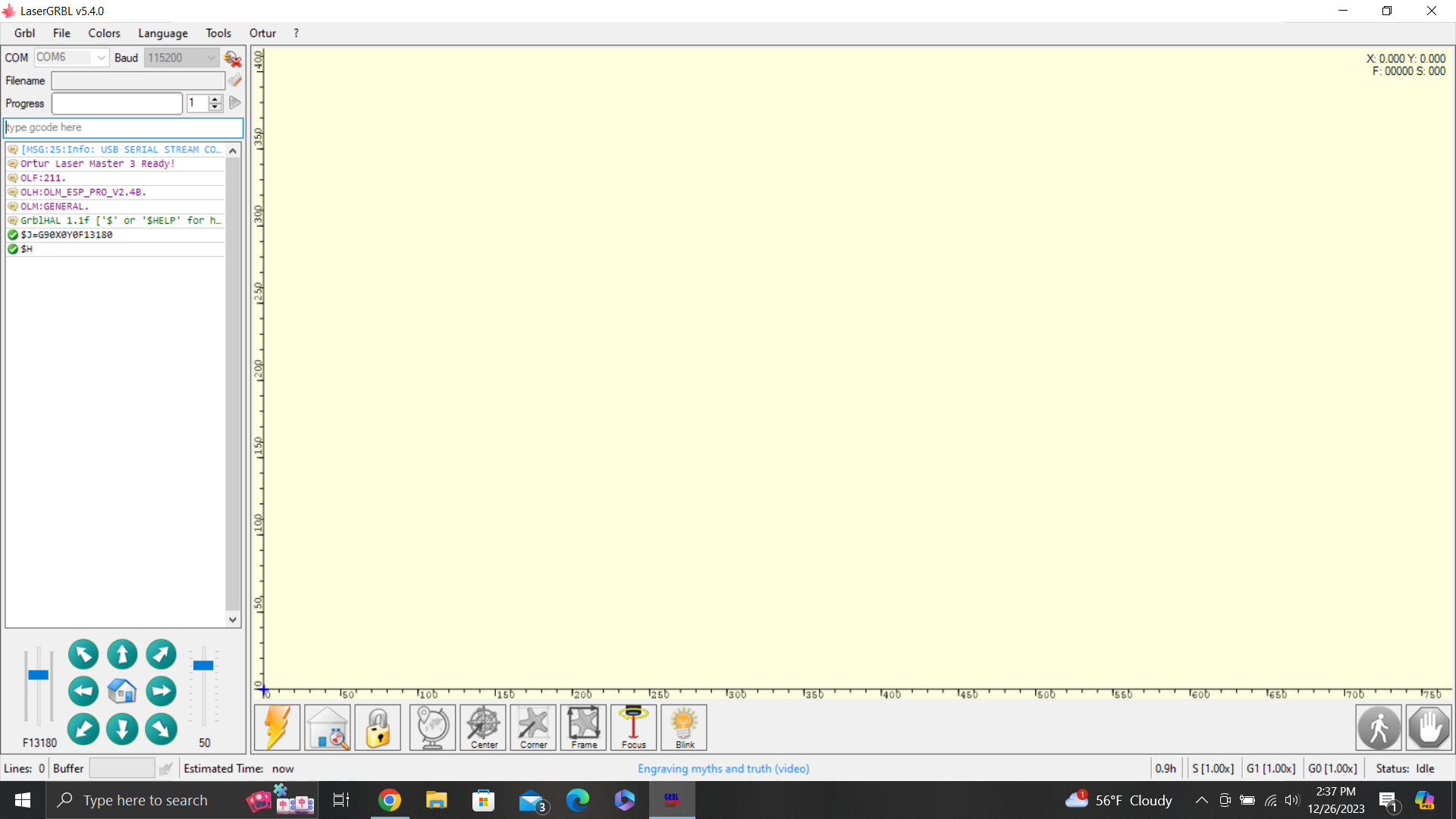
Are you absolutely certain you’re connecting to the same machine for both of these?
It looks like to me you’re connecting to one machine in LaserGRBL (COM6) and another in LightBurn (COM5). The welcome messages are different for each machine. One is running grblHAL 1.1f (the OLM3) and the other is GRBL 1.1h (unknown).
Do you have another laser connected to the computer?
If so, that would explain all the fuss. Try switching to COM6 in LightBurn.
No other laser. I do have a fox alien cnc connected to another com port. Could that be the problem?
Almost certainly.
In Laser window, explicitly select COM6.
HOLY CRAP, I’m kicking myself. Unplugged the cnc and plugged the laser into that com port and lightburn is working as it should, perfectly. Have no idea how the com ports got crossed but that was the whole problem. Thank you, thank you, thank you… i really appreciate you hanging with me through this.
1 Like