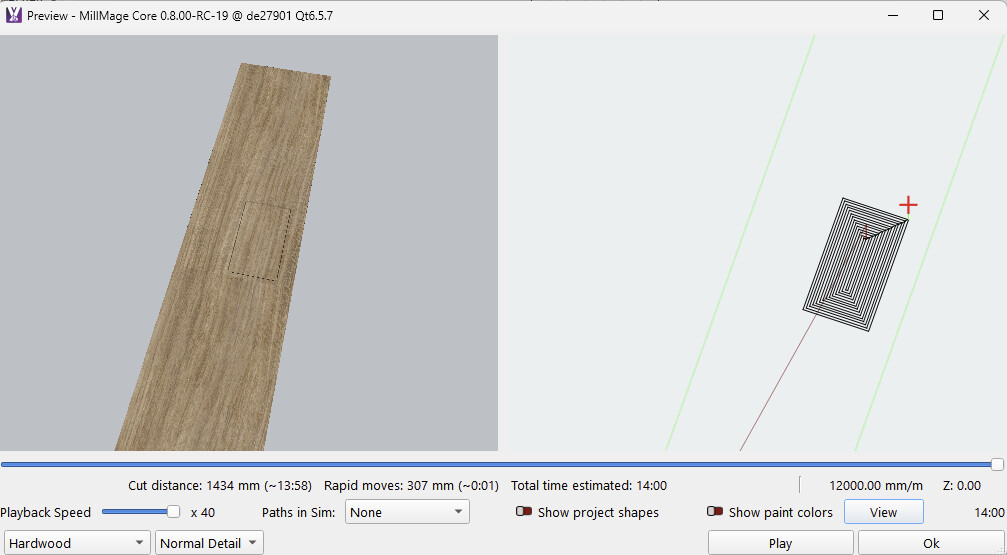
I find it odd that the left viewing pane does not allow zoom control according to mouse position, which the right pane does (As I would expect) Is it just me?
Nope, not just you either. All the times I used Preview (and I do religiously), I never noticed it was different. Now that I know, it does not bother me.
1 Like
I see what you mean.
To rephrase it:
In the right pane, it zooms to the location of the mouse pointer.
While on the left side, it always zooms to the middle of the screen
I’ll ask if that can be changed.
(You know, you can move the view with the middle mouse button.)
Again thanks for your reply, yes spot on…. and again I tried everything apart from the middle mouse button.
Would be nice if it could be changed though as nothing beats a little harmonisation 
1 Like
another option to make one or the other windows bigger could be a good option eg drag center split, or toggle one off completely , i use the left more to see how chamfers , round over will look and generally have show project shapes enabled
cheers
1 Like
You can move the view by pressing ALT key + Left mouse button also.
3 Likes
For the release, I’ve actually pulled the “zoom to cursor” from the right side, and made both views so the feel of rotate / pan / zoom is as consistent as I can get them.
The “zoom to cursor” function will come back when I’ve had enough time to play with it and make it feel right. At present, you always end up changing the “orbit point” when you zoom in, and rotating gets disorienting. With “zoom to center” it’s at least predictable and consistent.
4 Likes