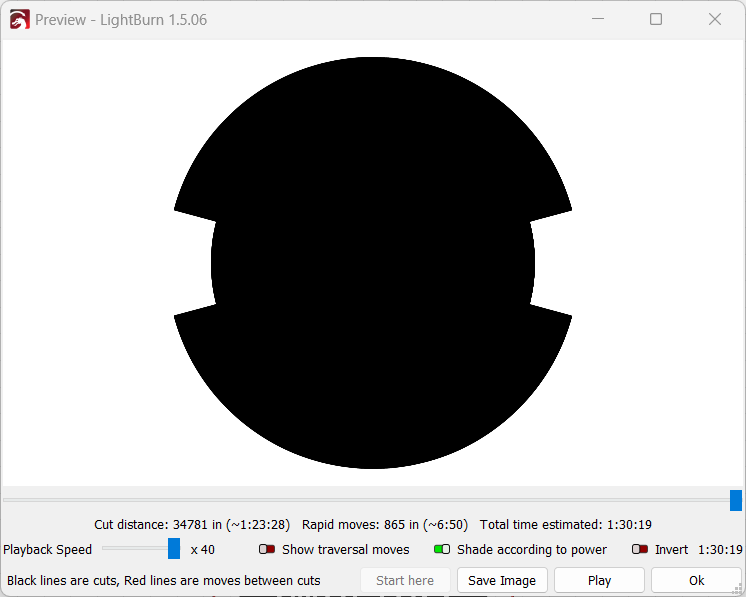
Why is my preview window black when my project displays properly?
Dean
Do you mind posting the .lbrn2 file so we can see how you’ve set it up.

I’m new to LightBurn, but I do come from an imaging background. I appreciate your time trying to figure out what I’m doing wrong.
SG Patch.lbrn2 (142.8 KB)
Your design has many duplicate shapes that are obfuscating the expected output and complicating the design. Either manually remove the duplicates until you get the desired outcome or use Edit->Delete Duplicates to remove them.
Additionally, I’d suggest disabling Flood Fill in the layer setting. It’s not likely to provide any benefit for this design and likely will contribute to other problems.
I was able to delete the duplicates, but that didn’t fix anything until I turned off the flood fill in the layer setting. I don’t know if that’s a default setting, but I don’t remember enabling that setting. I don’t even know what it does. Thanks for the assist.
Flood fill is definitely not default. It’s possible it was enabled if you opened a .lbrn file that had it enabled.
It’s meant to provide an alternative method of filling that reduces travel movements under certain scenarios. Specifically imagine a rectangular filled border. Flood fill will engrave the border one portion at a time instead of traversing the full width of the border which can save time at the cost of potential quality. It can also create other undesirable behaviors.
You can read more about it here:
Fill Mode - LightBurn Documentation (lightburnsoftware.com)
This topic was automatically closed 30 days after the last reply. New replies are no longer allowed.