Hello,
I am currently using the LightBurn software with the “Print and Cut” feature. I understand that this feature positions itself at each mark and cuts the content within those marks, then stops. I would like to know if it is possible to make the cutting continue beyond the marks. Is there a way to configure the software to extend the cutting area beyond the defined marks? Any guidance or instructions on how to achieve this would be greatly appreciated.
That’s not quite how ‘Print and Cut’ works. The marks are only used for aligning any previously printed or lasered artwork for subsequent lasering. Depending on what you want to do you will have to split your artwork yourself.
Here’s a more comprehensive description of Print and Cut:
As you can see, there are more cuts after the marks, but when I try to cut it says that there are cuts outside the area and these are not going to be cut. I want to know is there an option where I can continue with the design, without having to do so much circus.
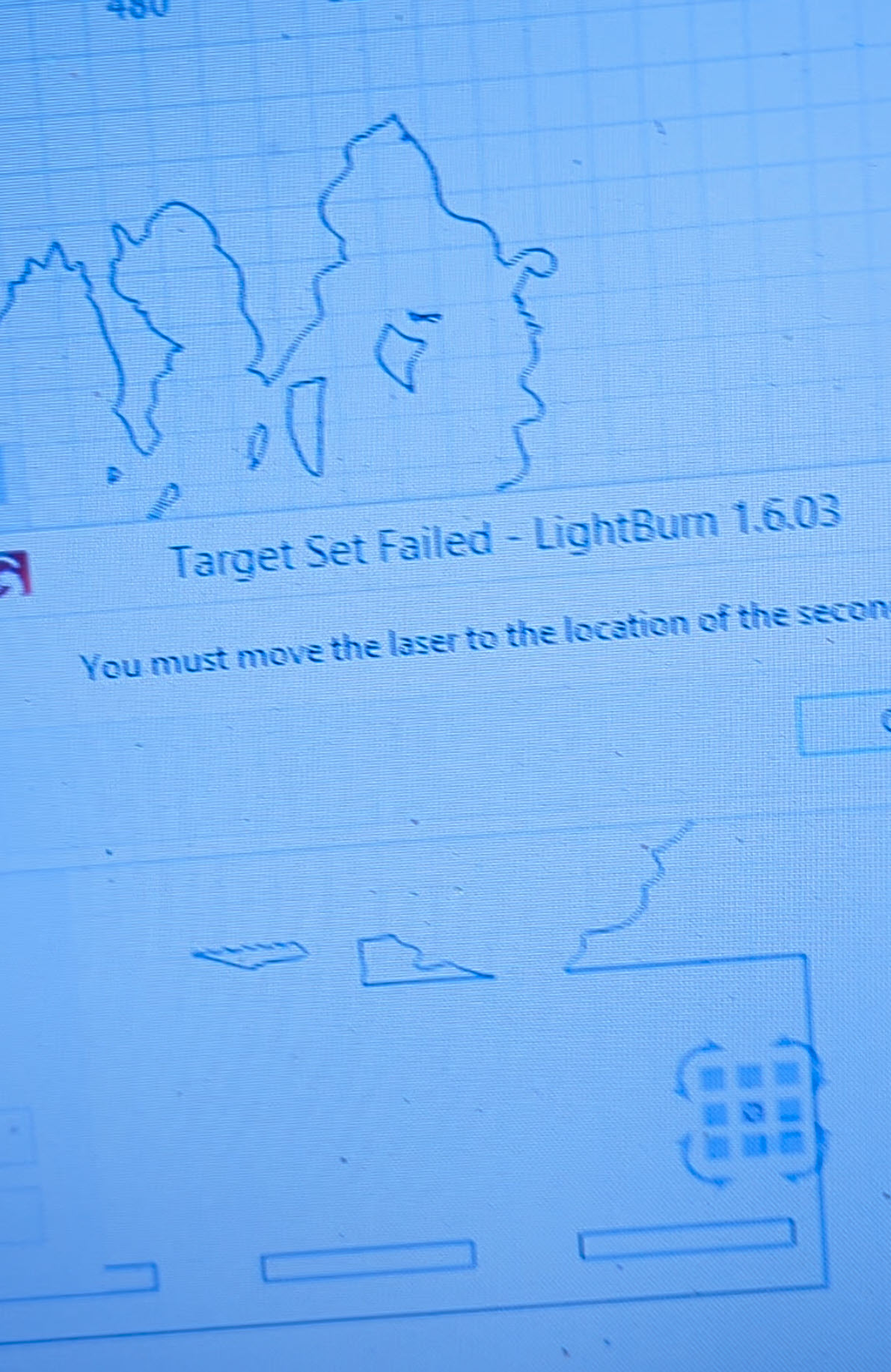
In any case, this version can no longer align the marks, it selects the first and the second when obviously I already moved the laser to the position it tells me “you must move the laser to the location of the second target” not go beyond that message…
It’s not clear to me exactly how you’re trying to use the print and cut feature at the moment. Did you read through and understand the document page I linked to? Is this something you’ve printed on a printer and now want to cut out on your laser or is it something that’s too large for your laser and need to split it into multiple sections?
"I want to cut a printed letter-sized sheet. For obvious reasons, the registration marks are within the same print. I’ve added other cuts beyond the printed sheet, but when I attempt to cut, a window pops up saying it won’t cut beyond the objects within the registration marks. I want to cut everything in the design. There must be a way to tell the software to cut everything in the design regardless of the registration marks.
I don’t speak English, ChatGPT is helping me. Where can I upload a video to show that the version I purchased cannot align the marks, while the cracked version worked fine?
I understood the help page perfectly; I have used that option before
I understand perfectly how it works. As I mentioned before, I had already done it with the pirated version I had. I decided to buy the original version because I had tried the software and liked it. Now that I am trying to resume cutting with the markers, it simply won’t work. I have absolute coordinates enabled and move the laser to the next marker, but it just says, “you must move the laser to the location of the second target.” I apologize if I repeat myself saying I have used it before and know how to do it. Regarding the first question, I just want it to cut everything that is designed beyond the reference markers. For example, I have an image the size of a letter, but my design is the size of legal paper. The markers are only on the letter size, but I want to know if it can continue cutting beyond the markers. Thank you. If this new version doesn’t work, where can I download previous versions?
Lightburn will cut anything within the constrains of your work area. The marks are for alignment only. They could be right next to each other and Lightburn would still cut the entirety of the work area, although you would not get a good alignment with the marks close to each other.
This is a different issue. Do you have anything on your screen outside the work area? If so, you need to verify that “Ignore Out of Bounds Shapes if Possible” is selected in settings or remove anything outside the work area.
Apparently not. I struggled with it a few times before it “clicked” for me.
Your image shows that you need to select the second target position. You are missing a step somewhere along the way. Watch this video and follow the steps exactly.
If you get your targets set correctly and there is nothing outside of, or crossing the bounds of your work area, it will burn your entire design.
Uploading your file or at least a full screen screenshot of Lightburn can be very helpful tothose trying to help you.
I place the laser at a point and select the first mark.
I move the laser to a different point where the second mark would be and select the second mark in the design.
2.5. From there, I can’t move on to the third point. (absolut coord)
It’s a little difficult to tell from the video. It would be nice to see your entire Lightburn screen. I don’t get a good view of your first target but it wasn’t set properly. It didn’t change to a blue or red circle. Looking at your second target though, it’s a circle, not a point. A circle cannot be used as a target. It must be a defined point, such as a cross hair. I believe that is your problem from what I see.
Change your targets to have a definitive point and select that point, not the circle.
I hope this video can clarify the issue. I can’t align the marks; this happened in the new version. I can’t see if the first question works with the response you offered because it won’t let me align the marks. Apparently, fixing that will allow cutting beyond what is inside the marks, but I insist I won’t know until I can align the marks. I don’t know why it doesn’t recognize the second point. As you can see in the video, activating and deactivating the offset allows me to select the second mark, but they still don’t turn green, so it’s useless. Thank you for your help and attention.
You had one red and one blue and selected align out put (no scaling) at 1:13 in your video. The laser window showed ready (Print and Cut) (Unscaled). At that point all you haf to do is click Start.
at that point all you gha to do is click Start.
I’m not sure what’s going on with the offset as I don’t use that feature. I fire the actual laser at low power to determine position.
It does look like you are selecting the outer circle rather than the point of the cross hairs on the second target, the first time. It also looks like you are not precisely going to the target position by the size of your moves, so that will result in an incorrect burn.
NO NO NO… The offset is used when you have a crosshair laser pointer so that the center of the laser positions correctly. It was by chance that I realized it works and lets me select the second mark when I deactivate or activate the offset. I have already uninstalled the version I bought and installed the cracked version, and it works without any issues. I think I will contact support to have them fix it or simply get my money back. It is definitely a software problem. I appreciate your attention (and by the way, it does not burn incorrectly). When I make the second mark, forcing it to be selected with the offset, nothing starts. Even though it is marked, it doesn’t send to the cut. I’m sure it’s the version. Thanks again, my friend. version 1.2
I found the latest update that works well with my cutter; it is version 1.4.05. You were right, I was able to cut the entire design by activating the ‘ignore out of bounds’ function. Thanks!