I have a Gweike G2 Pro 30W. I can’t get the software to recognize it. I’ve already installed Cypress FX2LP. The manufacturer says it’s a BSL Fiber.
Is this a configuration file?
Is this the Trial version of Lightburn?
Gweike tell me Cypress is a driver, and i use trial version
If you also have the 150mm lens, you can use my device profile.
Download this file, drop it into LightBurn, and select “Import”
Gweike_G2_Pro-30W-150mm.lbzip (192.5 KB)
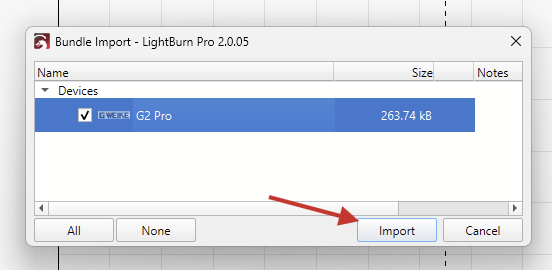
Then, make sure it’s selected here

mine is 110mm, its a diferent file?
I don’t have the 110mm lens and therefore can’t send you a different file.
You can still use this device profile for testing but the scaling of the output will be off. (Meaning, a 10x10mm square will engrave smaller)
To correct this, you’ll need to perform a Lens Calibration and Calibrate the Axes
We’re currently looking into a potential issue with this process, but please give it a try and let us know how it goes.

The import button in the Devices window can be used too.
The easier way is to simply drag-and-drop the .lbzip into the workarea of LightBurn and click the import button in the window that appears. (as illustrated earlier)
Your screenshot shows that you are using version 0.9.24. You’ll need at least version 1.7 in order to talk to the BSL controller in the Gweike!
I installed the trial version 2.0 and it detected it. I also installed the BSLcad file, and it set the X and Y coordinates correctly, in my case 110.