Hello everyone.
since I upgraded Lightburn from Core to Pro, my Ikier K1 pro max 24/48 doesn’t work properly at all anymore.
It’s connected to my mac mini with 12.7.6. Monterey.
it seems like something in Lightburn has changed;
$1=25
$2=0
$3=7
$4=0
$5=0
$6=0
$10=1
$11=0.010
$12=0.002
$13=0
$20=1
$21=1
$22=1
$23=3
$24=200.000
$25=2000.000
$26=250
$27=5. 000
$30=1000
$31=0
$32=1
$33=1
$34=10
$35=1
$100=100,000
$101=100,000
$102=1600,000
$110=50000,000
$111=20000,000
$112=1000.00 0
$120=4000,000
$121=1000,000
$122=500,000
$130=410,000
$131=410,000
$132=50,000
$140=30000,000
$141=20000,000
$142=1000,000
$ 143=2000.000
$144=1000.000
$145=500.000
$150=6000.000
$151=6000.000
$152=1000.000
$153=1000.000
$154=500.000
$155=500.000
After I do Autofocus I get this:
ALARM:2
G-code motion target exceeds machine travel. Machine position safely retained. Alarm may be unlocked. (Right-click the ‘Devices’ button to reset the connection)
On or near line 1:
Stream completed in 0:11
ok
Grbl 1.1h [‘$’ for help]
I was engraving on a painted wall tile, it starts engraving and suddenly stops and gives me ALARM 11.
I repeat that when I had the Core version, everything worked perfectly, but a few days ago I upgraded to the Pro version, and the machine does not work at all.
Please help me.
Thank you
Chris
There should be functionally no change between Core and Pro - the only difference is that Pro enables the control of DSP and Galvo lasers. Did you add another laser to your workshop that requires this?
Alarm:2 is the error for machine traveling outside of the boundaries set in firmware. If you home your machine, does everything home as expected?
Can you Save Gcode in the Laser window and attach it to a reply to this thread, so we can look at the code that’s causing the error?
Alarm:11 typically indicates that the maximum number of characters per line in the G-code has been exceeded, which should be visible if we open up that gcode in a text editor.
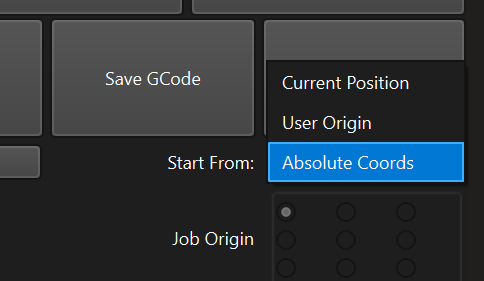
I would suggest turning on Absolute coordinates, and see if you get the same error:
This topic was automatically closed 30 days after the last reply. New replies are no longer allowed.