Problems with Origin on Neje Max 4 V2

Hey there,

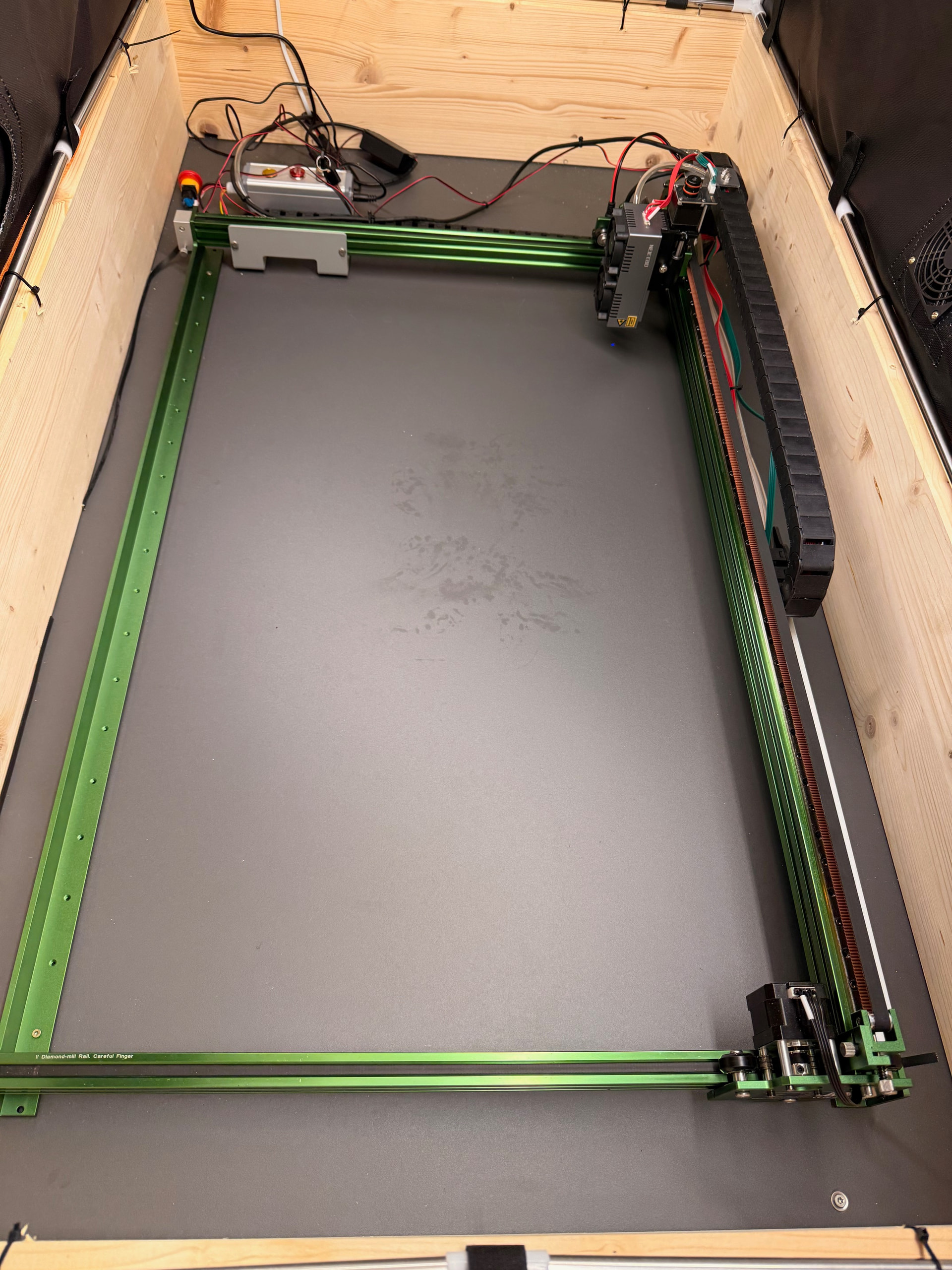
I’m running a Neje Max4 V2 and the laser has some problems setting the right coordinates when set to origin. The laser module is in bottom left position.
If I run the Neje app there is a small chance that the value for the origin is correct after restarting light burn (~10%).

It states

<Idle|MPos:0.000,460.000,0.000,0.000|Bf:100,1499|FS:0,0|Pn:P>

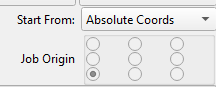
even though the origin should be 0,0 (using absolute coordinates in Lightburn)
image


If you move the laser to the top left, the value on the y-axis increases to 920. I would like to work in the 1 quadrant, so the calculation for any point given is simpler :wink:

$$
$0=10
$1=255
$2=0
$3=2
$4=0
$5=0
$6=0
$10=3
$11=0.010
$12=0.002
$13=0
$20=0
$21=0
$22=1
$23=1
$24=250.000
$25=2500.000
$26=250
$27=1.000
$30=1000
$31=0
$32=1
$40=0.200
$41=10
$42=10
$43=0
$44=0
$100=100.000
$101=100.000
$102=800.000
$103=44.444
$110=100000.000
$111=100000.000
$112=1200.000
$113=21600.000
$120=250.000
$121=250.000
$122=20.000
$123=250.000
$130=700.000
$131=460.000
$132=17.000
$133=360.000

Does position work correctly with their software?

In the console enter $#. I expect you will see:
[G54:0.000,460.000,0.000]
[G55:0.000,0.000,0.000]
[G56:0.000,0.000,0.000]
[G57:0.000,0.000,0.000]
[G58:0.000,0.000,0.000]
[G59:0.000,0.000,0.000]
[G28:0.000,0.000,0.000]
[G30:0.000,0.000,0.000]
[G92:0.000,0.000,0.000]
[TLO:0.000]
[PRB:0.000,0.000,0.000:0]

This is indicating a work offset on the Y Axis.
Before you do this next step, understand it might cause issue with Neje software if they require a work offset. If positioning is incorrect with their software as well, continue.
Enter RST=#. That should remove the work offset. Enter $# again to verify. It should now look like this:
[G54:0.000,0.000,0.000]
[G55:0.000,0.000,0.000]
[G56:0.000,0.000,0.000]
[G57:0.000,0.000,0.000]
[G58:0.000,0.000,0.000]
[G59:0.000,0.000,0.000]
[G28:0.000,0.000,0.000]
[G30:0.000,0.000,0.000]
[G92:0.000,0.000,0.000]
[TLO:0.000]
[PRB:0.000,0.000,0.000:0]

Hey, thanks for the reply :slight_smile:

Positioning didn’t work with their software either. I flashed the firmware and now I’m starting from scratch. I’m posting an update asap.

$H ok $# [G54:0.000,0.000,0.000,0.000] [G55:0.000,0.000,0.000,0.000] [G56:0.000,0.000,0.000,0.000] [G57:0.000,0.000,0.000,0.000] [G58:0.000,0.000,0.000,0.000] [G59:0.000,0.000,0.000,0.000] [G28:0.000,0.000,0.000,0.000] [G30:0.000,0.000,0.000,0.000] [G92:0.000,0.000,0.000,0.000] [TLO:0.000] [PRB:0.000,0.000,0.000,0.000:0]

RST=# is not working for the machine:

error:2
Numeric value format is not valid or missing an expected value.

Hitting ‘Home button’ once sets the y coordinates back to 460 while moving to the bottom left corner :frowning:

Your output is not showing a work offset.

Is this a new machine or new problem? You may need to contact Neje support.

I hope this wasn’t a mistake.

I bought the machine 4 months ago and was starting to set it up the last couple of days. So it’s fairly new.

So, it has never worked properly?

Did they include a Lightburn setup file? (.lbdev)

Did you use it?

Yesterday I was able to use it. It moved in the correct ways, but it took about 2-3 hours of research and trial and error, until it behaved in the intended way. Cutting worked just fine.

After rebooting the pc and turning on the laser today, i got the same issue like yesterday.

So I thought, that I got sth wrong -.-

There was no setup file, just some infos on the webpage.

The correct command is $RST=#

If you send $RST=* and home. What positions does it report in the homing position?

1 Like

Hey, I tried again. Used $RST=#. No changes in the lasers behaviour

$RST=#
[MSG:Restoring defaults]
ok
Grbl 1.1f ['$' for help]
[MSG: GRBL offline working: https://www.neje99.com/t1 ]
$#
[G54:0.000,0.000,0.000,0.000]
[G55:0.000,0.000,0.000,0.000]
[G56:0.000,0.000,0.000,0.000]
[G57:0.000,0.000,0.000,0.000]
[G58:0.000,0.000,0.000,0.000]
[G59:0.000,0.000,0.000,0.000]
[G28:0.000,0.000,0.000,0.000]
[G30:0.000,0.000,0.000,0.000]
[G92:0.000,0.000,0.000,0.000]
[TLO:0.000]
[PRB:0.000,0.000,0.000,0.000:0]
ok
<Idle|MPos:0.000,460.000,0.000,0.000|Bf:100,1500|FS:0,0|Pn:P>
ok

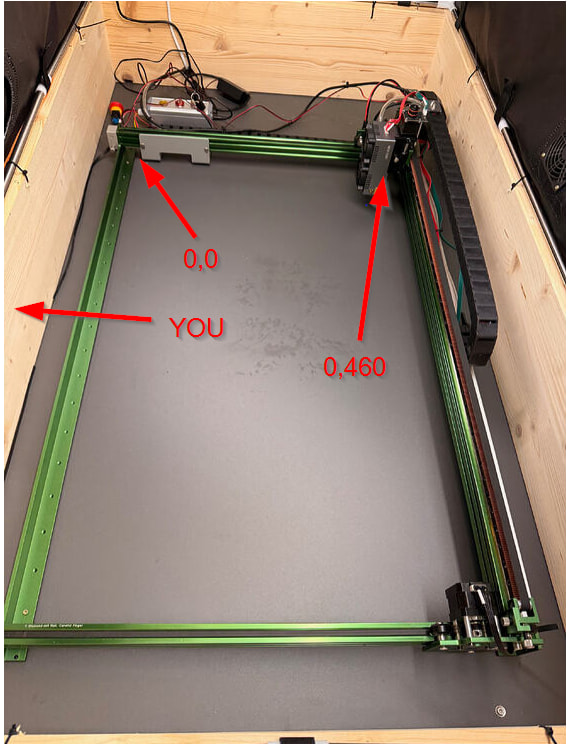
We will get it sorted. In your image, the laser homes to the bottom-left, correct? Be aware, that’s not bottom left of the laser!
It’s completely misconfigured. The bottom left corner of your laser is bottom-right in your picture. But then, x and y sizes are swapped.

So, lets start from scratch. Where are the limit switches located? Which position do you want to define as origin? Bottom-left of your picture?
Open LaserGRBL (NOT LightBurn). Set $3=0. Now use the arrow buttons. Where does the head move to?

Thank you very much in advance.

In my previous image the laser homes to the bottom left.
The long axis should be x the short axis should be y. At least that’s stated on the NEJE website.

I homed the laser in LaserGRBL. It moved to the top left corner.

If i set $3=0 the y axis movement is inverted (top click => down move) with $3=2 (inv. y-axis) the actual movement lines up with the pressed buttons.

Home Position top left and origin bottom left is fine for me, but I take everything as long as it works :wink:

OK, then you are standing on the left side in your picture? If you set $3=2 (inv y), then everything works as expected. After homing, the laser reports 0,460?

This is correct, because you are homing to the top-left. The origin of the laser is still bottom left, 0,0. So after homing, if you send the laser to 0,0 (or 5,5 to leave some space), the laser should travel to the bottom left (top left in your picture). Right?

1 Like

Yes, my mistake.

No problem. Figured that out soon after the post, but the forum didn‘t allow me to edit the message anymore.

That‘s right for the moment. :slight_smile:
Last time it behaved completely different after reboot. Maybe the parameters were not correctly saved to the machine, I will check for this later.

After rebooting it behaves fine.
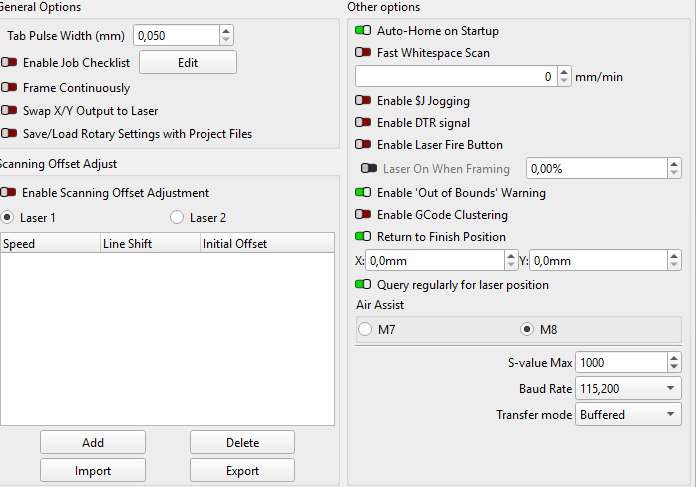
Once I start LightBurn it Homes to 0,0 but states 0,460 for its position. Reinstalling LightBurn did not help.
After that LaserGRBL also behaves the same way (homing to 0,0 stating 0,460), but I think it reads the coordinates directly from the laser.

I try to fully sweep LightBurn from the PC and give it a go…

1 Like

No. It does home to 0,460. You think that is 0,0, but it isn’t. It homes to the top-left. But the origin is bottom-left. Everything is ok. It’s defined like that in your firmware settings.
You need to stand at the side that I noted in the image. If you want another side to be the front, we need to switch motors and directions.

1 Like

1 Like

It once homed to to top left in LaserGrbl and stated 0,460 that was fine.
After that I started LightBurn and it homes to front left in lightburn and states (0,460) but that should be the origin with (0,0).
If I click origin after home it crashes in the front rail.

In my understanding the following values should be the right ones: