RC10 feedback from CNC and Laser Beta Testing

Millmage suffers similar buffering and memory allocation problems to current Lightburn release. Major reason to stop using it. Problem is multiplied by lack of saving last sent G-code line which enables operator to restart from last known position.

This causes lots of wasted materials.
LaserGRBL in comparison never has buffering issue even with 17MB g-code files.

Both Lightburn and Millmage suffer from using too much memory in the OS slowing the system down to the point where it just locks up.

Both packages suffer from lack of a accurate working estimator. Everyone else has estimates within 1-2%.

It would make sense to display the grid of the capability of the CNC bed i.e. 600 x 500 mm in black, with work piece in dotted other color user selectable. This makes setting up the job much easier and is more consistent with LB model.

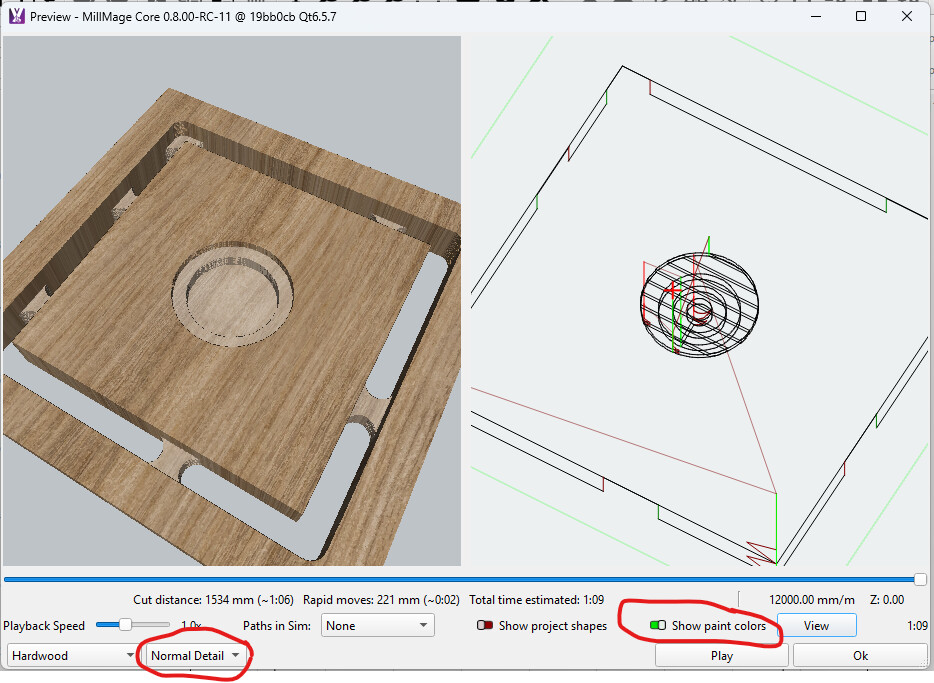
Preview is very crude. It does not enable a true 3D viewing capability, you can barely see depth especially in default wood mode.

The lightburn full editing suite should be merged, fill and offset added.

A full suite of import utilities for 2 and 3D CAD formats is needed.

Greyscale to depth mapping editor is missing. Greyscale to power is missing in Lightburn

Naming conventions and operational sequences are not fully consistent with 3D CNC terminology. Recommend getting with aircraft CNC specialist and be consistent with industry standard.

Mouse operations are disrupted randomly even on current W11 with Millmage.

Millmage should be integrated into Lightburn to keep things consistent. Offer LB lite as current LB package for $99, LB+MM for $199.

At least offer combo license LB+MM for $199.

Cut from MM to LB does not always work. We do a lot of CNC+Laser work and this is painful and wastes time.

Job costing module would be useful for both MM and LB.

A tool change dialog should be popped to inform the operator that they need to change the tool for non automated tool change systems which is the majority of systems. As the first operation is completed this pops then user changes tool, comes back to screen and hits Continue or Abort.

Layers are not very useful in current form.

You need to merge Slicer (Open Source Prusa 3.4 for example) then this works with 3D printers, lasers and CNC for Z and C axis mapping.

Z axis is very very limited, much more work is needed to justify the cost. It currently is a limited 2.5D at best. When you add full 3D creation then you can ask $399 for this package. Look at TinkerCad they have the right idea, except keep it local on the PC as internet really drags all the cloud oriented applications down. The current ability to run disconnected from the internet is a critical feature and the best security.

Where is the C or 4th axis functions? CNC system use X,Y,Z and C at same time.

Publish a ESP code table for each supported device. Ditto used G and S codes. Post in a forum area every time you add another new supported device. This will be huge help for users and vendors rarely provide this information. Part of the acceptance of a vendors device to be supported should be full documentation of all G-code, S and ESP codes.

A realtime joystick using Nintendo or similar game controller to enable using joy stick to realtime run CNC just like using the wheels and dials on mills and lathes. G-code Sender has this.

Much work needs to be done to full enable wireless to eliminate noisy USB connections

We have tested from RC6-RC10 and are working daily with it.

Our equipment

i7 8GB Laptops on Win 11

7Amp USB 2.0-3.0 Powered port expandors 7 port

Atomstack A/X70 laser

Two Trees TTC 6050

Prusa CoreOne

All this being said this is a Beta. If you resolve all the problems you will have an outstanding product launch. Here’s to seeing the end product.

Professor J

this is already there , you need to set it up under custom gcode

ive never had this prob and im using a laptop that is at least 8 yrs old, running some big jobs on 1200 x 2400 sheets with 2-3 hrs of machine time

cant you connect wirelessly?. ive been running wirelessly since RC2

1 Like

You will be stunned to read how many times users are told to avoid wireless (WIFI) and use USB instead. Install a WIFI Analyzer app and you will see why.

LaserGRBL is not a streaming application. It sends one line, waits for an ACK, then sends the next.

I have run both programs on i3, i5, and i7 laptops and never had it show a reduced performance. Without knowing your setup, is is difficult to speculate why you have this issue.

This is a MillMage thread, but you keep mentioning what is wrong with Lightburn. You seem to want to blend Lightburn and MillMage. They have very similar IDE’s, but that is all. None of those packages you mention, but do not name, have an IDE that even comes close to designing a project and controlling the machine all in one package.

Yes, both applications are 2.5D, but how many people have machines at home that are fully 3D capable, meaning it can cut a tapered spiral.

And at the risk of starting a flame war,
High School Graduate M

Here, here.

that’s a big fat no from me , leave them separate

1 Like

I am a no on this as well, Two different machines with completely different requirements.

I love that Lightburn can read Millmage files and vice versa however the programs are completely different animals.

2 Likes

You provided quite a lot of feedback both for MillMage and LightBurn. Since this is a MM support forum, I’m only going to respond to the MM comments here. LB comments should be posted in one of the LB forums. In general, if reporting bugs in the release candidate it’s a good idea to provide examples/screen shots as they can provide more insight than just words.

I’m not experiencing buffering or memory issues. I noticed that you mention your laptops only have 8GB of RAM. Win11 (and your apps) will work much better with 16GB of RAM. Adding RAM in most cases is a quick and easy fix.

Are you using USB cables with ferrite cores (aka chokes) on them? Those cables will have a ‘bump’ at one or both ends - similar to this example. Using cables without chokes on either CNC or laser can result in RFI interference. You can buy chokes that clip onto existing cables.

I notice you mention using USB port expanders… Some port expanders are not super high quality (i.e. not well designed from a hardware standpoint) - Anker expanders have been decent in my experience.

In CNC software (at least those similar to MM) it’s pretty standard to display the size of the workpiece (rather than the bed size). In many cases the bed size can be significantly larger than the workpiece.

Experiment with the various options on the preview window. The ‘show paint’ color toggle and level of detail drop-down options might help with the contrast. I’m sure the developers will add additional choices here over time.

Can you be more specific on the terminology you are referring to?

Disrupted how? Do you have a specific, repeatable example? [It’s difficult to assess your report without more details.]

Are you referring to cut/paste of an object between the two products? Do you have an example you can share?

Job costing is typically part of CAD/CAM packages that are many times the cost of MM/LB. MasterCam costs $10k/per seat. That’s a different market than MM is currently aimed at.

To make it easier for participants to see/comment, new feature suggestions likely would benefit from being posted in a separate thread.

The devs have mentioned that they want to add additional features over time - what you are using is the very first version. At the moment comparing features to something like Cut2D (which starts at $150 or so) is more aligned than comparing to Aspire (starts at $2k). Like LB I expect MM will develop additional capabilities.

I expect those will be added over time as well. Most hobby CNCs don’t come with a C axis setup by default.

There is a list of supported controllers in the documentation. There is also a MillMage Hardware forum for hardware-related and configuration questions. I expect over time that vendors will provide ‘bundle’ files for their CNC, like some are doing with LightBurn, to make it easier for users to configure MM.

The MM team have mentioned in another thread that this is on the todo list.

See my comments on using ferrite chokes to minimize RFI. Ensuring adequate grounding of dust hoses/ gantries/ spindles etc can also reduce potential issues.

Regards, David

3 Likes

Same for those I used in the past: MasterCAM, AutoCAD v12, EZCAM, and Catia.

Excellent writeup!

I think its very important to note that MillMage is not MasterCAM, Catia, etc. It is a 2.5D CAM package for home-gamer and prosumer CNC routers.

Good idea, in fact it’s been suggested before, and I’d suggest adding your thoughts here: Automatic cost calculation · LightBurn

Yep, out of the gate there will be very limited 3-axis features, MillMage is primarily 2.5D. But as time goes on, more features will be added, but for launch, we’re not expecting to have any 3D features - like Relief Carving and otherwise, but those features are planned.

This is planned.

If you have a noisy communication setup, that will be your responsibility to address. Ethernet and WiFi connections over IP are supported, and if you’re having drop outs or other issues, I suspect your communication settings are incorrect or there’s an external issue at play.

These feature-richening ideas are exactly what Fider is for - and this is planned.