Trying to setup rotary to control 4th axis on machine (A (rot)) but I’m not getting anywhere
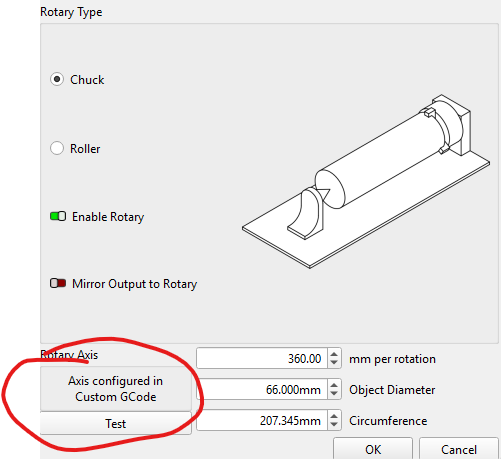
Anyone have an idea on what I need to do in the “Custom Gcode” settings?
Trying to setup rotary to control 4th axis on machine (A (rot)) but I’m not getting anywhere
Does your controller support the Aaxis (4th)? The machines that do not use the Yaxis usually are set up with the Uaxis for the rotary.
Your Bio says Opt Laser, but that is not the machine. Any GCode suggestions would likely depend on the laser machine brand and the controller manufacturer.
Yes, my machine has a rotary chuck on it and the controller (RichAuto) supports the 4th axis - Gcode uses A in degrees. I don’t have lightburn connected directly to the controller, I save the Gcode and load it manually into the controller.
My mistake here. Lightburn offers the Aaxis as a rotary choice. In this case, why the Custom GCode? What problem are you trying to solve?
Can you list your Custom GCode here?
Mike - thanks for the reply, when I go into the rotary settings I don’t get a choice to click X/Y/A axis as I see in much of the online documentation, it only directs you to the custom GCode settings (see screen snip). My current GCode settings have the following: G1 {x}[Y]{y}[Z]{z}[A]{rot} S{power} [F]{speed} but the GCode generated does not use A when I enable the rotary?
That must be specific to your controller or laser.
This topic was automatically closed 30 days after the last reply. New replies are no longer allowed.