Has this machine ever worked with Windows? Is this a brand new install? Another user reports a problem with the latest Windows update from yesterday or the day before causing their machine to stop working.
Is using Ethernet an option for you? That is a much more stable connection with Ruida controllers.
The machine used to work with Windows. The problem started after updating LightBurn.
Since then, I have tested two different Windows 11 computers, and both show exactly the same behavior. LightBurn can read the controller information successfully, but any command that sends data (Home, Frame, Send Job) fails with the “machine may be busy or paused” message.
I’ll buy an Ethernet cable and test the connection that way, since I understand it’s the recommended method for Ruida controllers. I’ll report back with the results.
Are you sure it was the Lightburn update and not a Windows update that caused the issue? Like I said, there was a recent Windows update that has caused at least one other user problems and about a year ago there was a Windows update that affected many users.
Most people have issues with the lan connection because they don’t understand how it works.
You can’t directly connect to a port that has no IP address. Which is your computer, even though the Ruida knows it’s own address, your pc port expects to talk to a DHCP server to get an address for itself..
Run it to your router. If you use the Internet, all of these drivers and paths have been worked out and tested to the infinite degree. When it connects it will make the usb go by the wayside.
The Ruida has a static address, meaning it’s not going to change. Your router expects a device to query it’s DHCP to get an address, which the Ruida cannot do. You need to tell your DHCP in your router to skip the lasers address. If not, it may issue duplicate IP’s which doesn’t work out so well.
Which other software is working? It sounds like you had a driver issue, and if the other software can communicate with the laser, it indicates that its installer came with a driver.
I’d be eager to hear if LightBurn now works if you can run a quick test
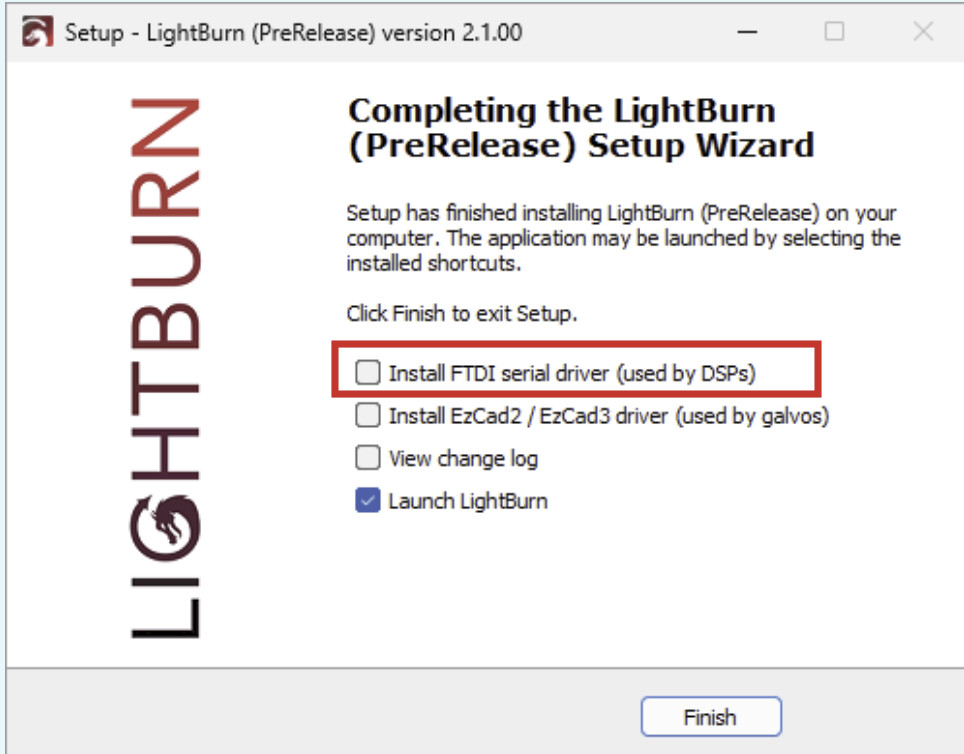
The LightBurn installer also comes with drivers for a DSP controller like your RuiDa. You would need to tick this box in the last step of the installer:
“FTDI” is the manufacturer of the Serial-USB chip in most, if not every RuiDa controller.
We only know your firmware version. Which exact controller do you have?
With your galvo laser, it’s a similar story as my previous message, but you’ll need to tick the other box Install EzCad3 / EzCad3 driver
If your controller is a BSL, you should have receveived the necessary driver from the manufacturer instead.