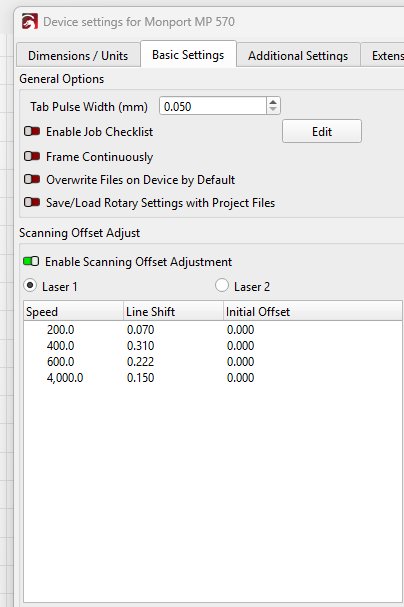
I started with my tests - using the 4000mm/s - not sure if the machine can actually use that, but this is what i was testing, I drew my box in lb, set it to fill, changed the intervals to 1mm, and got a test box with some lines that are way off. I measured them that that measurement came to 3.3mm.
i took my 3.3 mm Divided it by 2, and got 1.65 which i placed in the above table. the lines were not as long, but they were still way off. after doing this a bunch of times, I decided to just throw a .1 into the box and look at that, it lined up… a little tweak later, i came to .15 as a random guess.
It is (in my opinion) a very unrealistic value to ask a diode/CO2 laser to perform
Why not stay within the physical limits of what your machine can handle? The values you get from such an experiment cannot be used for anything because you do not know what your current speed actually is.
The 4000 mm/s speed will definitely screw up the results, because LightBurn interpolates between the table entries. I do not know if LightBurn does a curve fit on the whole table or just does a linear fit between the two entries bracketing the layer speed, but bogus data will be a problem.
Turn off Scanning Offset Adjustment and re-run the tests at 50 mm/s, then from 100 to 500 mm/s in 100 mm/s increments. If you use a 0.5 mm line interval, you can estimate the line offsets fairly accurately with the line spacing as a reference, but a measuring magnifier is better.
The final version of this self-defining test pattern may also be helpful:
Upload pictures of the results so we can look over your shoulder. It is possible to have a very slow power supply in the machine, but let the hive mind around here contemplate the results.