Do this:
Run another one at 300mm/sec. Then go to Edit > Device Settings, enable the scanning offset, create an entry that is 145mm/sec and measure how far that fill goes outside the line, and enter that. Then do the same for the 300mm/sec one. Make sure the switch to enable the offsets is enabled, and then try to run one.
It should look something like this when you’re done:
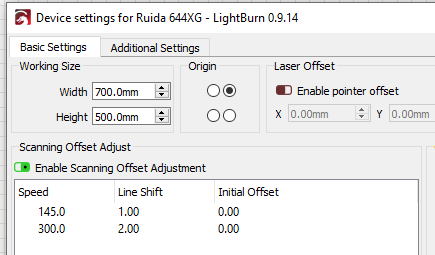
… but the ‘Line Shift’ numbers will be your measurements. You will likely have to tweak them a little unless you’re using calipers or something to measure.