So have just downloaded and updated Lightburn to Lightburn Core 2.0.04 and have imported some graphics to play with, for some reason when i click select on the import it selects the whole of the import not a section i want, is this a new feature and have to take different steps to select a certain part i imported. Either that or i am missing something, can anyone enlighten me.
You need to ungroup your import, and it has always been like that. 
1 Like
Please post a screenshot of what you are working on.
In general, import will bring in The entire file.
Do you understand the difference between a red selection box and a green selection box? Green selection grabs everything it touches.
Red selection only grabs what is entirely within the red box.
For selecting a part of an SVG object, grab whole object. UNGROUP as far as you can. Red box select the part you want to keep. Move aside. Use red box select to grab the parts you want to remove, delete.
Select your desired parts and GROUP to make moving and editing them easier.
Red select, click and drag from left to right
Green select, click and drag from right to left
1 Like
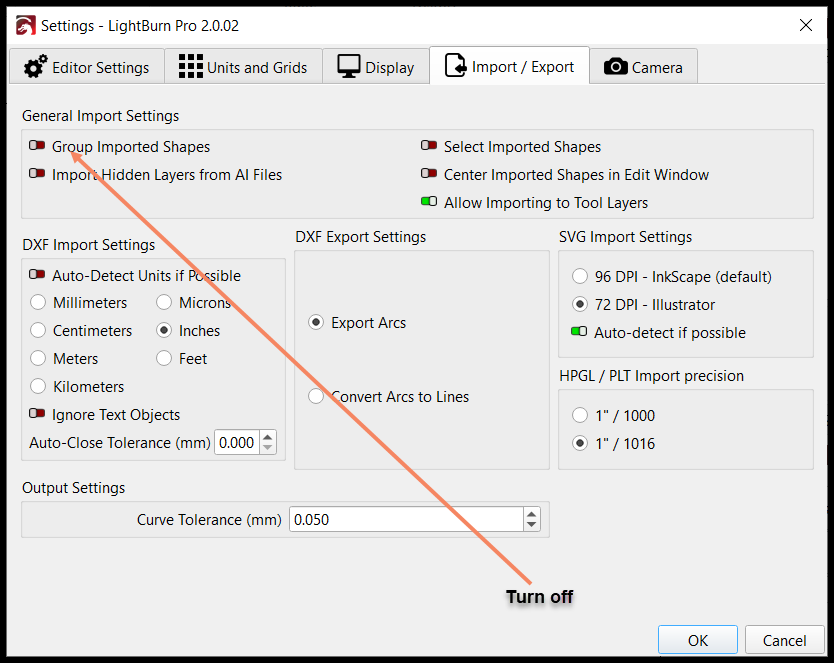
Thanks i will give that try.
1 Like
Thanks did know about the green box, will play with that.
Thank i will turn that off and give it a go.
1 Like
This topic was automatically closed 30 days after the last reply. New replies are no longer allowed.