I’ve been serching over an hour for what seems like an easy fix. I have an Ortur Laser Master 2 Pro running latest version of Lightburn. My waste board is engraved with various boxes to aide with alignment. I went to use a center box for the first time in several months and realized it was off around 16mm in -Y direction then remembered I had added in a Z axis adjuster a couple of months ago which has moved the laser relative to the the laser frame and waste board. I thought is would be in General settings. How do I shift the Y axis so it is aligned with the waste board?
Thanks!
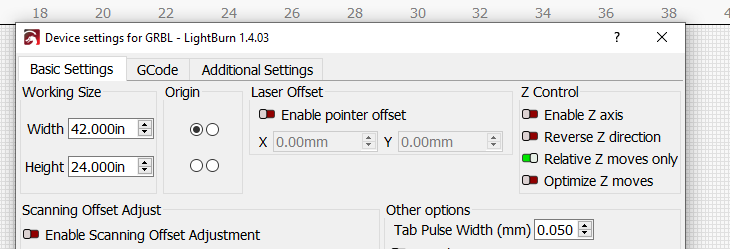
Thank you for your response! I tried it, had to double the error to make it work which enlarged the work area for 400mm to 436mm. Not exactly what I was hoping to do but it works!
Thanks
You adjusted work area or offset?
I did work area size. I tried laser offset but nothing changed even with enable pointer offset on
Edit - Machine Settings - (read) - X/Y Axis Settings - Home offset.
This will change the distance the head moves from the limit switches after you restart or reset the machine. You can adjust it to line up with the corner of your bed nearest the limit switches. Then set the “Working Size” as shown previously as the distance to the opposite corner.
Thanks Niall! I’ll try that when I get this 3 hour job off the machine. I’m beginning to think that pulling the waste board out and redoing it may be my best bet.
This topic was automatically closed 30 days after the last reply. New replies are no longer allowed.