Has anyone encountered issues after updating their software to 1.1.03? After I updated Lightburn, I noticed that Lightburn keeps freezing when I want to paused or stopped a current job. When I restarted the software, I tried continuing my work but nothing is happening. I also tried sending the data but it shows Transfer failed. The only way to correct is to restart my laptop and I already did it 3x (restarting the machine will not correct the issue)
It was working fine before the update and no changes were done prior to that except for the update.
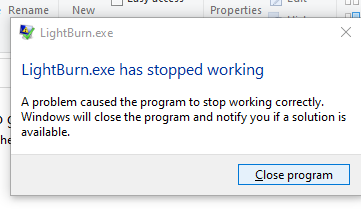
This latest update to 1.1.03 has also stopped my machine from working correctly. I start the program and try opening a file stored in my Google drive. As soon as I select a folder the program fails and closes with:
This failure also happened with 1.1.01 and 1.1.02 and I felt that this was the testing period. 1.1.03 came out and I thought that is it, but the same issues happened. I’ve found the only way I can use LightBurn 1.1.03 now is to open the folder and double click a previously made file. The files can be altered, burned and saved but you can not perform a “save as”. LightBurn seems to be failing in explorer.
Please tell us how to make this function correctly.
Have you tried saving to a location that is not in a Google Drive folder?
Are you using a Dell computer? They have a backup tool that uses a thumbnail previewer that was built with the same framework we build LightBurn on, but a different version. When Windows tries to load their plugin viewer within LightBurn, it tries to use the framework library LightBurn is using (but it’s the wrong version) and crashes, taking LightBurn with it.
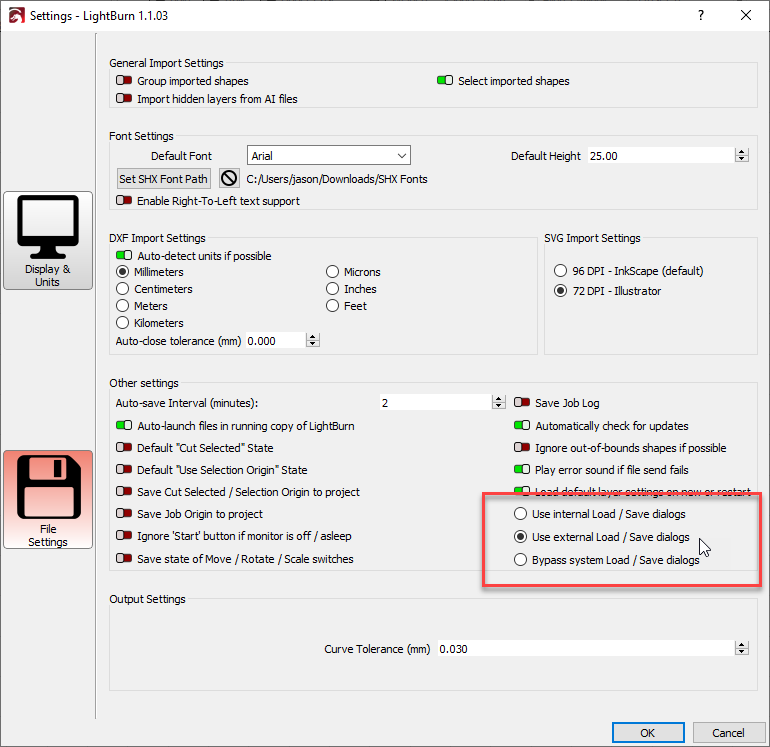
If you go to Edit > Settings, click the ‘File Settings’ button, then change this to "Use extern Load/Save dialogs’, it tells LightBurn to spawn a separate application to display the file load/save dialog, and this one doesn’t use the framework, so there’s no conflict.