English translation
Hi Niko,
The fact that the first attempt after calibration was successful makes me confident that you did everything right!
This leads me to believe that something is wrong with the positioning of the laser. It’s good that you are using “absolute coordinates.” Did you perform a homing sequence before execution?
Can you engrave two circles next to each other, click “Update Overlay,” and send us a screenshot of the entire LightBurn window?
This will allow us to see how severe the misalignment is.
The test Melvin suggests with exporting the settings may also provide helpful clues. You are welcome to upload the exported .lbcm file here so we can check it.
Are you using the new AprilTags for lens calibration? These are more accurate than the “dot map.”
For maximum precision in lens correction, I recommend this new procedure with AprilTags and tracking Calibrate Camera Lens (Labs) - LightBurn Documentation
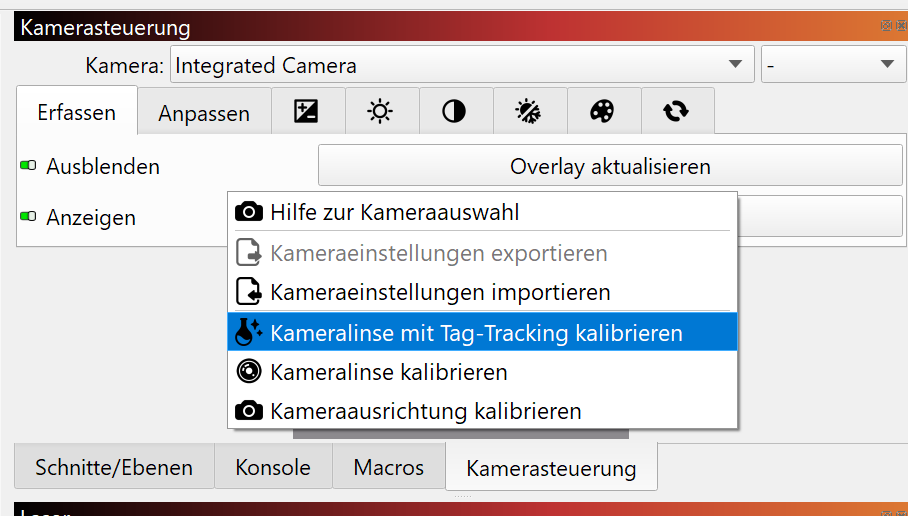
The feature is still in development and can only be accessed by right-clicking in the camera window here:
Important: after this step, you must perform the Camera Alignment again.
I look forward to seeing your results.
Hallo Niko,
Dass der erste Versuch nach der Kalibrierung passt stimmt mich zuversichtlich, dass du alles richtig gemacht hast!
Das lässt mich vermuten, dass etwas mit der Positionierung des Lasers nicht stimmt. Es ist gut, dass du “Absolute Koordinaten” verwendest. Hast du vor der Ausführung eine Homingsequenz gemacht?
Kannst du einmal zwei kreise nebeneinander gravieren, “Overlay Aktualisieren” klicken und uns einen Screenshot des ganzen LightBurn Fensters senden?
Damit können wir sehen, wie stark der allfällige Versatz ist.
Der Test, den Melvin vorschlägt mit dem exportieren der Einstellungen kann auch hilfreiche Anhaltspunkte geben. Du kannst die exportierte .lbcm Datei auch gerne hier hochladen, damit wir sie prüfen können.
Verwendest du zur Linsenkalibrierung die neuen AprilTags? Diese sind genauer als die “Punkte karte”.
Für die maximale präzision der Linsenkorrektur empfehle ich diese neue Vorgehensweise mit AprilTags und Tracking Calibrate Camera Lens (Labs) - LightBurn Documentation
Die Funktion ist noch in Entwicklung und nur durch Rechtsklick im Kamerafenster hier zugänglich:
Wichtig: nach diesem Schritt musst du nochmals das Camera Alignment durchführen.
Ich bin gespannt auf deine Ergebnisse.
This makes me suspect something is wrong with the laser’s positioning. It’s good that you’re using “Absolute Coordinates.” Did you run a homing sequence before running the program?
Could you engrave two circles next to each other, click “Update Overlay,” and send us a screenshot of the entire LightBurn window?
This will allow us to see how much offset there is.
The test Melvin suggests, exporting the settings, can also provide helpful clues. Feel free to upload the exported .lbcm file here so we can check it.
Are you using the new AprilTags for lens calibration? They’re more accurate than the “point map.”
For maximum lens correction precision, I recommend this new approach using AprilTags and Tracking Calibrate Camera Lens (Labs) - LightBurn Documentation
This feature is still under development and can only be accessed by right-clicking in the camera window here:
image
Important: After this step, you must perform the camera alignment again.
I’m looking forward to your results.