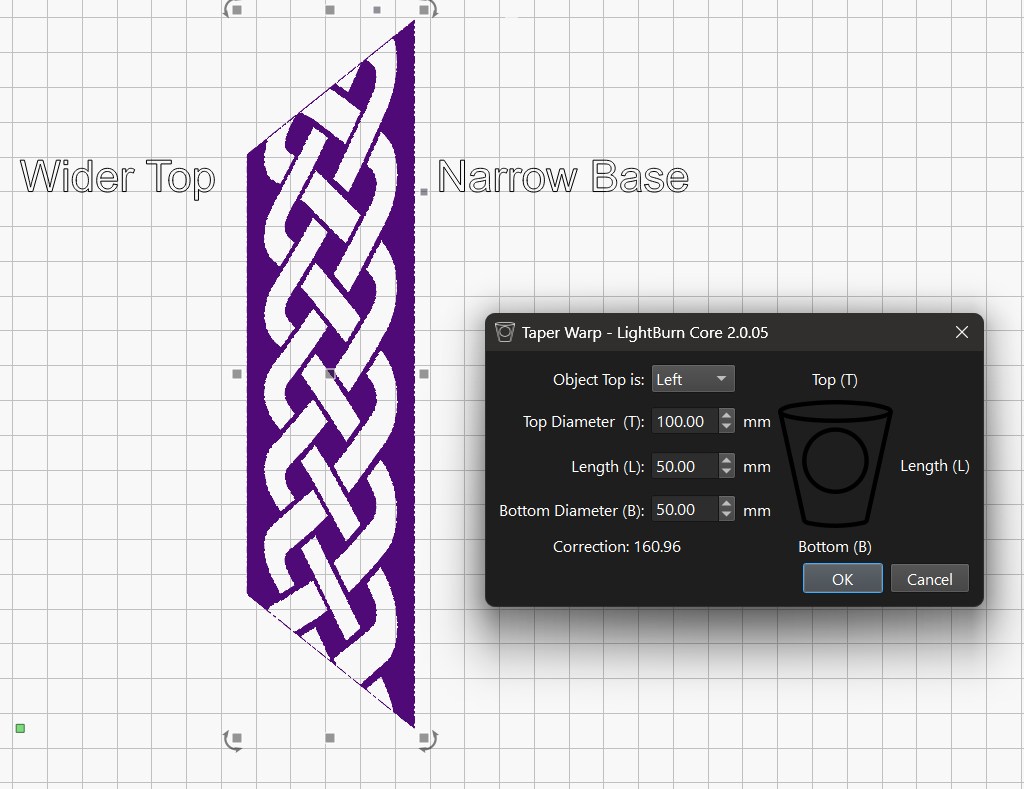
Since the top has a bigger circumference shouldn’t the left be longer
Because all parts of the mug (or whatever) rotate at the same angular speed, the “narrower” top part of the pattern covers the entire circumference, as does the “wider” bottom part.
In effect, the top part gets stretched more than the bottom part on the mug. The Taper Warp pre-distortion corrects for that, so the top part “looks right” after being stretched around the larger circumference.
Ok, I’ll take your word on this and will give it a try.
I admit I can’t wrap my head around this (pun intended)
Follow up question…
In the Rotary Setup window which diameter do I use?
Top, bottom or less likely, split the two?
Per the doc:
If you’re working with a tapered object, use the largest end of the taper for the object diameter.
Because the upper surface of the mug must be at a constant height to maintain the correct focus, you’ll be shimming one end of the rotary to put its axis at an angle. Doing that on a roller rotary will cause the mug to crawl off the low end as it rotates.
If your object is not evenly shaped, you might also try this tool:
I read this and missed it. Thanks for pointing that out.
Interesting. I can definitely put this to use, Thanks
Edit In: Works Well with PNG files, thanks again.