I just bought a new laptop to control my OLM3. I had to re-download Lightburn, but now my Text does change when I switch from line to fill when I change the setting in my Cut/Layer list. It stays on line.
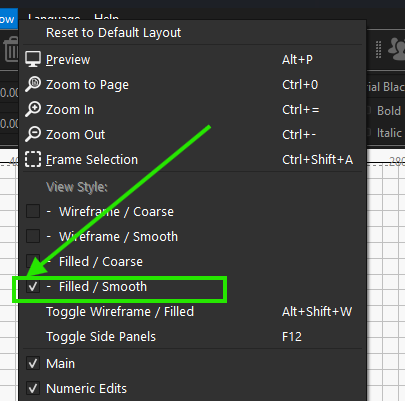
Migrate all your previous settings to the new PC:
If you preview (Alt+P or click the ‘TV Monitor’ button on the toolbar) you’ll see it fills correctly when output, regardless of how it shows in the editing window.
LightBurn was actually designed to work in ‘wire outline’ mode, which is what it defaults to on a new install. Turning on Filled Rendering mode can make it more difficult to work with selections, boolean operations, and node editing, among other things.
One more thing to check once the preview is showing fills: if you use a script or handwriting font where the letters overlap, LightBurn’s Fill treats the overlapping areas as holes, so the spots where strokes cross can come out as unfilled gaps. Converting the text to a path (Arrange > Convert to Path) and then using Weld merges those overlaps into one clean outline that fills solid. It’s also worth confirming the new laptop has the exact same font installed, since a substituted font can have open or messy contours that won’t fill properly.
This makes me think you’ve never actually used LightBurn, since that’s not true, and hasn’t been since the initial release.
The difference between these two text objects is that the top one has the ‘Welded’ setting enabled (which is on by default)

The gaps only appear in the lower one, where I explicitly disabled that setting.
LightBurn alters the geometry to fuse the letters, while leaving the text “live” and editable. It is absolutely not necessary to use ‘Convert to Path’ to correct this.
