The only way that you could burn text at exactly a specific height is to generate the text, select it, then change the height value in the toolbar to match what you want… now, please bare with me. We aren’t just lazy, it’s just that fonts are weird.
When you select a font size in the font Height input box you are telling the internal font system to render the font with that maximum height. Now, you will probably think that an uppercase letter is representative of the maximum height a font can be, but it’s not. Check out this graphic:
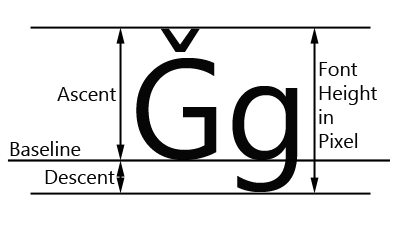
So there’s a couple of things we have to deal with.
- Ascenders: Things like accents. What you see above the G in that image. I know, in English we don’t really use those but they still have to be accounted for.
- Descenders: Letters that have parts that go below the “line” you are writing on.
j,g,q,petc.
So when we tell a font to be rendered at 1" tall, it’s telling it to make it so that anything that could be written will fit into that height.
Pretty much, your text shape will never be exactly the height as what you specified in the font Height box. And sadly, that’s just how fonts and typography are. Most of the time it doesn’t matter. But if it does for you, get it close with that value and then use the shape size properties to tweak the height - just remember to click on the lock icon to make sure the width changes with it.
When you do that you will actually see the font height value update to show what the new height value for that font is.
Hopefully that helps clear up the confusion.