Good afternoon. New to Lightburn. After setting up the software and sending a file to the laser. this is a message I get on the dispaly. Other type file and laser head just moves to the corner then stops. has anybody encountered this? what is the solution. thanks
How did you send the file to the laser?
Good afternoon via USB
cable connected to the laser and PC
Let me ask it differently…
What did you do in Lightburn to send the file to the laser?
I just wanted to try out lightburn coz for about 13 years I have been using corel laser that came with my laser but lately after a windows update, corel laser could not be reinstalled so I decided to try out LB. it recognizes the laser and sends files but as soon as I click run on the machine its says OTHER FILE TYPE even if its an .out file from LB
Are you clicking Start or Run GCode?
Start: The file is streamed to the laser and should automatically run there. What do you see in the Console window when you do this?
Run GCode: You have to Save GCode first, which you can do with any file extension. The .OUT extension is not typical, but should work just fine if your laser expects it. Just look for it when the Run GCode window opens.
I think a TopWisdom a DSP controller similar to a Ruida, so it does not use G-Code and does not have readable files.
This seems to be a common problem with no clear solution:
https://forum.lightburnsoftware.com/search?q=topwisdom%20file
@JohnJohn: Is there anything definitive? The licensing description says TopWisdom is supported, but folks seem to be having a lot of trouble.
Did not see that coming. Thanks!
I click START. sorry not run. then the message OTHER FILE TYPE pops out of the console, if I insist and press ENTER, the laser head just moves to a corner from the set origin but does not fire or anything. just moves then stops
yes its a DSP. not G code. So I guess LB is not compatible with the machine. Shout out to LB team, I hope they resolve this issue in the future. thanks
@ednisley said it is supported, and I saw it too, so I am sure somebody will drill into this issue.
Thanks for being patient and considerant. Gotta love technology!
Edit:
With your safety glasses on and your project loaded up and ready to send to the TopWisdom laser engraver…
In LightBurn 2.0, click ‘Laser Tools’, click ‘Machine Settings’, click the ‘Basic Settings’ tab and click the red slider switch next to ‘Alternate Machine ID’.
Then click ‘OK’ in the bottom right.
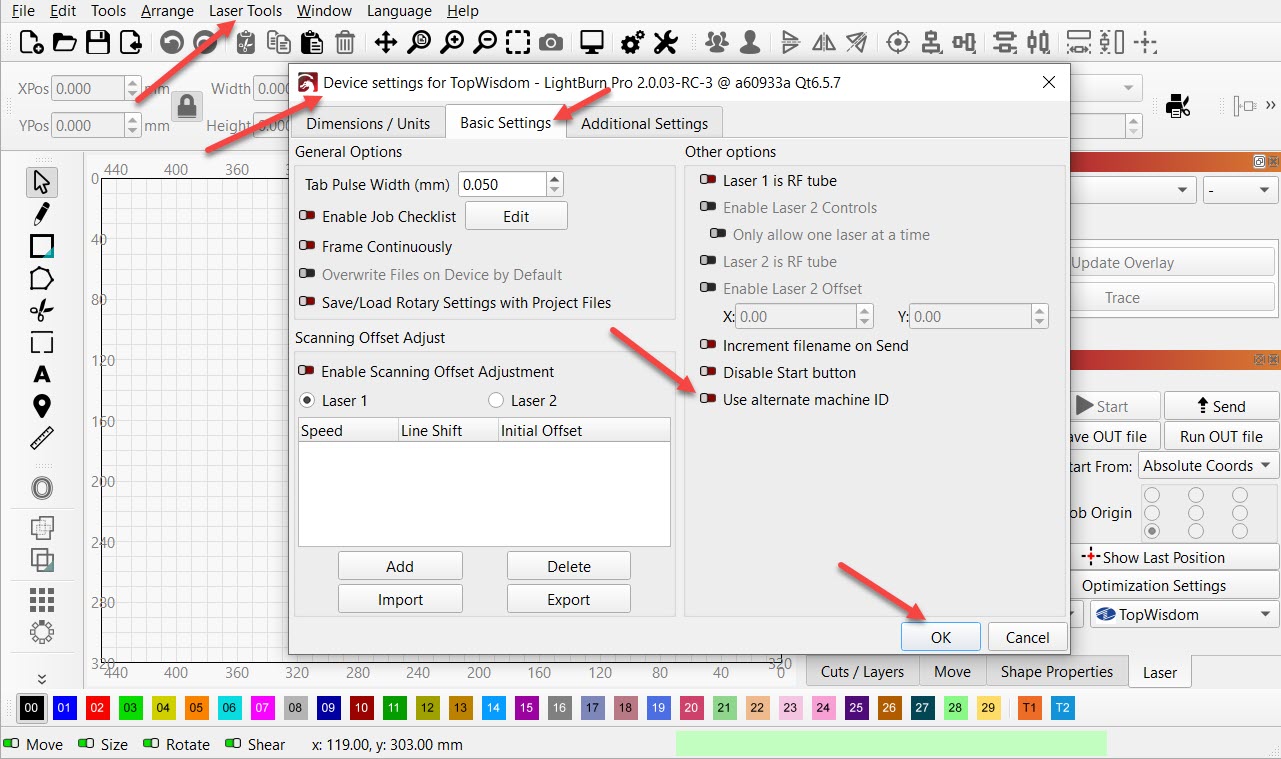
After Clicking OK, Send the file to your laser.
Please let us know if the laser is working and if this is what was needed.
Do you have a model number for the TopWisdom controller in the Laser Engraver?
A picture of the controller with that model number is helpful and welcomed.
I was looking at some internal references and I saw a picture of a sticker on the corner of a TopWisdom controller that showed the Model Number, Serial Number and the Firmware Version number. This picture would also be appreciated.
Thanks! 
Good morning John! Thanks you for this. will try it when im at the other shop and will do as you advise. hope this works. really looking forward to using LB. warm regards and thanks for the support