Transfer Failed, been working for years!

Do you recall when this started happening?

If nothing else changed, your settings should be back to a working state when you Load Prefs Backup and choose an entry from an earlier date when it last worked.


  • What’s your value for the “Network Timeout” in Device Settings? See, if increasing this to say 8000ms helps.

  • How large is the resulting file if you use “Save UD5 file” in LightBurn?

These controllers communicate over the network using UDP which, unlike TCP, doesn’t perform an initial handshake or retransmit lost packets.
This can make them susceptible to interferences from other devices. → It might even be worth temporarily unplugging other computers from the network to rule them out as the problem.


This is a good idea as another communication test and the results may give us further hints:

When you send a file to the machine using LaserCad, does it appear in the File List in LightBurn?

Files sent from LaserCad do indeed appear in the LightBurn File List.
They can also be deleted from the Lightburn File List from within Lightburn

1 Like
  • What’s your value for the “Network Timeout” in Device Settings? See, if increasing this to say 8000ms helps.
    I cannot find this setting. Is this for WIN7 or WIN10? Can you be more specific. Is this a Registry setting?

  • How large is the resulting file if you use “Save UD5 file” in LightBurn?
    I have been trying small files 20K to 60K
    Even a simple 50mm box outline drawn with the Create Rectangle tool and saved as ud5 file does not transfer.

Trying different Prefs now. No luck so far.

I checked the Network Timeout in the prefs file for the AWC608. It was set to 10000.
I edited as a txt file and tried 5000 and 20000, still no file transfer.

In the Device Settings in LightBurn:

Thank you for confirming. That shouldn’t be the issue, then.

Not sure if I follow you here. Which file are you referring to here?

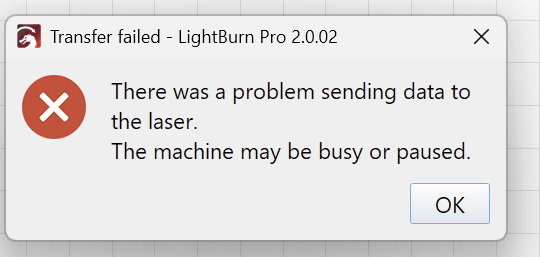
To make sure: Is this the error you are seeing?

Do you recall: Did this issue start appearing when you upgraded to version 1.7.06, or did you already have this version and it suddenly stopped working?

If it started after an update, please see if communication is restored when using LightBurn 1.6.03.
You can download this version from here:
https://release.lightburnsoftware.com/LightBurn/Release/LightBurn-v1.6.03/LightBurn-v1.6.03.exe

OK, got it. Was already set to 10000ms

Try this:

  • Make a really small file, like a rectangle or two.
  • Go to Help > Enable Debug Logging
  • Click Start and try to send the file
  • Turn debug logging off

Go to your Documents folder and find the LightBurnLog.txt file and attach it here.

Yes, this is the error I am receiving.

I edited the prefs file directly.
However today with your screen shot, I found the correct menu and the setting was at 10000ms.

LightBurnLog.txt (795 Bytes)

14:20:35.680 D: “LightBurn 1.7.05” “Tue Jul 29 2025”
14:20:54.825 D: EnableZ: false Relative: true
14:20:54.826 D: 1 floaters
14:20:54.826 D: PathTree build: 0
14:20:54.826 D: 1 floaters
14:20:54.826 D: PathTree build: 0
14:20:54.826 D: Optimize by score: 0 ms
14:20:54.827 D: 1 floaters
14:20:54.827 D: Overlap removal: 0
14:20:54.827 D: Removed 0 whole shapes
14:20:54.827 D: CutBuilder took: 1 ms
14:20:54.827 D: ------------------------------
14:20:54.829 D: NumColors: 1
14:20:54.830 D: Protocol::GenerateCuts time: 3
14:20:54.980 D: sending 62101 bytes
14:20:54.980 D: O: “7d7d7d7caa7d7b2c”
14:20:54.981 D: I: “7d7d7d7faa7c7b2c72020202027f”
14:20:54.981 D: Controller busy
14:21:03.876 D: Clipboard data present:
14:21:03.876 D: (“text/plain”)

Downgraded to 1.6.03 and transfer completed. Log attached.
LightBurnLog.txt (129.5 KB)

Also I checked Network Timeout. It was default set to 10000ms

Do you have the ability to connect via USB temporarily, just to see if that works?

I will try it. Though I never use USB.

I can send files on USB with 1.6.03

So can I get to a newer version?
What about V2 on a WIN10 machine?

I sent you a private message with a version to try. You should see a little “Envelope” icon in the upper right of the window - click that.

1 Like

I have an LO-X7 controller which I think is very similar to yours. Came from LightObject. Similar history - files transferred without issue over WIFI then got that same file transfer error.
Same bridge router, same home router, computer and controller all the same. Did upgrade from 10 to 11.
Now it works first try and sometimes it takes me several tries to get it to successfully load a file. Nothing that I can think of causes it. A lot of things happen on a computer that you don’t realize.
I just click send until it works. It eventually always loads.

Hi Dean,

Thank you for chiming in. In the other case, a newer version of Lightburn sent the controller a command that’s not supported on older hardware. - The test version OZ sent to William worked, and the change will be included in an upcoming update.

In your case, where it eventually works, it’s a sign of a Network Timeout. → See if increasing this in the Device Settings helps.

2 Likes