Is there a trick to using Tabs. I tried inserting tabs on a line in a design. They show up on the design if i click on the tabs icon but they do not cut or show up in the preview
Seems to be a bug with tabs. Even though i have set tabs for manual it still automatically makes multiple tabs. Or im doing something wrong
Share your project file. Explain what you’re wanting to achieve and how you have attempted to get there and maybe someone can help. Without that, all anyone can do is guess.
I dont think the file will help. But here’s what i did
Create a design
Under the layer I set it for Line, then turn on Tabs and set it for Manual
I manually enter the tabs i want
When i cut the job it still makes additional tabs from the ones i entered manually
Tabs are problematic in my opinion. The tab process is kind of spread around. Not to mention trying to see them in preview.
Tabs should be more visible in preview.
The whole process should be handled in the cuts/layers window.
Tabs should be visible whenever they are enabled.
Think i figured out the issue. The shape i was trying to add tabs to has multiple pieces which is causing issues. Need some more work to figure this out. But still when im on manual tabs it wants to add its own tabs to various shapes. If i have no manual tabs it doesnt add any tabs. But when i add my own manual tabs it wants to add extra tabs automatically
If i just do a simple square and add tabs it works fine. But when i use my design and add manual tabs it wants to add extra ones. If i dont have any manual tabs it doesnt add any additional tabs. So something to do with my design.
Do they show up in preview? Make sure your power is set low enough to create a tab.
Think the issue is with the design. Here’s a sample of the part i am having issues with. Looks like its made of three separate pieces. With 3 smaller pieces all grouped together. If someone wants to play with this. Add two tabs manually. Then cut the piece and you will see it makes more than two tabs. If i could weld all these pieces together i think it would fix the issue
Tabs Issue.lbrn2 (29.0 KB)
What was blue layer for?
The blue layer was for another part of the design that is not needed. But if you expand the design in the file i sent there are three very small blue pieces connecting the three red layers. I think this is what causing the issue with tabs.
If you want to duplicate the issue. Add two manual tabs to this piece then cut it. It will make more than two tabs
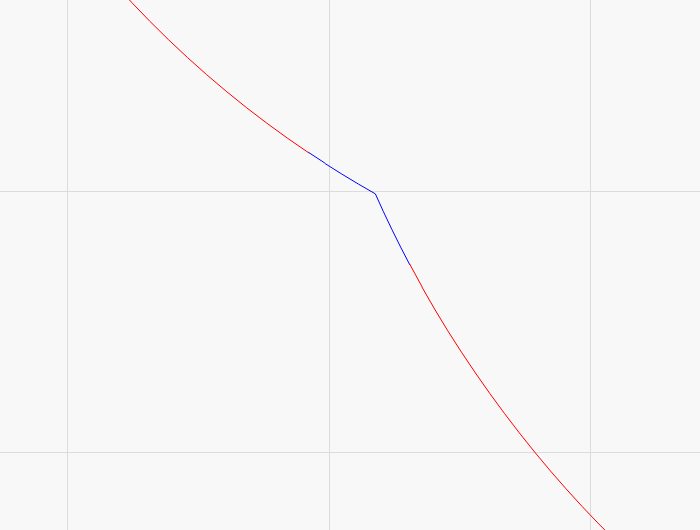
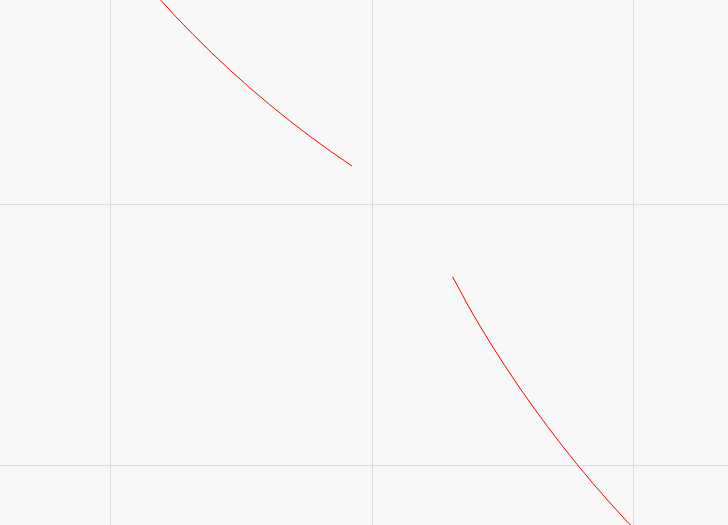
I agree with all that but why would that cause it to add extra tabs when i have the Tab mode set to manual and i have set tabs manually. The other part is it only adds extra tabs when i add tabs manually. If i don’t have any tabs entered manually no extra tabs show up. And the extra tabs don’t show up in preview. Really weird. Lightburn doesn’t like something here. Maybe a Bug?
Maybe if i move the blue smaller fill pieces to the Red layer that would correct the issue.
I think your whole issue is with the blue layer, Change it to red and select all and do an auto join, then check with fill mode to see if that closed it.
I will try that first part. But i cant do auto join because the red and blue lines don’t overlap. And i don’t know what auto join is. Only Weld
ALT+J, it worked when I tried it.
Ill try it again later . I just tried auto join and it didn’t work. Maybe just moving the little blue pieces to the red layer will work. They are all on one group so it shouldn’t be too hard. Thanks for looking at this. I’ll let everyone know if i find a solution
You can’t join 2 different layers.