My scoring is cutting thru on fine scoring (small words), even when lowering my min power. Changed my min power to 6 with speed of 300 with a sample square to score and it still cuts thru on the corners.
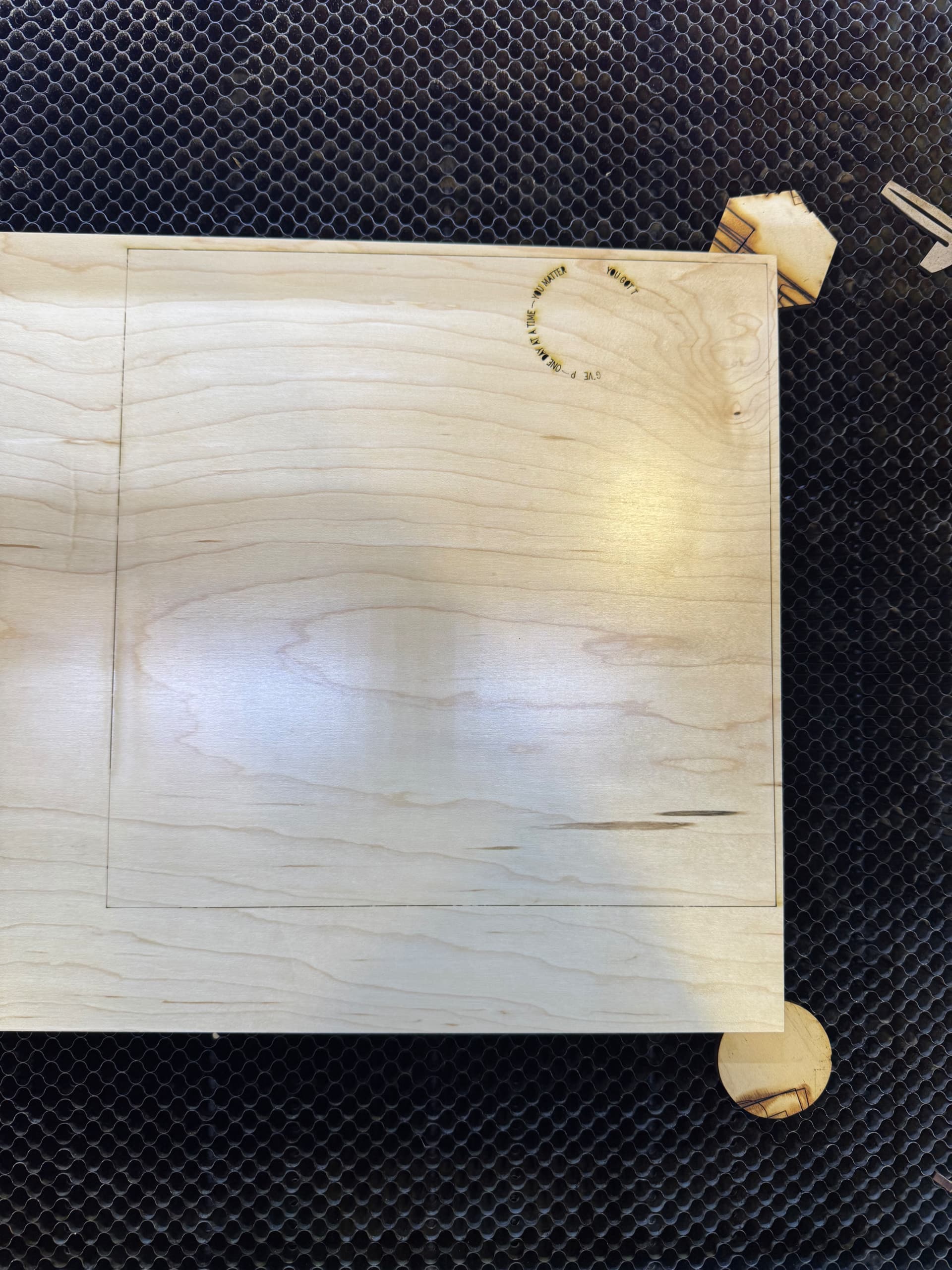
This is because the laser is at the same burning power when it stops to change direction. Unfortunately, I do not know if you have a Constant Power switch you can turn off in the Pro version Cuts Settings window with a Ruida.
1 Like
If the machine is this one:
Then it has far too much power for tiny vector designs / lettering. There are several problems:
- Small vectors do not allow high speeds
- 100 W glass-tube lasers don’t fire well below about 15%
So, although you can set a layer speed of 300 mm/s in LightBurn, the machine cannot move that fast while tracing along each of the tiny vectors in those letters.
Basically, you must use a Fill layer to “engrave” those letters: the head will scan across the whole design at the layer speed. Then you adjust the layer power to get the proper depth / darkness within the design.
1 Like
Sorry I should clarify.
I normally score about speed 45 and power 12. (If I recall) and have been for years.
A couple of months ago just randomly it started cutting thru at this setting. Someone suggested that was slow so sped it up to 100.
Didn’t help. Replaced the controller on my machine (per TTP) and it was good again. For 6 weeks (and about 2 hours of use). Yesterday back to the same thing. We changed the speed to 300 on a large 10x10 square shape to see what it does. Max power 12. Min power 6.
The lines still show, but 2 out of the 4 corners it’s cut right thru.
More information always helps … 
That seems much more plausible: the power is about as low as you can make it and the machine can’t move rapidly on small vectors.
Collectively, the evidence now points to a failing high-voltage laser power supply.
The HV supply regulates the current through the laser tube, so it directly controls the beam power. Most supply failures cause low current (“Why isn’t my laser cutting today?”), but yours is intermittently failing hot ("The light! It burns!).
The Sunray should use a better HV supply than typical Amazon sellers offer, so see what TTP has for you.
When you post a speed, it’s a good idea to put the units along with it. It only takes a couple of keystrokes to do this. Even if it’s painful, at least do it when you initially post.
Some machines run in mm/s, some mm/m… I have documentation from LBT100 coating spray and it’s in in/s, they recommend 35in/s, which translates to about 890mm/s. Most hobby machines can’t run this fast.
We’re assuming mm/s.
When I try and fix something, I don’t do well if I can’t see where the rubber meets the road, so to speak.
When lasing wood, it’s normal see variations within the grain. When I examine yours, I see variations in areas I would not expect as the grain doesn’t change that much. I circled the area, there is little variance in grain compared to the lasers damage.
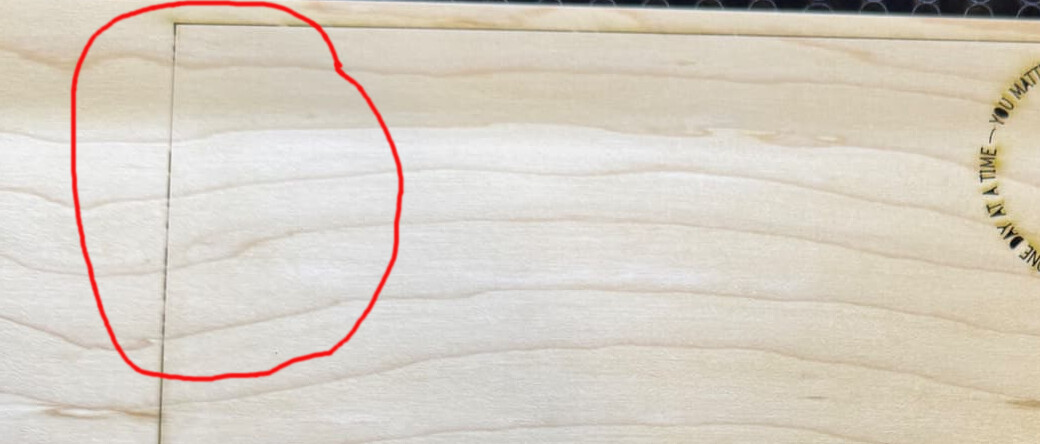
There’s likely more than a couple reasons for this but I can give you the two that may help.
When a tube lases, it isn’t instant and goes through a transition period until the cavity starts to resonate and it’s actually lasing. At such a low power setting, it might not really be lasing as we expect.
Another thing glass tubes do is have a change in resonance or TEM mode. Usually the beam quality gets better as the laser is operating at higher power. Main reason RF machines have a better beam quality (M2).
Most of the tubes, I’ve seen at low power are in TEM01 mode.
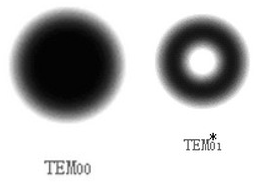
This is m2 short/far and you can see at low power levels it’s not reaching TEM00 mode, it’s in TEM01 mode. Works fine as long as you keep more power on it.

It’s difficult to get a good idea of the mode, you can’t really pulse it at high power without it just punching a hole through it.
Your lens only makes this smaller, if your source is TEM01, then your spot is TEM01, just smaller. You can imagine how differently your machine would operate with a doughnut shaped power area compared to a point.
The Ruida setting for start speed could affect what power you’re using. Mine was set to 20mm/s originally and I’ve lowered it to 5mm/s. I drew up this graph, that represents the way I think it works.
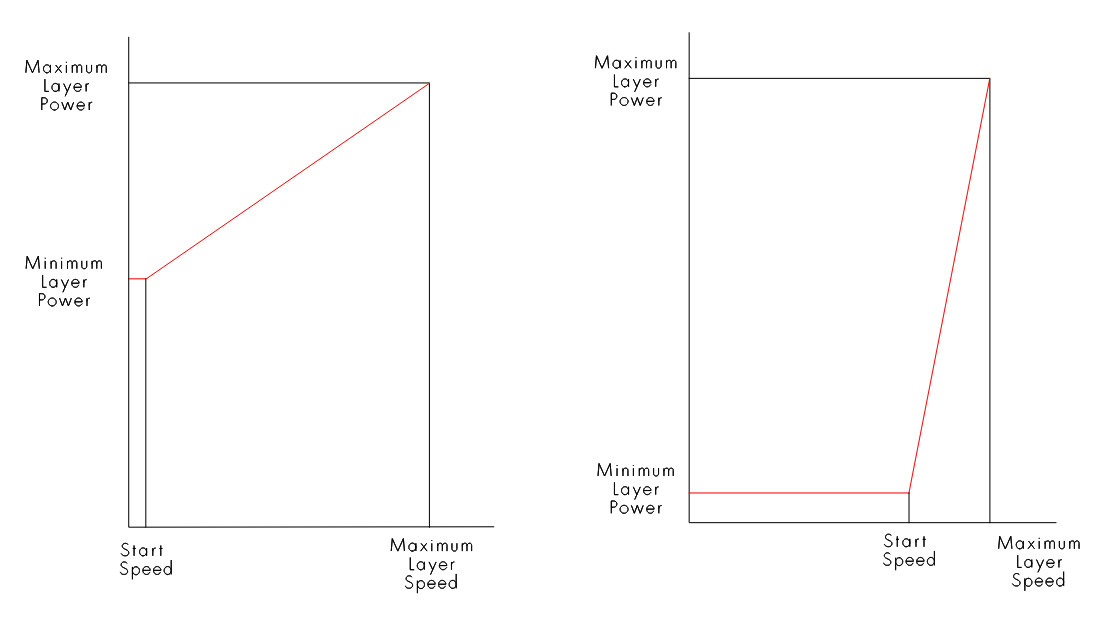
It’s not going to get to speed if you’re doing the small vector lettering. I would expect it to be at speed doing the area in red, after/before the corner.
The worst of all issues are when there’s more than one of them. Likely not the case, here.
In my opinion, it appears to be running at such a low current it’s really lasing… this and the start speed setting may have you running a lot at your low power settings.
Probably written too much. You’ll have to sort out what works for you.
Good luck

I do not have a CO2 machine, and I did not think it was too much. 
1 Like
This topic was automatically closed 30 days after the last reply. New replies are no longer allowed.