I thought I come back reporting on some of my findings regarding the Z-Axis Control issue in case someone else may be of need…
Basically, the situation is as follows with how Lightburn and the Machine interact with each other:
Lightburn by default operates the Z-Axis inverted which I assume has its roots with the Machine’s referencing Z-Axis Homing Switch being situated at the TOP of the Rail the Tool Head rides along - This defines the topmost position as Z=0 everything else is based on ( Z=25 being the Tool Head scraping along the Honeycomb Bed  )
)
Because of this Operations with Consecutive Passes enabled and a POSITIVE defined Z Step per Cut (mm) value would start the first Cut at the Bottom the Material Thickness with the Tool Head then getting RAISED for each consecutive Pass - This is obviously not how this kind of operation should work.
As far as I can tell - The Immediate Solution is - unfortunately - a PER Material Profile based one where we define a NEGATIVE Z Step per Pass (mm) value - Resulting in the Tool Head now getting LOWERED for each consecutive Cut:
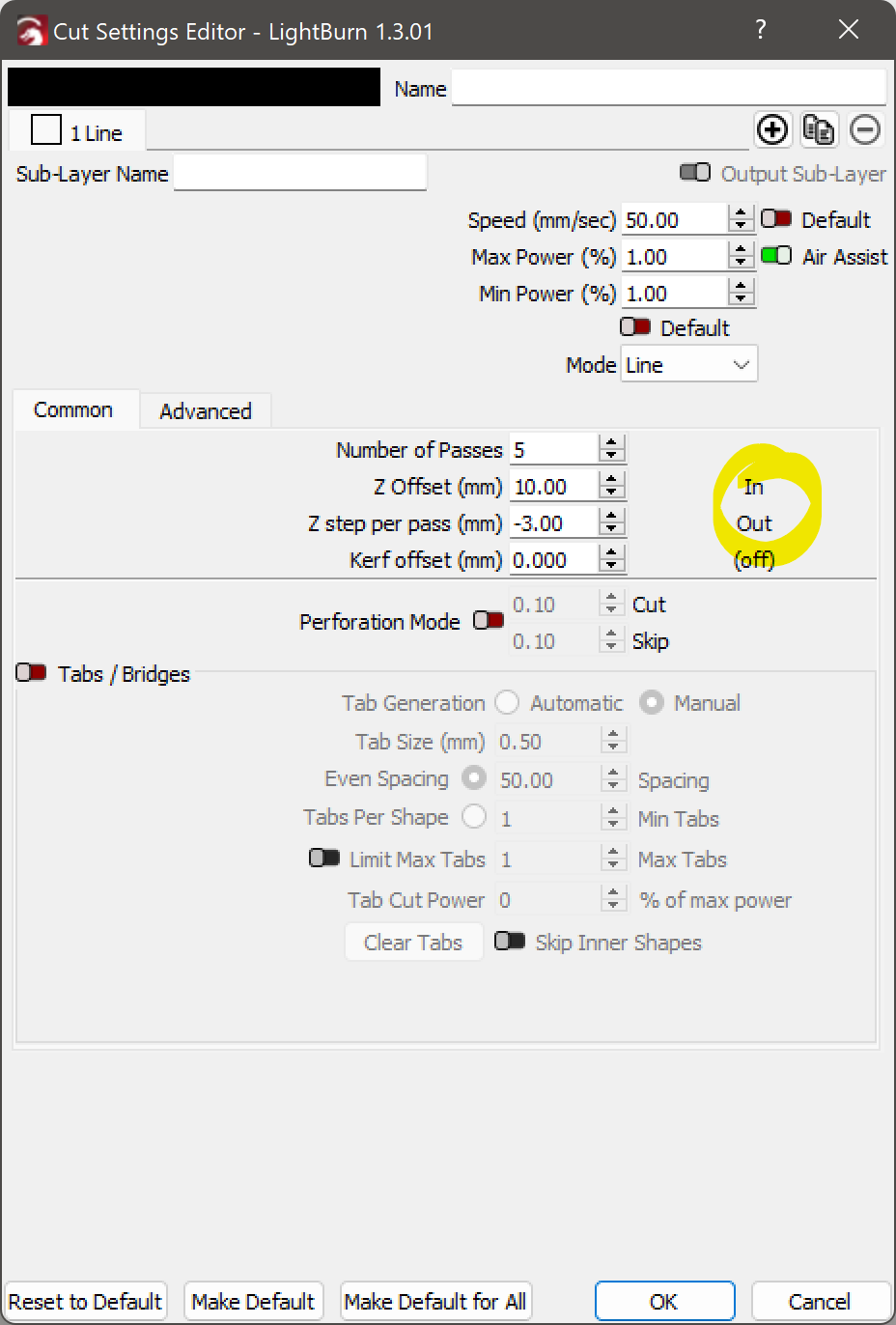
Being able to set a NEGATIVE value for that setting has eluded me until I came across this Post which quite frankly I think should be replaced with an Invert Toggle Switch for awareness’s sake ( also
In / Out should be renamed to Normal / Inverted )
I’d actually even go as far as to moving this Setting to the global Device Setting instead as I can hardly imagine someone making use of such feature only on a per Material Basis - Who the heck cuts most of their Materials Top to Bottom but some Bottom to Top!? 
Besides the change to the Z Step per Pass (mm) we now also need to change the Z Offset (mm) as the Tool Head will otherwise still start the first Pass at the bottom of the Material Thickness instead of the top resulting in it crashing into the Material or Honeycomb Bed as it is now getting properly DROPPED with each consecutive pass ( instead of RAISED like before ).
IMHO, another Contender to either be entirely moved to the Device Setting or at least have it also available there to for the per Material Profile one to be ADDED to it.