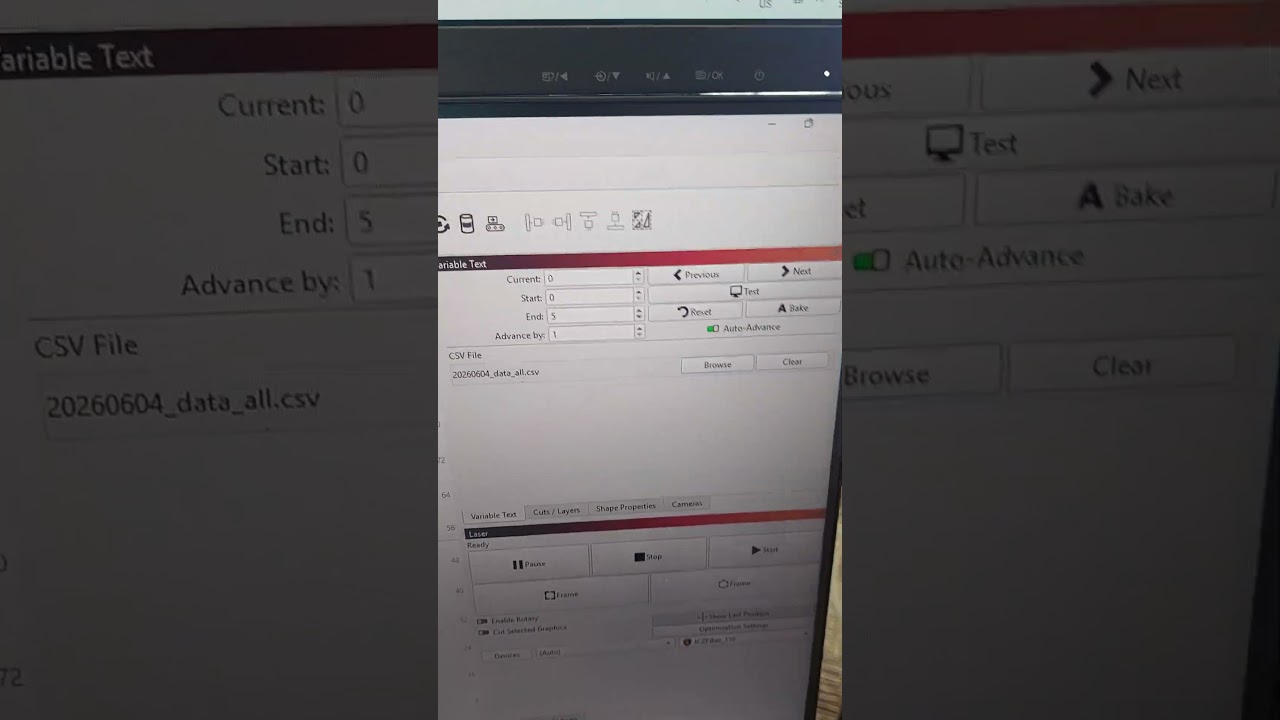
thought maybe the blank field #1 might be causing the issue, so separated to 2x different input csv files, still no luck. I get maybe 3-4 and then it just hangs.
These files used to work fine in version 1 of LB. Now I can’t complete the job.
Is there a crash dump file or something I can upload that will highlight what’s causing LB to hang on these simple jobs?
Can you send us a screenshot of the entire LightBurn window when it “just hangs”?
There won’t be a crash log if the program didn’t crash (close), but you can try capturing a Debug Log
Turn on the debugging log by clicking on “Help > Enable Debug Log”. This logs all actions taken, so it’s important to try and capture as brief a log as possible to make finding the issue easier.
The log file will be written to your “My Documents” folder on Windows, and is cumulative - each time you enable the debug log it will append to any existing log, so it’s a good idea to delete it after you’re finished.
After enabling the debug log, perform the action that caused the hang, then disable the logging from ‘Help > Enable Debug Log’ once again. Then, retrieve that file from the above location and attach here.
We are having a similar problem LightBurn 2.1.02, Hangs when we send a job to our JCZ Fiber Laser, works ok with Ruida 664XS CO2 Laser. We have reverted to 2.0.05 while a fix is found
I am having a similar problem where Lightburn v2.1.02 crashes when using variable text. If there are only 3-4 variable text elements, the Frame and Start work fine and the file is burned. However, if there are more than 4 variable text elements, 11 in this case, when I press Start to burn the file the screen does the Windows opaque look, and I get the “Not Responding” at the top of the screen. Everything hangs up and eventually I get the “Program not responding” window and Lightburn closes.
Yes, same here. My fiber has a JCZ control board, and I’m pretty sure the UV does as well.
I cannot use any variable text with this version. I have also downgraded to 2.0.05 and that seems to work fine with variable text.
Any update from developers re this issue? Have we provided enough information for you to replicate the issues I demonstrated in the videos I attached above?
I’d love to upgrade to the latest version but variable text is a must-have for my jobs so it would be good to get an update as to whether or not the devs can replicate this issue and what plans there are to rectify it.
@ihockings Thank you for taking the time to upload your video. I’m only now getting around to properly looking at it.
So far, I have been unable to reproduce any hangs or crashes while using Variable Text in version 2.1.02.
“Crashing” to us means, LightBurn closed, and you need to reopen it. Is this what happened?
If so, you should get a LightBurn_Crash_Log.txt saved to your desktop. If that’s the case, please send us this file, along with a detailed explanation of the steps you took. Attach the project file (.LBRN2) and .CSV files used in the process.
Since you all say that you’re experiencing the same issue, can you send us a screenshot of what you see when it freezes?
The default “End” value in the Variable Text window is 999.
If you load a .CSV file with say, 5 lines, this End value adjusts down to the maximum available value, which is 4, because it starts counting at 0. (Computers…)
If you then load a .CVS file with more than 5 lines, LightBurn will not increase the End value on its own.
It’s debatable whether we want the End value to automatically jump to the highest value of available lines.
I’ve attached a link to a video of what happens when I try to burn a file with 3 text elements as well as a file with 16 text elements. The 3 element file (T-J Name Plate) works fine. However, once i use a file with more than 4 test elements such as (T-G Name Plate) the file crashes upon pressing the Start or Frame button. Screen goes opaque and says “Not Responding” then eventually closes. As you can see in the video, the start and end are correct. The file has some blank fields, but I do not believe this to be an issue as I’ve tested it with another file that was completely filled out. Unfortunately, a crash log does not appear on the desktop.
I can’t see this issue listed as fixed in the changelog (unless it’s been given some title that sounds like something different to this issue we’ve raised).
Can you confirm if this fix is included in this release?
you’ve got me baffled with this comment. If I load a .csv file that has more entries than the current End Value, why wouldn’ t I want that End value to automatically increase to cover the total number of availble lines in the csv file? Now I’ve got to manually type 999 in the end value, THEN load the file, so it drops down to match available lines. I can’t think of a scenario where I load a csv file with say, 100 entries but you retain the end value at it’s previous lower number? That means I now have to open the CSV file, check how many entries are in it, set the End Value to that (minus 1 for zero indexing) so I make sure I engrave every entry in the file. I’m sure there are edge cases where maybe people don’t mark every entry in the csv file, but presumably most if not almost all would be wanting to mark every entry in the csv file they’ve just loaded. This seems a bizarre programming choice to me.
Have now tested v2.1.03 with variable text, and I can confirm it didn’t hang this time, using same csv file, and same LB file, that was having issues initially, so the patch appears to have solved the problem.
I can see a situation where someone wouldn’t expect the new End value to increase if it had previously been reduced manually, because there are only a certain number of workpieces or a limited amount of space available.
That’s why I first asked the team, whether it was a deliberate change.
(1.7 always updates the “End” value to the new maximum of the updated CSV file.)
I’ve created an internal report to match this behavior in the 2.1