Weird Controls for FoxAlien CNC/Laser (GRBL)

I had switched back to CNC for a few jobs, but I am now back to needing the laser. I have contacted FoxAlien, they sent what all the GRBL settings should be. I have confirmed that is what I have.

Now, when it homes, it goes to the far right and pushes the z to the top. No movement on y axis at all… Move controls work for Y axis and Z axis, but left and right are reversed for X axis.

I replied to FA with this info, waiting to hear from them.

I’m going to document every step I make so hopefully someone in the know can correct me.

Laser GRBL did the exact same thing - so I did $3=1, which fixed it. All move directions are correct in Laser GRBL and Lightburn. It now ‘homes’ to the left side, but it doesn’t move the Y axis during homing.

after attempting to home in LB, I noticed this error:

ALARM:8

Homing fail. Cycle failed to clear limit switch when pulling off. Try increasing pull-off setting or check wiring.

Increased pull-off from $27=3 to $27=5, then $27=15 - no change.

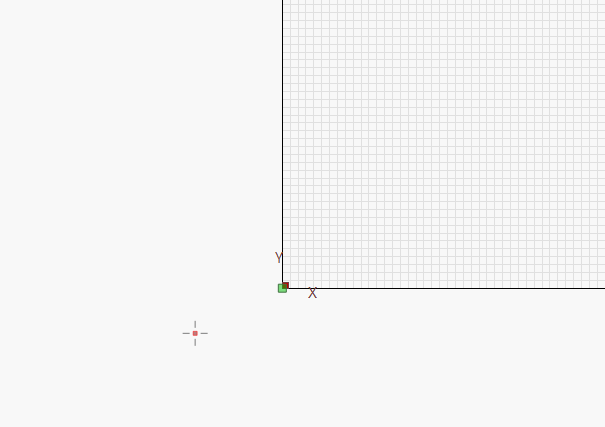
I manually jogged to lower left… Don’t know if this is related, but it thinks the laser is farther ‘down’ and left’ than it actually is - see attachment.

I’m going to stop for now. doing more research on what the….

Hi Jeff,

What were the settings recommended by FoxAlien? Can you paste them here plase? Are these the codes recommended when using a laser?

What are your GRBL settings now?

Please go to your LightBurn>Window>Console, and enter these commands, one line at a time, and press “enter” after each:

$i
$$
$#
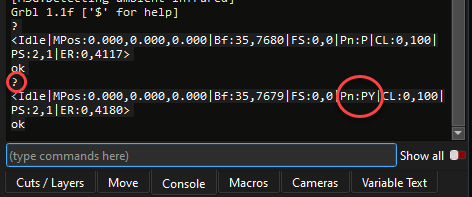
?

Select All, and copy (right-click to copy) the results from the Console Window, and paste back here, it’s easier to do it this way instead of copying screenshots;

2026-01-16_16-26-17

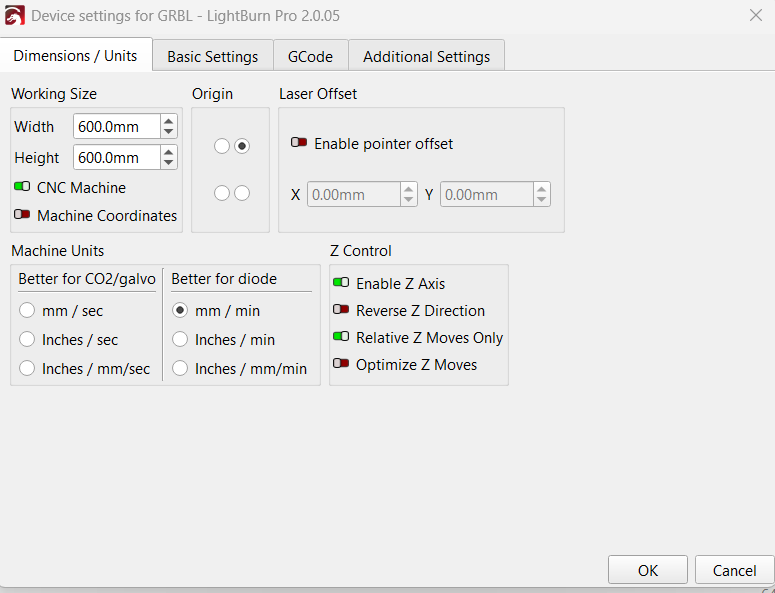
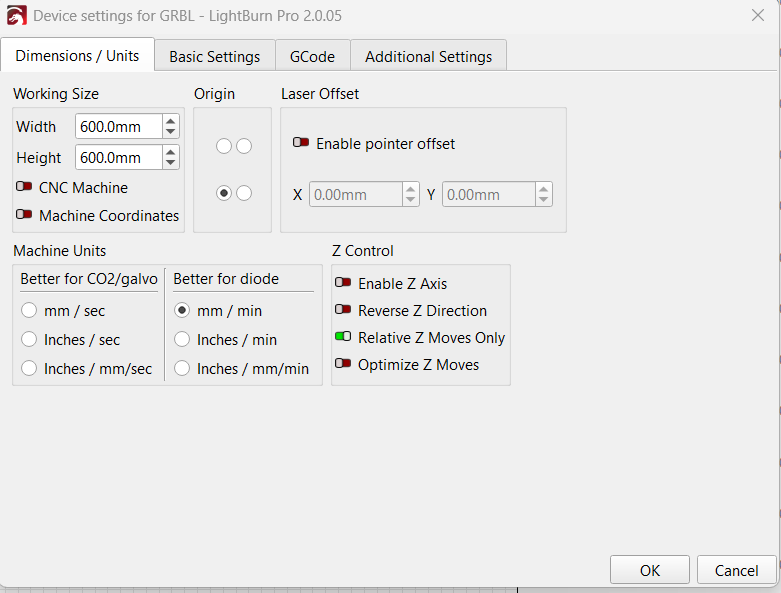
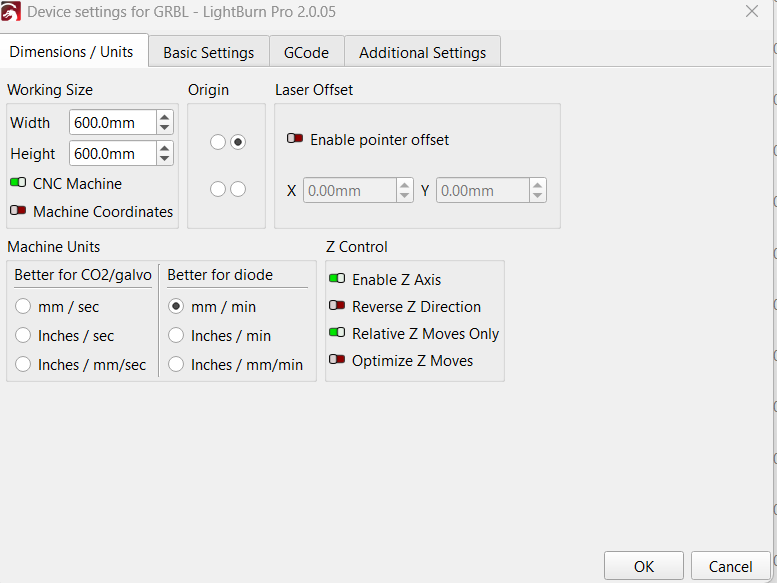
But please also include screenshot of your Device Settings>Dimensions/Units settings.

If you start homing this time with the laser head in the middle of the work area does the Y axis start to move toward the front? and then fail after it has reached the limit switch? or does it throw an alarm immediately without moving a jot?

Doublecheck the Y axis limit switch; if you enter ? into the console while you manually activate the limit switch you should see ‘PN:PY’ in the status report, and when not activated, you should see only ‘PN:’ or ‘PN:P’;

This is what they sent me:

$0=10 (Step pulse time)

$1=255 (Step idle delay)

$2=0 (Step pulse invert)

$3=0 (Step direction invert)

$4=0 (Invert step enable pin)

$5=0 (Invert limit pins)

$6=0 (Invert probe pin)

$10=3 (Status report options)

$11=0.010 (Junction deviation)

$12=0.002 (Arc tolerance)

$13=0 (Report in inches)

$20=0 (Soft limits enable)

$21=1 (Hard limits enable)

$22=1 (Homing cycle enable)

$23=3 (Homing direction invert)

$24=100.000 (Homing locate feed rate)

$25=1000.000 (Homing search seek rate)

$26=250 (Homing switch debounce delay)

$27=3.000 (Homing switch pull-off distance)

$30=10000 (Maximum spindle speed)

$31=0 (Minimum spindle speed)

$32=0 (Laser-mode enable)

$100=320.000 (X-axis travel resolution)

$101=320.000 (Y-axis travel resolution)

$102=800.000 (Z-axis travel resolution)

$110=1500.000 (X-axis maximum rate)

$111=1500.000 (Y-axis maximum rate)

$112=600.000 (Z-axis maximum rate)

$120=300.000 (X-axis acceleration)

$121=300.000 (Y-axis acceleration)

$122=100.000 (Z-axis acceleration)

$130=600.000 (X-axis maximum travel)

$131=600.000 (Y-axis maximum travel)

$132=90.000 (Z-axis maximum travel)

This is what I currently have:

$0=10

$1=255

$2=0

$3=1

$4=0

$5=0

$6=0

$10=3

$11=0.010

$12=0.002

$13=0

$20=0

$21=1

$22=1

$23=3

$24=100.000

$25=1000.000

$26=250

$27=3.000

$30=10000

$31=0

$32=0

$100=320.000

$101=320.000

$102=800.000

$110=1500.000

$111=1500.000

$112=600.000

$120=300.000

$121=300.000

$122=100.000

$130=600.000

$131=600.000

$132=90.000

I believe the only change I have made is $3 – I changed from 0 to 1, which inverted the x axis. It now responds correctly.

Here is the copy of what I get from the list of commands you requested ($i $$, $#, ?)

$i

[VER:1.1h.20190825:]

[OPT:V,15,128]

Target buffer size found

ok

$$

$0=10

$1=255

$2=0

$3=1

$4=0

$5=0

$6=0

$10=3

$11=0.010

$12=0.002

$13=0

$20=0

$21=1

$22=1

$23=3

$24=100.000

$25=1000.000

$26=250

$27=3.000

$30=10000

$31=0

$32=0

$100=320.000

$101=320.000

$102=800.000

$110=1500.000

$111=1500.000

$112=600.000

$120=300.000

$121=300.000

$122=100.000

$130=600.000

$131=600.000

$132=90.000

ok

$#

[G54:150.763,-27.634,-18.968]

[G55:0.000,0.000,0.000]

[G56:0.000,0.000,0.000]

[G57:0.000,0.000,0.000]

[G58:0.000,0.000,0.000]

[G59:0.000,0.000,0.000]

[G28:0.000,0.000,0.000]

[G30:0.000,0.000,0.000]

[G92:0.000,0.000,0.000]

[TLO:0.000]

[PRB:0.000,0.000,0.000:0]

ok

?

<Idle|MPos:3.000,3.000,-3.000|Bf:15,127|FS:0,0|Pn:Y|Ov:100,100,100>

Ok

As for homing from the middle of the bed – it homes z, then it homes x, it never moves y. It is not at the y limit switch, and I can manually jog the y axis.

This is what comes up in console when homing:

Homing

ALARM:8

Homing fail. Cycle failed to clear limit switch when pulling off. Try increasing pull-off setting or check wiring.

Grbl 1.1h [‘$’ for help]

[MSG:Check Limits]

[MSG:‘$H’|‘$X’ to unlock]

<Alarm|MPos:3.000,3.000,-3.000|Bf:15,127|FS:0,0|Pn:Y|WCO:150.763,-27.634,-18.968>

Ok

Checking limit switch:

?

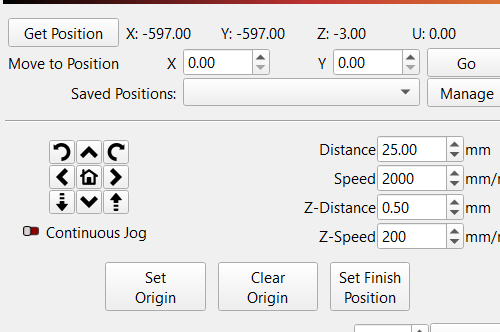
<Idle|MPos:-597.000,-597.000,-3.000|Bf:15,127|FS:0,0|Ov:100,100,100>

Ok

Hold switch activated:

ok

ALARM:1

Hard limit triggered. Machine position is likely lost due to sudden and immediate halt. Re-homing is highly recommended.

[MSG:Reset to continue]

Grbl 1.1h [‘$’ for help]

[MSG:‘$H’|‘$X’ to unlock]

[MSG:Caution: Unlocked]

Ok

In doing this, I clicked the limit switch a few times, and might have actually fixed it…. I restarted everything and let it home, which it did normally. And lightburn is showing it in the home position instead of way off the work piece.

I am not going to change any settings until I hear from you, but I am going to try a couple burns to see how it does.

UPDATE: things appear to be working normally, but I am getting the ‘out of bounds’ warning, even though nothing is out of bounds. I see the option to disable the message, but I’d rather know/correct a problem that it thinks it has. Ideas? I have confirmed lightburn is set to 600x600 in device settings and in machine settings.

UPDATE2: Everything seems to be acting as I’d expect. I only use ‘start from current position’ until I can look more into the others… Also, if I enable ‘continuous jog’, left and right are reversed. They are not reversed unless I enable that..

So - the out of bounds warning and the ‘continuous jog reverses direction’ are the only issues I’m currently having.
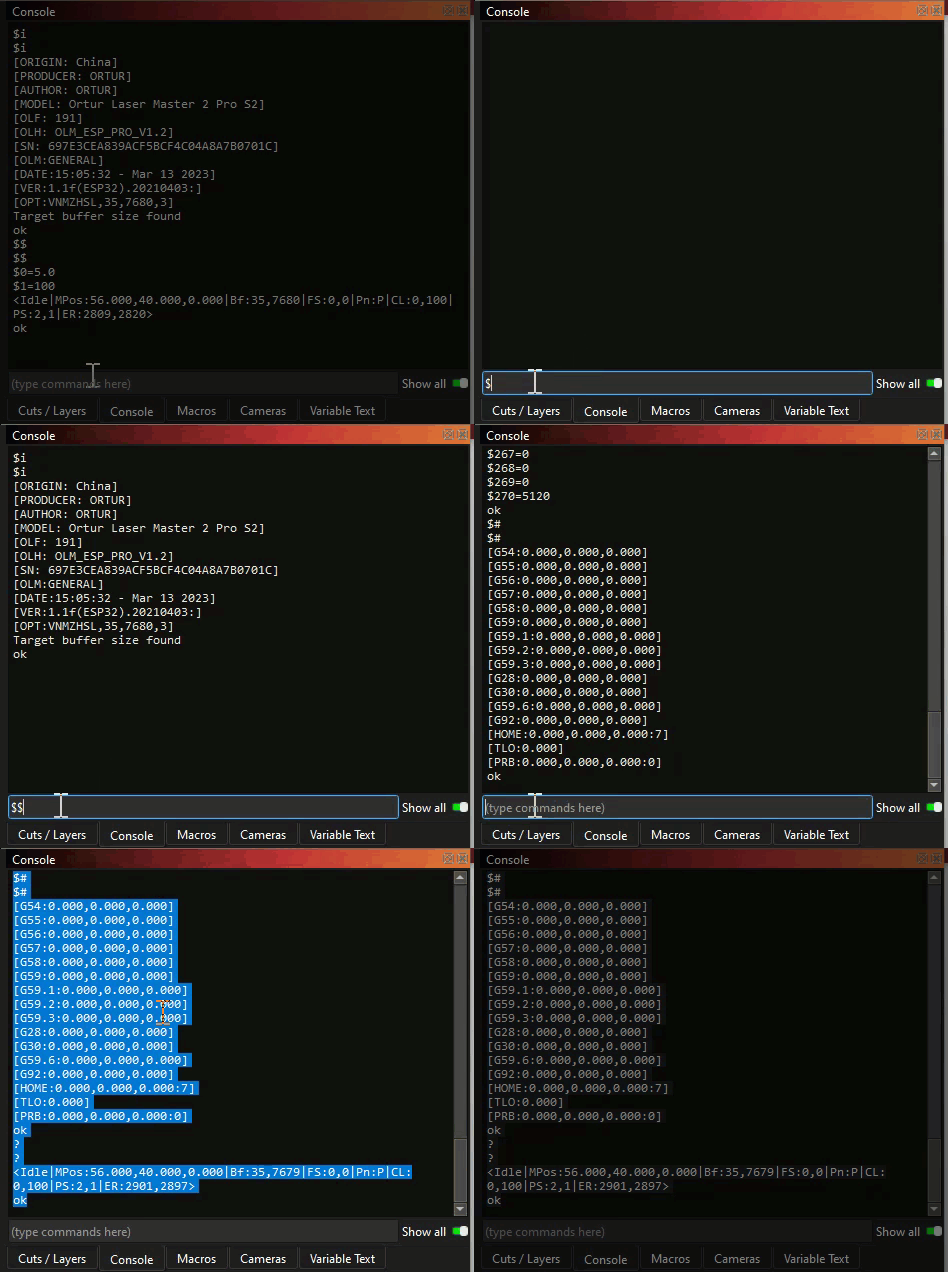
Glad you found the Y limit switch issue - get yourself a spare or two.

The out of bounds problem is possibly caused by the G54 offset you have at the controller;

To remove that offset enter $RST=#

After homing, click on ‘Get Position’, in the Move window, you should see zeros.

So my steps should be - enter that command, then home the machine? Or home then command?

Enter the command, then home the machine and check the position and the “Show Last Position” should be correct.

I get -597 -597 -3… It does have a 3mm step off of the limit switches.

normal jogging is still normal - continuous jog only goes right (right and left both move it right) and up (both up and down move it up) - this is X Y I mean.

And it still gives the out of bounds warning

Hi Jeff,

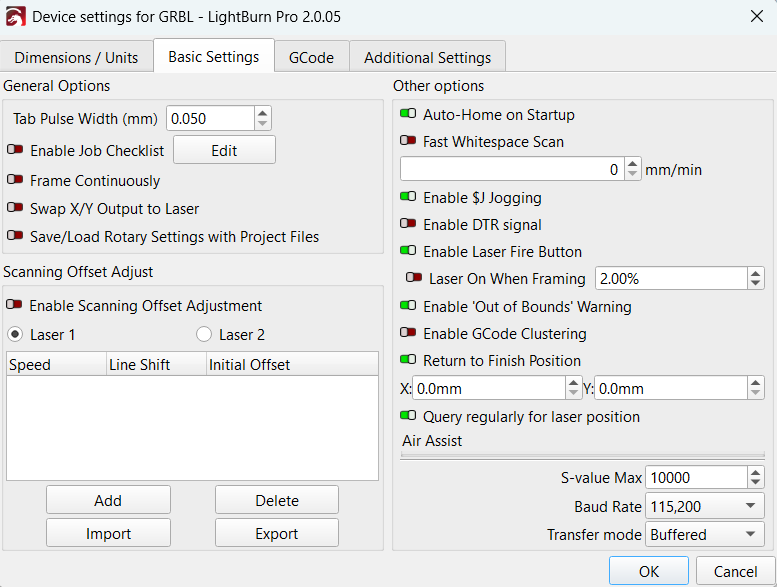
Are your device settings still the same? Should be like this?:

This is what they were - I have changed them to match yours.

(same info I included in email to Lightburn support and FoxAlien support - hoping for consistent messaging on what to try next)

Here is what I get when I enter $$

$0=10

$1=255

$2=0

$3=1

$4=0

$5=0

$6=0

$10=3

$11=0.010

$12=0.002

$13=0

$20=0

$21=1

$22=1

$23=3

$24=100.000

$25=1000.000

$26=250

$27=3.000

$30=10000

$31=0

$32=1

$100=320.000

$101=320.000

$102=800.000

$110=1500.000

$111=1500.000

$112=600.000

$120=300.000

$121=300.000

$122=100.000

$130=600.000

$131=600.000

$132=90.000

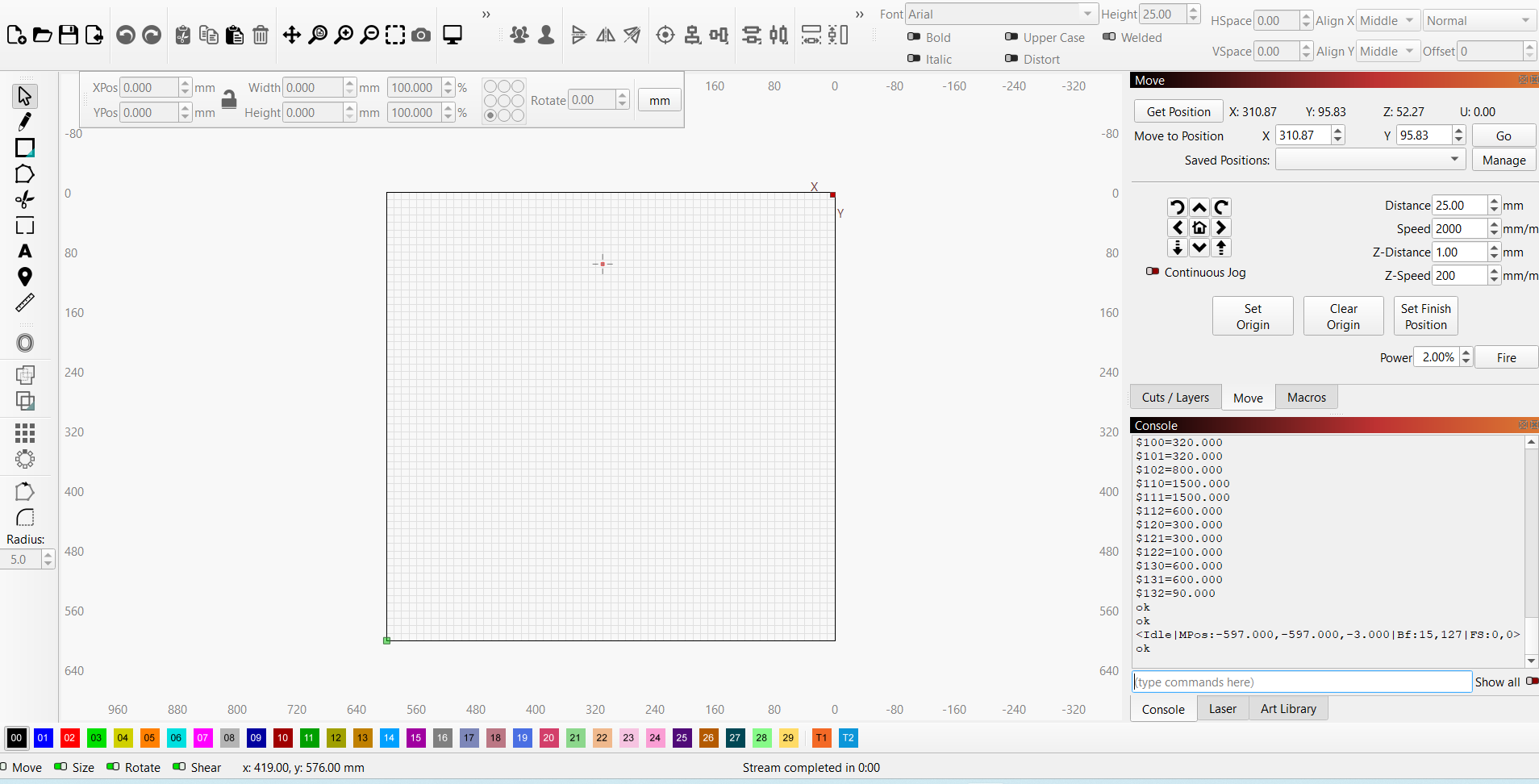
Attached are screen grabs of the settings in lightburn, along with the main screen of lightburn. After homing, which the machine does to the bottom left with z at top, it shows, according to the main lightburn screen, that the laser is very near the top, a little to the right of center.

Moving left, right, up, down, z-up, z-down, all work as expected – EXCEPT – it thinks its at the top of the work area so it won’t go beyond that – when in reality it’s only about 4-5 inches from the bottom.

Is this still the current situation?

I’d advise you to turn off $J continuous jogging at least for now.

When exactly did you get the out of bounds warning?
This can have multiple reasons. For example: If your designs are placed very close to the edge of the workarea and you’ve set an Excessive Overscan.

Does it also happen when you use Absolute Coordinates as the Start From value?

It’s interesting. I put Lightburn Support and FoxAlien Support in the same email so they can both see what is happening and what I have tried - and I get conflicting solutions from them. (none of which has completely worked yet).

It gives the out of bounds as soon as I click start. even if it’s a new project with only a 1” square in the center of the workbed.

I have not tried absolute coordinates.