1: I start a new project and enter the workpiece dimensions.
2: I draw my project and add a new operation.
3: Then I go to the process settings and select my milling cutter.
4: In the grid method, I move the arrows so that the milling head is approximately 1-2 mm above my workpiece.
5: Then I use the arrow keys to move my workpiece all the way to the back.
6: Now I switch to the “Go To” position in the grid and press the XYZ0 key.
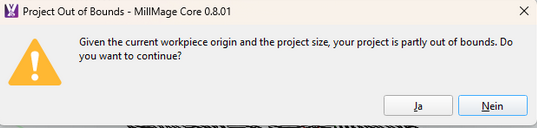
7: I started working on it. Then I got the message: “Due to the current workpiece origin and project size, your project is partially outside the permissible range. Do you want to continue?”
After that, I canceled the process because it wasn’t working.
My projects are always smaller than the workpiece and the mass of the machines.
This is my workflow, in order of how I work and how I proceed.
Have you clicked Yes and let it run the job doing an air cut? I have the same error message, but if I click Yes it runs the job correctly. I posted about this earlier, but never got any answer as to why it happens.
This is the thread I posted in:
Hopefully someone on the dev team will take a look at it.
In your Project Setup Edit, you have 20mm Safe Clearance Height, but no clamps on your setup. Maybe try changing that to about 5mm and see if you get the error message.
I agree with @misken that it is a coordinate issue. Did you try changing that 300 to 280 to see if it would run? It might be computing something like a boundry error because it is at a machine limit.
When I confirm the error message that always appears (see screenshot) by clicking “YES,” the machine mills in mid-air. And I haven’t changed any settings. Apparently, I’m not the only one with this problem. Unfortunately, no one seems to have a solution. Neither Lightburn support, Millmage support, nor anyone else I’ve asked has one. I just want to be able to mill. It’s not the machine, as this problem also occurs with other people who own different machines. Surely there must be a solution to this problem?
I completely understand your frustration. You may think it is a software issue, but I propose it is not. If it were, everybody would be seeing the same error message. In each situation where it has occurred, it has been a design, machine setup, part setup, or coordinates issue. As you can see, there are a lot of things that can go wrong. A CNC mill adds another degree of complexity compared to devices like lasers and Cricut machines.
“Cutting air” says your setup needs adjusment for things related to the Zaxis. “Out of Bounds” indicates X and Y also need a correction.
For sure. You are our eyes and ears. We only know what you tell us in your answers to the questions. Until the correct questions and answers are processed, we have an incomplete picture of your exact setup. Because nobody is standing in front of your machine except you, it can can be a frustratingly slow process. Most of us do not have your machine and are users just like you. But within this Forum are some very experienced milling machine users.
With all that said, I have looked at your program but I will now try to actually run it on my machine, One thing that concerns me is that the program shows the “Sandra” operation, but does not contain the operation for the “Happy 30th Birthday” part (posting #12 image shows you sctually engraved that part). Yet it does contain the vector paths for it. You have edited the file or created a new one for our examination. We need the actual file you started with to ensure all the settings reflect what might have caused the error.
I spent half a day with Lightburn support, sending screenshots, explanations, files, my G-code, and support information. However, I still haven’t received a solution. And I don’t have enough storage space here in the forum to send all the data I sent to support. I always entered exactly what support told me. And since yesterday, I haven’t received any further information on what to do next, so I’m not getting anywhere with my problem. It’s frustrating when you start helping someone and then have to wait for information again.
Please give them time. It is now the weekend, but for some of the Lightburn people the weekend starts in their time zone.
>> In the meantime, I will continue to work on this if that is okay with you.
I will download those extra files, but I see 2 different sizes for the “Sandra Birthday.mage” files (postings #8 and #36). You are creating a moving target for us.
Because it didn’t work the first time with Sandra and I got an error message, I tried again with a different size, but that didn’t work either. I also have a file that I only drew, and that one didn’t work either. I have no idea why.
I can’t send you the email history with support so you can see what has already been changed and what hasn’t?
I already have enough info for now. It likely will not help if I do not have the same machine as you. The developers at Lightburn have a lot of different machines. They may be waiting for one with your machine to analyze the info you sent. Just a guess on my part.
UPDATE: I tried a couple of your files and got the OOB message on all of them. I then loaded one of my files I ran a long time ago and I also get that Out Of Bounds message. So it looks like we have a task for the developers.
I am including @Rick so he can get this detail to the right people.
In the meantime, your “cutting air” issue may be due to not setting Zzero tool tip at the top of the material. As for the OOB message, click Yes and go on. Once I did that, my old file ran as normal.