hey there
when framing with my omtech polar desktop it keeps telling me it exceeds the bed size, but it doesn’t ? then the laser fires up but t eh button turns red
hey there
when framing with my omtech polar desktop it keeps telling me it exceeds the bed size, but it doesn’t ? then the laser fires up but t eh button turns red
This doesn’t tell us much.
You can get this via Edit → Machine Settings → Vendor Settings then you have to look at both X and Y axes for their acceleration values. These values will help to tell us if there is a problem with overscan.
If it’s not a problem, you can upload the offending .lbrn2 project file.

it doesn’t matter what I cut if put a tiny circle in there it says its too large for the bed, then when it goes to cut it turns blue then goes red
ive just downloaded the new version of light burn and its only happened since then
It sounds like something in the origin has changed… That could cause that along with the start from and job origin values.
If all else fails, then I’d suggest you roll it back to a previous version if you’re sure about the software. If you have something definite in the software, then an email to support wouldn’t hurt along with a link to this thread.
Have you checked if you are in inches or mm?
I have def in mm
ok il check out the start origin , I didn’t know I could go back ! how do I do that haha
You can edit your device settings. Click on device then, select your laser and click on edit.
If you don’t change it, it will retain the previous value. You can also duplicate it and work on a separate copy.
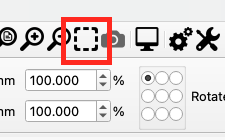
In Lightburn, press CTRL/CMD + A (Select all) then click this icon.
I meant with your project loaded, sorry. Also take a screenshot of the preview window with your project loaded.
Edit: since you’re using current position also click the show last position button on the main screen.
Initially I’d change the start from in the laser window to absolute coordinates.
This means where it is on your visual workspace is where the laser should place it.
If this runs without issue, then I’d have to guess it has to do with your start from setting.
This topic was automatically closed 30 days after the last reply. New replies are no longer allowed.