The elipse tool is no longer showing on bthe tool bar.
It has become a drop-down menu, try clicking/holding the mouse over the button, it will retain the status from its last action.
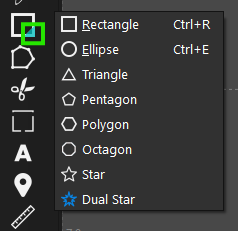
Is there a way to set this and the welding tools back to the original behavior without the dropdown?
It will be over 10 icons…I think the submenu system works great.
Although it’s not quite original:
- Click-and-hold mouse pointer on the tool icon
- The shape menu appears
- Move the mouse pointer over the shape you want
- Release the mouse button
- The selected shape is now active
If you generally draw many shapes in succession, without each one, turn off the Switch to Select Mode option so the shape tool remains active:
The Weld tool remains a separate icon, with the other Boolean tools in a single icon behaving as above: click-and-hold, slide, release.