I am a real newbe and i am trying to get my machine setup using Millmag. I allreay use lightburn and would like to stick using your product. Anyway the machine i have is a custon Print NC machine using the Flexihal controller.
Anyway the Main issue right now is the the coordinates panel never shows any coordinates so anything i try to set is not correct. Not sure if im missing something or not. I also get a issue that randomly i loose control from the flexihal remote control.
Just so you know, I am not a Lightburn person. I am a user just like you.
I do not know IOSender, so I cannot comment on the display. However, it sounds like grblHAL is not reporting the position information back to MillMage.
Can you try connecting with Lightburn? Just Jogging should review if the controller is reporting.
NO does not display allways stays zero. so when i jog are anything it allways stays zero. IN those other programs showing the coordinates is allways displayed and will chnage or update as expected including whn i clik the get button it shows current. In Millage or light burn nothing in anyway.
The $10 value can either be 0, or 1 according to the GRBL docs
As far as I know, $10 should be set to 1 to report Machine Coordinates.
To gain more insights, please enable “Show All” in the Console window and send us a screenshot of the output after you clicked on “Get All” in the Move window here.
Uh. Are you sure you had the “Show all” toggled on? Because normally sending ? should result in a response that gives us the position… If it doesn’t then it’s a bizarre syntax that we’re not reading properly.
Another decent way to know what’s going on with the position reporting, would be to install the Arduino IDE, open it up, select the right serial port (with MM and LB closed) and then launch the serial monitor:
If you can share a screenshot of that response, we’ll be able to tell if we’re doing something wrong, or if GrblHAL is misbehaving on the Flexihal board.
HI There.. I have tried again in Millmage with a capture attached.
I changed the $10=0 to try then did what you asked open console and clicked GET ALL and i got back 2 lines continually ( OK ?). I did just type ? and the same thing happened.
I downloaded the Adruino but cant get it to work. I wants a board and any i tried dont work.
I am a real newbe with this stuff so not sure how to get it going.
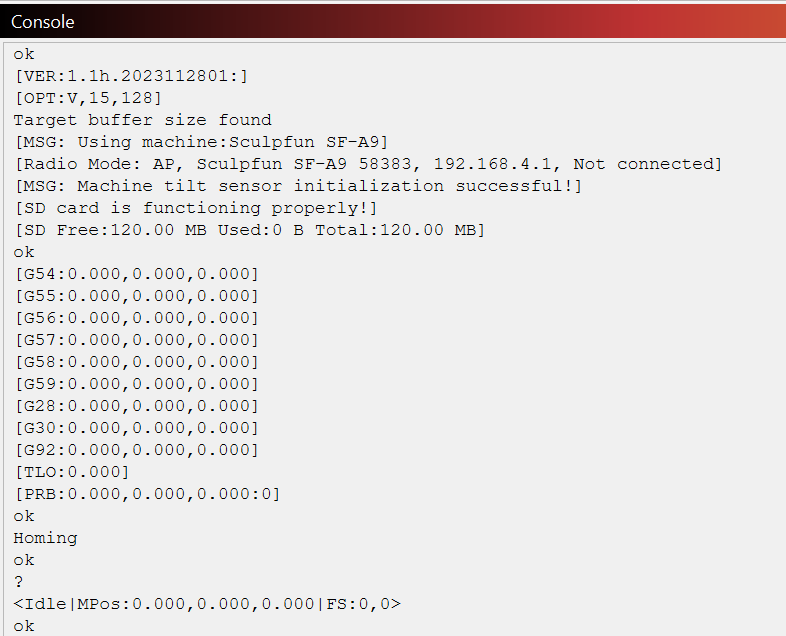
This is what mine looks like for comparison. As you can see, There is a lot of information your controller does not supply. And a lot mine does not supply.
EDIT: Based on what I see, your controller does not respond to all standard GRBL commands. If Lightburn cannot poll the controller position registers, then this begs the question: What about that other software that is showing position information?
Educated Guess: Those others are not polling the controller using standard GRBL commands (which do not work on your controller), they are displaying where the software thinks the laser should be, not where the controller says it really is.
I did a couple of other tests using a couple of the other programs like Iosender Candle Ect and if i change the $10=0 i dont get coordinates in any of them. Just thought i would add this.